Description
🖥️ Product Overview
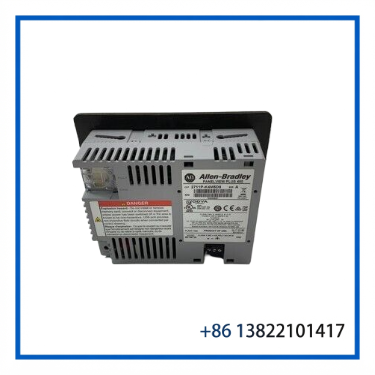
The A-B 2711P-K4M5D8 is a PanelView Plus 6 400 graphic operator terminal designed for industrial machine monitoring and operator control.
This model uses a keypad interface and a grayscale TFT LCD display. It is identified as a 400-series PanelView Plus 6 terminal with RS-232 communication only, DC power input, and Windows CE 6.0. The product provides a compact HMI solution for machines and automation systems that require local visualization, alarm monitoring, parameter entry, and operator commands.
The terminal is part of the legacy PanelView Plus 6 family. Rockwell Automation lists the 2711P-K4M5D8 as discontinued, with the discontinuation date shown as December 30, 2022 and no planned direct Rockwell Automation replacement.
⚙️ Key Features
🔹 PanelView Plus 6 400 operator terminal
🔹 Keypad operator interface
🔹 3.5-inch grayscale TFT LCD display
🔹 320 × 240 display resolution
🔹 16-level grayscale graphics
🔹 Eight keypad function keys
🔹 RS-232 communication interface
🔹 24 VDC nominal power input
🔹 Windows CE 6.0 operating system
🔹 FactoryTalk View Machine Edition application platform
🔹 Compact panel-mounted industrial HMI design
🔹 Suitable for legacy Allen-Bradley and third-party automation applications
📋 Product Datasheet
| Parameter | Specification |
|---|---|
| Brand | A-B / Allen-Bradley |
| Model | 2711P-K4M5D8 |
| Series | PanelView Plus 6 |
| Product Type | Graphic Operator Terminal |
| Terminal Family | PanelView Plus 6 400 |
| Operator Input | Keypad |
| Function Keys | 8 |
| Display Type | Grayscale TFT LCD |
| Display Size | 3.5 inch |
| Monitor Class | 4-inch PanelView Plus 6 |
| Display Resolution | 320 × 240 pixels |
| Display Color | 16-level Grayscale |
| Display Area | Approx. 70 × 53 mm |
| Communication | RS-232 |
| Communication Configuration | RS-232 Only |
| Supported Serial Protocols | Configuration Dependent |
| Rated Input Voltage | 24 VDC Nominal |
| Input Voltage Range | Approx. 18–30 VDC |
| Power Consumption | Approx. 9 W Typical / 15 W Maximum |
| Operating System | Windows CE 6.0 |
| Application Software | FactoryTalk View ME |
| Backlight Type | LED |
| Minimum Backlight Life | Approx. 25,000 Hours |
| USB | USB Interfaces Available |
| Country of Origin | United States of America |
| Product Status | Discontinued |
| Condition | Verify Actual Item Condition |
The model-specific Rockwell Automation product record confirms the 400-series PanelView Plus 6 configuration, keypad input, grayscale display, RS-232-only communication, DC input, and Windows CE 6.0. The official record also identifies the country of origin as the United States of America.
🔄 Operating Function
The 2711P-K4M5D8 provides an operator interface between personnel and an industrial automation system.
A typical application structure is:
Operator → PanelView Plus 6 Terminal → RS-232 Communication → PLC or Controller → Machine / Process
The terminal displays process information and machine status while allowing the operator to interact with the application through the keypad.
Typical functions include:
- Viewing machine operating status
- Monitoring alarms
- Starting and stopping machine functions
- Changing operating parameters
- Selecting production modes
- Viewing diagnostic information
- Entering setpoints
- Displaying process values
PanelView Plus 6 applications are developed using FactoryTalk View Studio Machine Edition and run through the FactoryTalk View ME runtime environment.
🛠️ Installation and Configuration
Before installing a replacement terminal, compare the complete catalog number and system configuration.
Recommended checks include:
- Confirm the exact model number 2711P-K4M5D8.
- Back up the existing FactoryTalk View application.
- Verify the RS-232 communication cable and port configuration.
- Confirm the controller communication protocol.
- Check baud rate and serial parameters.
- Verify the 24 VDC power supply.
- Inspect the panel cutout and mounting hardware.
- Check keypad operation.
- Verify display and backlight condition.
- Confirm firmware and application compatibility.
- Test communication before returning the machine to production.
Because this model is an RS-232-only configuration, it should not be assumed to provide the same network options as other PanelView Plus 6 terminals.
🔍 Maintenance Tips
🧹 Keep the front keypad and display surface clean.
🔌 Inspect the power and serial connectors for oxidation or loose connections.
💾 Keep a backup copy of the FactoryTalk View application.
💡 Monitor the display brightness and backlight condition.
⌨️ Test all keypad function keys during preventive maintenance.
⚡ Verify the stability of the 24 VDC power supply.
📡 Check serial communication wiring if the HMI powers up but does not exchange data with the controller.
For long-term spare storage, protect the terminal from moisture, dust, electrostatic discharge, and mechanical damage.
❓ Frequently Asked Questions
Q: What is the A-B 2711P-K4M5D8?
A: It is a PanelView Plus 6 400-series graphic operator terminal with keypad input, grayscale display, RS-232 communication, and DC power input.
Q: What is the display size?
A: The active display is approximately 3.5 inches, while the terminal belongs to the PanelView Plus 6 400 display class.
Q: Does this model have a touchscreen?
A: No. The 2711P-K4M5D8 uses a keypad operator interface rather than a touchscreen.
Q: How many function keys are available?
A: The model is configured with eight keypad function keys.
Q: What communication interface does it use?
A: The official model configuration identifies RS-232 communication only.
Q: What voltage does it require?
A: The terminal uses DC input with 24 VDC as the nominal supply voltage. Published specifications indicate an input range around 18–30 VDC.
Q: What software is used to configure the terminal?
A: PanelView Plus 6 applications are developed using FactoryTalk View Studio for Machine Edition.
Q: Is the 2711P-K4M5D8 still manufactured?
A: Rockwell Automation lists the model as discontinued, with December 30, 2022 shown as the discontinuation date and no planned direct replacement.
Q: Can another PanelView Plus terminal replace it directly?
A: Not automatically. The display type, keypad configuration, communication interface, application compatibility, power requirements, panel dimensions, and system configuration must be checked before replacement.
🔄 Recommended A-B / Allen-Bradley Models
- A-B 2711P-K4M5D8 – PanelView Plus 6 Grayscale Keypad Terminal
- A-B 2711P-K4C5D8 – PanelView Plus 6 Color Keypad Terminal
- A-B 2711P-B4C5D8 – PanelView Plus 6 Color Keypad/Touch Terminal
- A-B 2711P-K4M20D8 – PanelView Plus 6 Grayscale Keypad Terminal
- A-B 2711P-K4C20D8 – PanelView Plus 6 Color Keypad Terminal
- A-B 2711P-K6M5D8 – PanelView Plus 6 Grayscale Terminal
- A-B 2711P-B6M5D8 – PanelView Plus 6 Grayscale Keypad/Touch Terminal
- A-B 2711P-K6C5D8 – PanelView Plus 6 Color Keypad Terminal
- A-B 2711P-T6C5D8 – PanelView Plus 6 Color Touch Terminal
- A-B 2711P-B6C5D8 – PanelView Plus 6 Color Keypad/Touch Terminal
These models belong to related PanelView Plus 6 product configurations. They should not be treated as direct replacements without checking display type, input method, communication interface, application compatibility, and physical mounting requirements.
🏭 Application Summary
The A-B 2711P-K4M5D8 is a compact PanelView Plus 6 operator terminal designed for legacy industrial automation systems that require keypad-based machine operation and RS-232 communication.
Its grayscale display, eight function keys, compact footprint, Windows CE 6.0 platform, and FactoryTalk View ME environment make it suitable for machine monitoring, alarm handling, parameter adjustment, and operator control.
For replacement applications, match the complete catalog number 2711P-K4M5D8, display configuration, keypad type, RS-232 communication setup, power supply, and existing FactoryTalk View application before installation. The model is officially listed by Rockwell Automation as discontinued, making tested surplus inventory particularly relevant for maintaining existing installations.