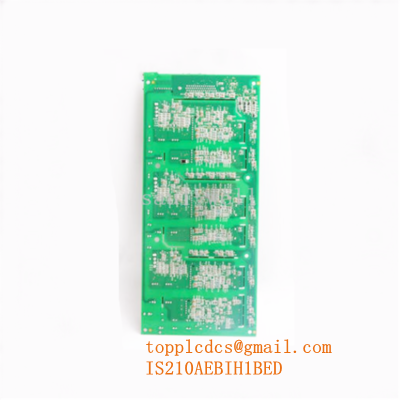

Description
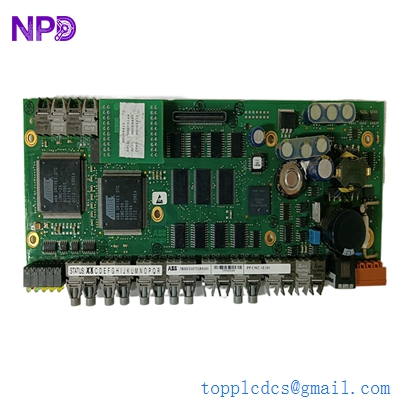
- Model: ABB PPC902AE101 (3BHE010751R0101)
- Brand: ABB (Switzerland)
- Series: UNITROL 6000 / AC 800PEC High-Performance Series
- Core Function: Main processor and control unit for excitation and high-power rectifiers
- Product Type: Controller Module / Processor Board
- Key Specs: Real-time signal processing, optical fiber communication, high-speed control loops
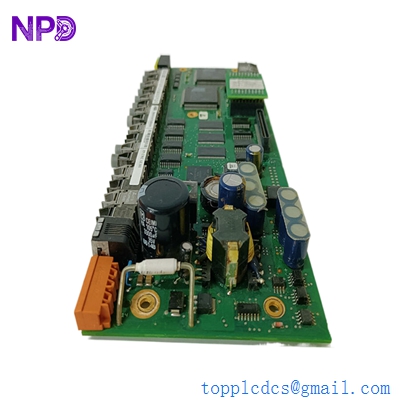
ABB PPC902AE101 3BHE010751R0101
Key Technical Specifications
- Part Number: 3BHE010751R0101
- Processor Architecture: High-speed RISC processor for complex control algorithms
- Communication Interface: Multiple fiber optic links (TX/RX) for high-speed I/O
- Control Cycle Time: Sub-millisecond range (typical for high-power excitation)
- Programming Environment: Control IT / AC 800PEC Toolset
- Internal Memory: High-capacity Flash and RAM for redundant control logic
- Mounting: Integrated DIN-rail or rack-mount sub-chassis
- Diagnostics: Integrated self-monitoring with front-panel LED status indicators
- Power Supply: 24 V DC (nominal) via dedicated backplane or terminal
- Connector Type: High-density backplane and specialized front-panel I/O
- Operating Environment: Optimized for high EMC (Electromagnetic Compatibility) environments
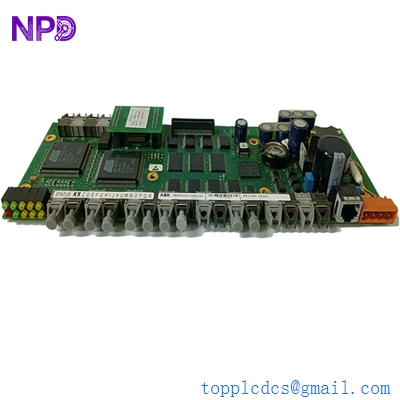
ABB PPC902AE101 3BHE010751R0101
Installation & Configuration Guide
Phase 1: Pre-Installation (Estimated time: 20 minutes) ⚠️ Safety First:
- This module controls high-power excitation systems (UNITROL). Accidental triggering can lead to generator over-excitation or field damage. Ensure the excitation system is “Blocked” and “Locked Out.”
- Firmware Verification: In my experience, the PPC902AE101 must have the exact firmware version matching the other redundant controller in the system. Check the version label on the side of the module.
- Discharge all static electricity and use an ESD-safe workspace. These modules utilize sensitive FPGAs.
Phase 2: Removal (Estimated time: 10 minutes)
- Fiber Optic Care: Gently remove the fiber optic connectors. Do not bend the cables beyond their minimum bend radius (usually 30 mm). Place dust caps on the fibers immediately.
- Release Fasteners: Loosen the top and bottom screws.
- Extraction: Pull the module straight out. These boards are long; ensure you don’t torque the board while it is still partially engaged with the backplane.
- Configuration Check: Note the position of any DIP switches or rotary dials on the board surface.
Phase 3: Installation (Estimated time: 20 minutes)
- Match Settings: Set any physical switches on the new 3BHE010751R0101 to match the old unit.
- Insertion: Align the module with the chassis guides. Push until the backplane connector is fully seated.
- Secure: Tighten the faceplate screws to ensure proper grounding to the chassis.
- Reconnect Fibers: Ensure the fiber optic tips are clean (use an alcohol-free cleaner if necessary) before clicking them into the TX/RX ports.
Phase 4: Power-On & Commissioning (Estimated time: 45 minutes)
- Apply 24 V control power.
- LED Sequence: Watch the LEDs. A successful boot is typically indicated by a steady “Run” LED and the absence of a “Fault” or “Alarm” LED.
- Tool Communication: Connect your laptop via the service port. Use the AC 800PEC tool to verify that the application software is loaded and the module is “Online.”
- Redundancy Sync: If part of a dual-channel system, verify that the new PPC902AE101 is communicating with its partner and that the “Active/Standby” handshake is working.
Customer Cases & Industry Applications
Case 1: Hydroelectric Plant Excitation Recovery A hydroelectric facility in Southeast Asia experienced a sudden failure of their UNITROL 6000 excitation controller. The system dropped into “Single Channel” mode, creating a high-risk situation where any further fault would trip the entire generator. The lead time from the OEM for a PPC902AE101 was 14 weeks. We delivered a New Surplus module in 4 days. After a firmware synchronization, the system returned to full redundant operation, securing the plant’s stability.
Case 2: Steel Mill Power Rectifier Maintenance A large steel mill used the AC 800PEC series (including the PPC902) to control a high-current rectifier for their furnace. The original board suffered thermal fatigue after 10 years of continuous service. By keeping a New Surplus 3BHE010751R0101 in their on-site strategic inventory, their maintenance team was able to swap the module during a scheduled 4-hour maintenance window, avoiding an unplanned production stoppage that would have cost over $100,000.
Frequently Asked Questions (FAQ)
Q: Can I use the PPC902AE101 as a direct replacement for the PPC902AE01? A: Not necessarily. The “101” suffix often indicates a specific hardware revision or memory capacity. While the base functionality is similar, you must verify with your AC 800PEC project configuration to ensure the software will accept the hardware change.
Q: Does the module come with the application software pre-loaded? A: No. Like most high-level ABB controllers, the PPC902AE101 is “Blank” from the factory. You must download your specific project application (the logic and parameters) using the ABB Engineering Toolset once the module is installed.
Q: Why are there so many fiber optic ports on the front? A: These are for high-speed communication with peripheral I/O modules and the firing pulse units. In high-power excitation, electrical signals are too slow and prone to noise; fiber optics ensure the sub-millisecond control required for generator stability.
Q: How do I verify the health of a New Surplus module? A: We perform a power-up self-test and a communication handshake on our ABB test rack. We can provide a diagnostic report showing the “System Healthy” status before the unit leaves our warehouse.
Q: What is the “ROI” of buying surplus for a UNITROL system? A: The main ROI isn’t just the 30% savings on the part cost—it’s the elimination of lead time. For a power plant, the “Carrying Cost” of a spare PPC902AE101 is negligible compared to the cost of being offline for 3 months waiting for a factory-order part.
I’m always open to corrections if I get something wrong; the best way to handle that is to just tell me what I missed or what I need to know! You can also always turn off the use of this personal context in your settings.