
Description
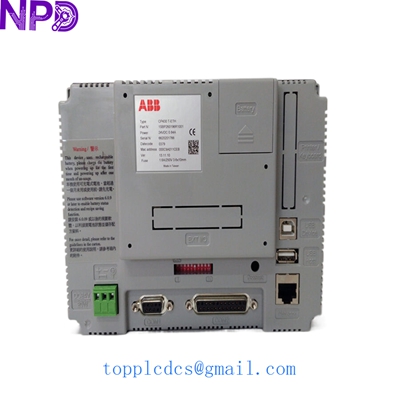
- Model: CP430T-ETH
- Part Number: 1SBP260196R1001
- Brand: ABB (CP400 Series)
- Series: CP400 Performance HMI
- Core Function: Graphic Operator Terminal for Machine Control and Monitoring
- Product Type: Human Machine Interface (HMI)
- Key Specs: 7″ TFT Touch Screen | 65k Colors | Ethernet + Serial (RS232/485)
- Display Type: 7-inch TFT LCD Color Display
- Resolution: 800 x 480 pixels (WVGA)
- Backlight: LED (Typical life 30,000+ hours)
- Touch Technology: 4-wire Analog Resistive
- Processor: RISC ARM9 32-bit (High-speed execution)
- Memory: 128 MB Flash / 64 MB DDR RAM
- Communication Ports:
- 1 x RJ45 (10/100 Mbps Ethernet)
- 1 x COM1 (RS232/RS422/RS485)
- 1 x USB 2.0 (Host for data logging/peripherals)
- Input Voltage: 24 V DC (18 to 32 V DC)
- Protection Class: IP65 (Front panel) / IP20 (Rear)
- Software Tool: CP400Soft (Programming and configuration)
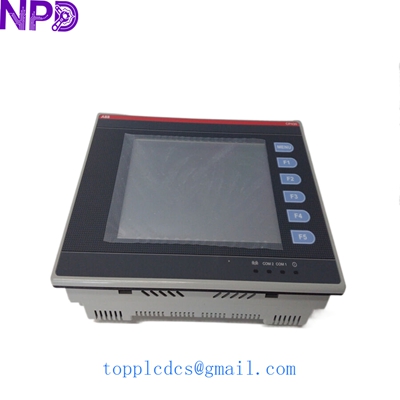
ABB CP430T-ETH 1SBP260196R1001
Installation & Configuration Guide
Stage 1: Pre-Installation
⚠️ Safety Checklist:
- Power Verification: Ensure your 24 V DC power supply is regulated. Spikes beyond 32 V will permanently damage the internal logic board.
- Cut-out Dimensions: The CP430T-ETH requires a specific panel cutout (approx. 192 x 138 mm). Measure twice; an oversized hole will compromise the IP65 seal.
- Environment: Avoid mounting in direct sunlight, which can cause the TFT film to yellow and degrade over time.
Required Tools:
- Small Phillips screwdriver (for mounting clips)
- Flat-head screwdriver (for power terminal block)
- Ethernet crossover or straight cable (for programming)
Stage 2: Mounting
Steps:
- Prepare the Gasket: Check that the waterproof gasket is flat and free of dust. This is the only thing protecting your electronics from moisture.
- Insert HMI: Slide the CP430T-ETH into the panel cutout.
- Fixing Clips: Tighten the 4 mounting clips evenly.
- Pro Tip: Use a “criss-cross” pattern when tightening to ensure the pressure on the gasket is uniform. Do not over-torque, or you may crack the plastic frame.
Stage 3: Electrical & Comm Connections
Steps:
- Power Wiring: Connect +24 V and 0 V. Note: Always connect the ground terminal (PE) to the cabinet ground to reduce EMI noise on the touch screen.
- Serial Connection: If using RS485 for an ABB AC500 PLC, ensure the pinout on your COM1 cable matches the ABB standard (Pin 1=Rx+, Pin 6=Rx-, etc.).
- Ethernet Setup: Connect to your local network. The default IP is often printed on the back label, but you will likely need to assign a static IP within your PLC’s subnet.
Stage 4: Testing & Commissioning
Validation:
- Power Up: The ABB logo should appear within 10 seconds.
- Touch Calibration: If the touch feels “off,” hold your finger on the screen during startup to enter the system menu and run the calibration utility.
- Communication Test:
- Green LED on the Ethernet port = Physical Link established.
- Use the “Ping” command from your PC to verify the HMI is reachable.
- Project Download: Use CP400Soft to transfer your .vbp project file. Ensure the “Firmware Version” of the software matches the HMI hardware revision.
Customer Cases & Industry Applications
Case 1: Textile Factory Upgrade (Intermittent Screen Failure)
Situation: A textile mill in India was using an older CP430T-ETH that had become unresponsive to touch due to years of chemical exposure and heavy-handed operators.
Task: The machine was idling, costing the plant $5,000 in lost production per day. They needed an exact replacement that wouldn’t require rewriting the control logic.
Action: We supplied a New Surplus 1SBP260196R1001. Because it was an identical model, the customer simply uploaded their existing backup file from a USB stick.
Result: The machine was back online in 20 minutes. The plant manager appreciated that the New Surplus unit had a much brighter LED backlight than their 10-year-old original.
Case 2: Water Treatment Plant Remote Monitoring
Situation: An integrator was building a small-scale RO (Reverse Osmosis) plant. They needed a cost-effective 7″ HMI that supported Modbus TCP/IP to communicate with various sensors.
Task: The budget was tight, and high-end HMIs were over-specified for the task.
Action: We recommended the CP430T-ETH. Its built-in Ethernet port made it easy to connect to their SCADA system for remote monitoring without extra gateway modules.
Result: The project was delivered under budget. The CP430T-ETH‘s IP65 rating provided the necessary protection against the humid environment of the water treatment facility.
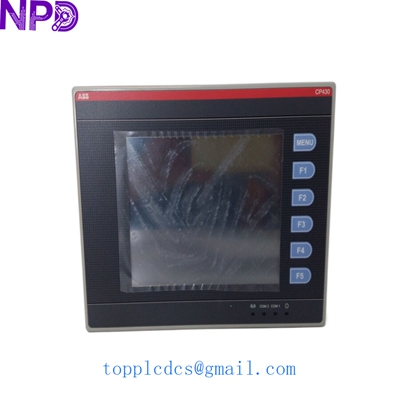
ABB CP430T-ETH 1SBP260196R1001
Frequently Asked Questions (FAQ)
Q: Can I use this to replace a CP430T (Non-Ethernet version)? A: Yes. The CP430T-ETH is the upgraded version with an Ethernet port. It retains the same serial ports and cutout dimensions, so it is a “drop-in” replacement. You will just have the added benefit of network connectivity.
Q: What programming software do I need? A: You need CP400Soft. Please note that the newer PB610 Panel Builder software used for the CP600 series is NOT compatible with this older CP400 series hardware.
Q: The screen is blank, but the “Power” LED is on. What happened? A: In my experience, this usually means the backlight has timed out or failed. Check your “Screen Saver” settings in the system menu. If the screen remains black even after a reboot, the internal LED driver or the TFT panel itself likely needs replacement.
Q: Is “New Surplus” the same as “Refurbished”? A: No. Our units are New Surplus, meaning they are original ABB products that were purchased for projects but never installed. They still have the original screen protection film. Refurbished units are used parts that have been repaired; we do not sell those.
Featured Inventory List (Current Stock)
- ABB 3BSE018161R1 (PM866)
- Bently Nevada 3500/22M
- TRICONEX 3503E
- GE IS215UCVEH2AE
- Honeywell CC-PAIH01
- Siemens 6ES7 414-2XG03-0AB0
- Allen-Bradley 1756-L73
- Schneider 140CPU65150
For more details on these parts, visit our catalog at newplcdcs.