
Description
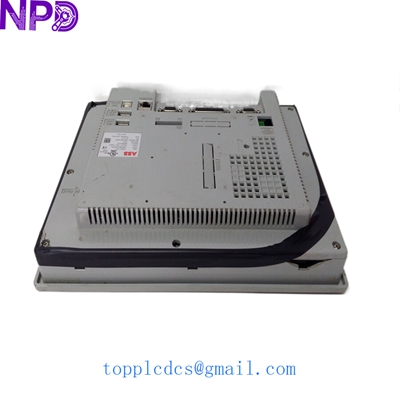
- Model: ABB CP450 T-ETH (1SBP260189R1001)
- Brand: ABB (Switzerland-Sweden)
- Series: Control IT / CP400 Series HMI
- Core Function: Graphic operator interface for PLC and DCS system visualization
- Condition: Original New Surplus (New in Box), Factory Sealed
- Type: Touch Screen Operator Panel (HMI)
- Key Specs: 10.4″ TFT Color Display | Ethernet (TCP/IP) | RS232/485 Ports
- Display Size: 10.4 inch (Diagonal)
- Display Type: TFT Color LCD (High contrast and brightness)
- Resolution: 640 x 480 pixels (VGA)
- Touch Technology: Analog Resistive (Supports gloved operation)
- Communication Port 1: Ethernet 10/100 Base-T (RJ45)
- Communication Port 2: Serial RS232 / RS422 / RS485 (DB9)
- Power Supply: 24 V DC (Range: 18-32 V DC)
- Internal Memory: 4 MB Flash for project data | 512 KB SRAM
- Protection Rating: IP65 (Front panel) / IP20 (Rear)
- Configuration Software: CP-Soft (compatible with AC31 and AC500 series)
- Operating Temp: 0°C to +50°C (32°F to 122°F)
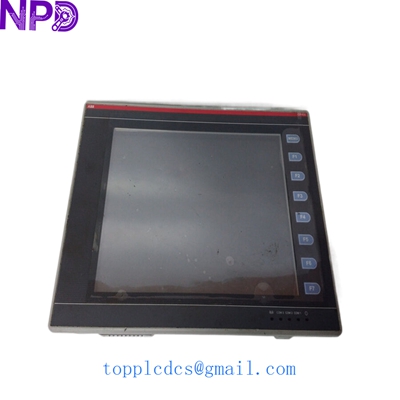
ABB CP450T-ETH 1SBP260189R1001
Installation & Configuration Guide
In my experience, the CP450 T-ETH is a rugged unit, but since it’s a legacy model, the biggest challenge is often software compatibility. If you are replacing an older unit, make sure you have the original project file (*.cp) or the ability to upload it from the functioning old unit before it dies completely.
Phase 1: Preparation (20 minutes)
⚠️ Safety First:
- Power down the 24 V DC supply before removing the panel from the enclosure.
- Check the cutout dimensions. If you are upgrading from a non-ABB panel, you may need an adapter plate.
- Use a static-safe environment when handling the rear electronics.
Phase 2: Hardware Installation
- Mounting: Place the CP450 T-ETH into the panel cutout. Use the supplied mounting clamps to secure it evenly. Don’t over-tighten, or you might warp the front bezel, affecting the touch sensitivity.
- Grounding: Connect the functional earth terminal on the back of the unit to the cabinet ground. This is critical for preventing “ghost touches” caused by electrical noise.
- Cabling: Plug in the RJ45 Ethernet cable for PLC communication and the 24 V DC power connector.
Phase 3: Configuration & IP Setup
- System Menu: On power-up, you can usually enter the system menu by touching specific corners of the screen (refer to the manual for the sequence).
- IP Address: Set the static IP address to match the subnet of your ABB AC500 or AC31 PLC.
- Project Download: Use CP-Soft via the Ethernet port. If the Ethernet port isn’t configured yet, you might need to use a serial download cable for the first transfer.
Phase 4: Verification
- Observe the “Comm” LED or on-screen status icons.
- Test all touch zones to ensure the calibration is correct.
- Verify that data values (tags) from the PLC are updating in real-time.
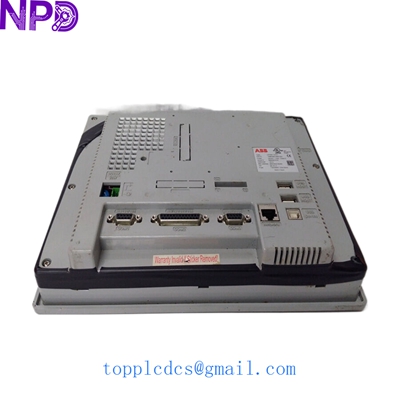
ABB CP450T-ETH 1SBP260189R1001
Customer Cases & Industry Applications
Case 1: Food & Beverage – Rapid HMI Replacement A dairy processing plant in Western Europe had a CP450 T-ETH fail due to a cracked screen from repeated heavy-handed use. The HMI controlled the entire pasteurization line. Without it, the line was blind. We shipped an Original New Surplus unit the same day. Result: The plant was back in production within 48 hours, avoiding the spoilage of thousands of liters of raw milk.
Case 2: Plastic Extrusion – Avoiding System Overhaul A plastics manufacturer was told by their local integrator that the CP450 was “end-of-life” and they needed to upgrade their entire control system (PLC + HMI) for $25,000. They chose to buy a spare 1SBP260189R1001 from us instead. Result: They spent less than 15% of the upgrade cost and kept their proven system running for another 5+ years.
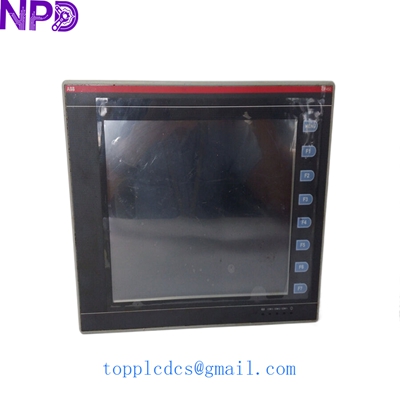
ABB CP450T-ETH 1SBP260189R1001
Frequently Asked Questions (FAQ)
Q: Is the 1SBP260189R1001 compatible with newer ABB PLCs? A: Yes, it can communicate with AC500 PLCs via Ethernet using Modbus TCP or the ABB ETH protocol. However, you must ensure your CP-Soft project has the correct drivers selected.
Q: Can I use a stylus on this screen? A: Yes. Since it is a resistive touch screen, it responds to pressure. You can use a plastic stylus, a finger, or even a gloved hand.
Q: Does it include the mounting clips and power connector? A: Our “New Surplus” units are typically complete with the original mounting hardware and the green 24V power terminal block. We’ll verify the box contents for you before shipping.
Q: Why choose the “T-ETH” version over the standard CP450? A: The “T-ETH” specifically includes the Ethernet port. In modern factories, this is essential for networking multiple panels or connecting to a central SCADA system without running long, noise-prone serial cables.
Q: Is the backlight replaceable? A: On the CP450 T-ETH, the backlight is a CCFL or LED assembly (depending on the revision). While it can be replaced by a technician, it’s usually more cost-effective to replace the whole unit with a New Surplus module to ensure the touch membrane and logic board are also fresh.