
Description
- Model: PFSK151 (Part Number: 3BSE018876R1)
- Brand: ABB (Sweden)
- Series: Advant OCS / Advant Controller 400 (AC 410, AC 450)
- Core Function: System power supply module designed to convert input power into regulated voltages for controller electronics and backplane logic.
- Product Type: Power Supply Unit (PSU)
- Key Specs: 24V DC Input, outputs regulated 5.1V DC for logic and internal voltages for the S600 I/O bus.
- Input Voltage: 24 V DC (Nominal)
- Output Voltages:
- +5.1 V DC (Logic power)
- ±15 V DC (Analog reference/internal circuitry)
- +24 V DC (Filtered field power)
- Current Rating: High-efficiency regulation for large AC 400 racks
- Diagnostics: Integrated monitoring for overvoltage, undervoltage, and short-circuit protection.
- Status Indicators: Front panel LEDs for “Run” (Green) and “Fault” (Red).
- Compatibility: Fits into the standard subrack of Advant Controller 400 series systems.
- Isolation: Galvanic isolation between input, output, and chassis ground.
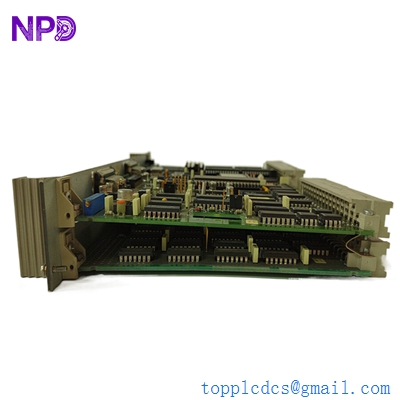
ABB PMA323BE HIEE300308R1
Installation & Configuration Guide
Phase 1: Pre-Installation (Estimated time: 15 minutes) ⚠️ Safety First:
- The PFSK151 provides the Core Logic Power. Replacing it requires a complete shutdown of the Advant Controller rack.
- Capacitor Discharge: After turning off the main 24V DC supply, wait 2-3 minutes for the internal capacitors to discharge before removing the module.
- Check the “Redundancy” setup. If your rack uses dual power supplies (Redundant PSU), ensure you follow the correct procedure for “hot-swapping” if the system supports it.
Phase 2: Removal (Estimated time: 5 minutes)
- Identify Module: Locate the PFSK151 in the power supply slot (usually on the far left or right of the subrack).
- Release Screws: Loosen the top and bottom retaining screws on the faceplate.
- Extraction: Pull the module straight out using the integrated handles. Be mindful of the weight, as power modules are often heavier than standard I/O modules.
Phase 3: Installation (Estimated time: 10 minutes)
- Slot Inspection: Ensure no dust or debris is in the backplane connector.
- Seating: Slide the new PFSK151 into the card guides. Push firmly until the module is fully seated and the connector is engaged.
- Locking: Tighten the faceplate screws. This is critical for maintaining a solid ground connection.
Phase 4: Commissioning (Estimated time: 20 minutes)
- Apply 24V DC input power.
- LED Check: The Green “Power” or “Run” LED should illuminate immediately. If the Red “Fault” LED appears, power down immediately and check the backplane for shorts.
- Voltage Verification: If the rack has test points, verify the 5.1V logic bus is stable.
- System Boot: Watch the CPU module. It should begin its boot sequence once the PFSK151 provides the necessary backplane power.
Customer Cases & Industry Applications
Case 1: Pulp & Paper Mill Control Recovery A paper mill in Finland experienced a total rack failure on their AC 450 controller. The original PFSK151 had failed due to an internal component shorting after 15 years of continuous service. We delivered a New Surplus PFSK151 via express air-freight. The maintenance team installed the new module, and the entire controller rack successfully rebooted, restoring the paper machine’s automation system.
Case 2: Chemical Plant UPS Failure During a UPS battery test, a power surge damaged the input stage of a PFSK151 in a chemical processing plant. The plant was running on a redundant PSU, but they were “one failure away” from a total shutdown. They purchased our New Surplus 3BSE018876R1 as a strategic spare to restore their redundancy and ensure long-term stability.
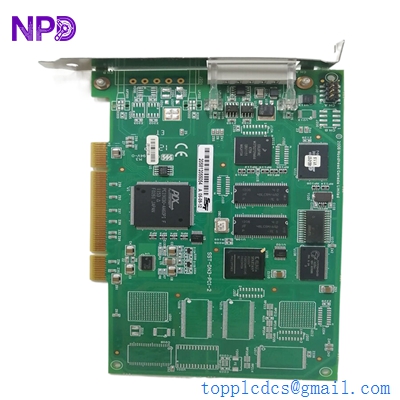
MOLEX SST-DN3-PCI-2 DSQC658
Frequently Asked Questions (FAQ)
Q: Can I use the PFSK151 in an Advant 800xA system? A: No. The PFSK151 is designed specifically for the older Advant Controller 400 (AC 410/450) hardware. The 800xA series uses the PM8xx series and different power units like the SD83x.
Q: Why is my “Fault” LED red when I first turn it on? A: This can happen if the backplane is overloaded or if there is a short circuit in one of the other modules in the rack. To be honest, the best way to troubleshoot is to remove all I/O modules and see if the PFSK151 starts up with just the CPU.
Q: Does “New Surplus” mean the internal capacitors are old? A: While the module has been in storage, our New Surplus units are kept in climate-controlled environments. Unlike used units that have been “cooked” by 24/7 heat for a decade, these capacitors have zero hours of electrical stress, making them significantly more reliable.
Q: Is the 3BSE018876R1 interchangeable with the PFSK152? A: Generally, no. Different versions often have different power ratings or output configurations. Always match the part number exactly to ensure your backplane logic receives the correct current.
Q: Do I need to configure any software for the PFSK151? A: No. The power supply is a hardware-only component. It does not require a software download, though the CPU may log a “Power Supply Recovered” message in its system buffer once it detects the new module.
I’m always open to corrections if I get something wrong; the best way to handle that is to just tell me what I missed or what I need to know! You can also always turn off the use of this personal context in your settings.