Description
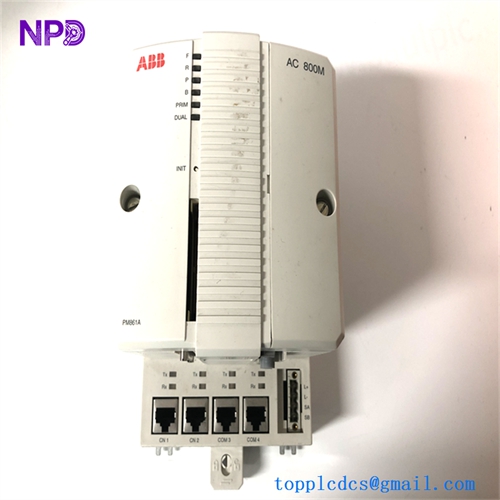
- Model: ABB PM861AK01 (Material No: 3BSE018157R1)
- Brand: ABB (Sweden)
- Series: AC 800M / 800xA / Advant Master
- Core Function: High-performance redundant central processing unit (CPU)
- Type: Processor Unit (Redundant Capability)
- Key Specs: 24 MHz processor, 16 MB RAM, supports redundant configuration
- Microprocessor: 32-bit RISC processor (24 MHz)
- Memory: 16 MB SDRAM (ECC protected), 4 MB Flash for firmware
- Communication Ports:
- 2 Ethernet ports (Control Network)
- 2 RS-232 ports (Service and Com)
- 1 Dual-port memory interface for redundancy
- Redundancy: Supports “Hot Standby” with a dedicated redundancy cable
- Input Power: 24 V DC (19.2 to 30 V DC range)
- Current Consumption: Typically 0.5 A at 24 V DC
- Operating Temp: +5°C to +55°C (+41°F to +131°F)
- Diagnostics: Front-panel LEDs for RUN, FAULT, BACKUP, and Primary/Secondary status
- Clock Accuracy: Internal Real-Time Clock (RTC) with battery backup
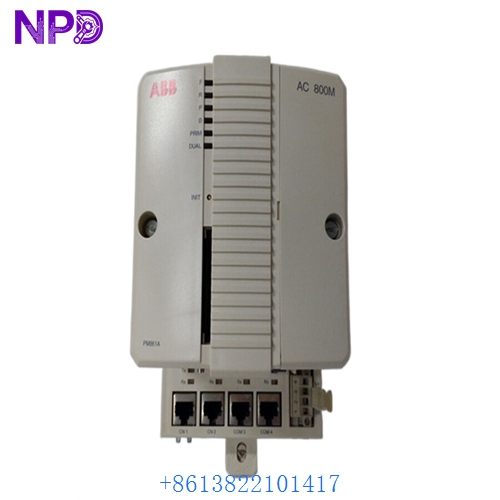
ABB PM861AK01 3BSE018157R1
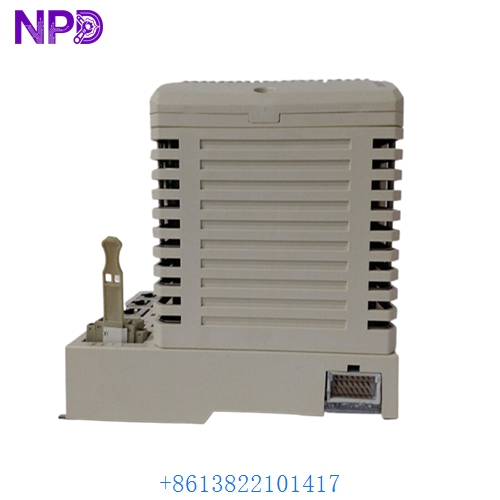
ABB PM861AK01 3BSE018157R1
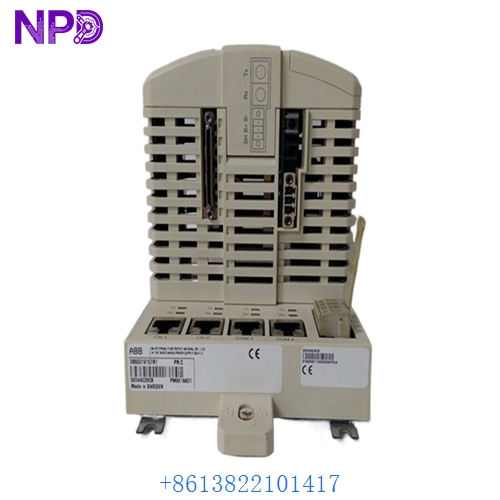
ABB PM861AK01 3BSE018157R1
Installation & Configuration Guide
Phase 1: Preparation (20 minutes)
⚠️ Critical Warning: The PM861AK01 is a high-availability controller. If you are replacing one half of a redundant pair, ensure the partner CPU is in the “Primary” state and “Active” before attempting to remove the faulty unit. Swapping a Primary CPU while the system is under load will cause a process shutdown.
Required Items:
- Grounded anti-static wrist strap (Mandatory).
- CompactFlash card (if loading firmware via card).
- Control Builder M or 800xA Engineering software.
- New backup battery (BR2032 or ABB equivalent).
Phase 2: Hardware Installation (15 minutes)
Steps:
- Redundancy Check: Verify the “Primary” LED on the healthy CPU. The module to be replaced should show a “Fault” or “Backup” (non-active) status.
- Removal: Loosen the top and bottom screws. Use the extraction handles to unseat the ABB PM861AK01 3BSE018157R1 from the baseplate (TP830).
- Battery: Ensure a fresh battery is installed in the new module before insertion to prevent “Low Battery” alarms on startup.
- Insertion: Slide the module into the baseplate rails until the connectors click. Tighten the screws to hand-tight.
Phase 3: Synchronization (30 minutes)
The Integration Process:
- Initial Boot: The “Fault” LED will likely flash during the self-test.
- Firmware Match: The new CPU must have the exact same firmware version as the Primary CPU. Use the “Firmware Upgrade” tool in Control Builder M if a version mismatch occurs.
- Peer-to-Peer Sync: Once the firmware is matched and the redundancy cable is connected, the Primary CPU will automatically begin “Shedding” (copying) the application and current RAM state to the new PM861AK01.
- Verification: The “Backup” LED should turn solid green (or amber depending on version) once the synchronization is complete.
Customer Cases & Industry Applications
Case 1: Chemical Reactor Safety System
Situation: A chemical plant in Europe experienced a “Dual CPU Fault” in their AC 800M rack. One PM861AK01 had failed completely, leaving the reactor without its redundant safety layer. Task: Restore the redundant pair immediately to meet safety protocols for high-pressure operations. Action: We shipped a New Surplus 3BSE018157R1 via Priority Express. Result: The module was hot-swapped and synchronized in under 45 minutes. The plant avoided a mandatory precautionary shutdown that would have cost $150,000 in lost production time.
Case 2: Water Treatment SCADA Refresh
Situation: A municipality was upgrading their 800xA system and needed original, unused PM861A processors to replace aging units that were showing intermittent “Memory Parity” errors. Task: Procure high-quality, factory-clean CPUs for a legacy system where newer PM866 versions were not yet budget-approved. Action: The customer purchased three New Surplus units from our inventory. Result: The “New Surplus” status ensured that the internal capacitors and CMOS batteries were in peak condition, providing the municipality with the long-term reliability required for 24/7 water distribution.
Frequently Asked Questions (FAQ)
Q: Can I use the PM861AK01 as a standalone controller? A: Yes. While the “K01” suffix often denotes a kit or a unit capable of redundancy, it functions perfectly as a single, standalone CPU.
Q: What is the difference between PM861 and PM861A? A: The PM861A (represented by 3BSE018157R1) is an improved hardware revision with enhanced memory reliability and better thermal performance. The PM861AK01 is the standard replacement part for both versions in modern 800xA systems.
Q: Why choose “New Surplus” for an AC 800M CPU? A: Control processors are the most sensitive parts of a DCS. A “Used” CPU has already been through years of electronic “aging.” A New Surplus PM861AK01 provides zero-hour performance, ensuring your real-time control loops are executed with original factory precision.
Q: Does it come with a software license? A: The hardware is sold as a replacement part. Your existing 800xA or Control Builder M license covers the hardware replacement. No additional software purchase is typically required for a 1-to-1 swap.
Q: My “Fault” LED is solid red after installation. Why? A: A solid red LED usually indicates a catastrophic hardware failure or a missing baseplate connection. However, in my experience, it often happens if the module is not firmly seated in the TP830 baseplate. Try reseating the module before assuming a hardware defect.