
Description
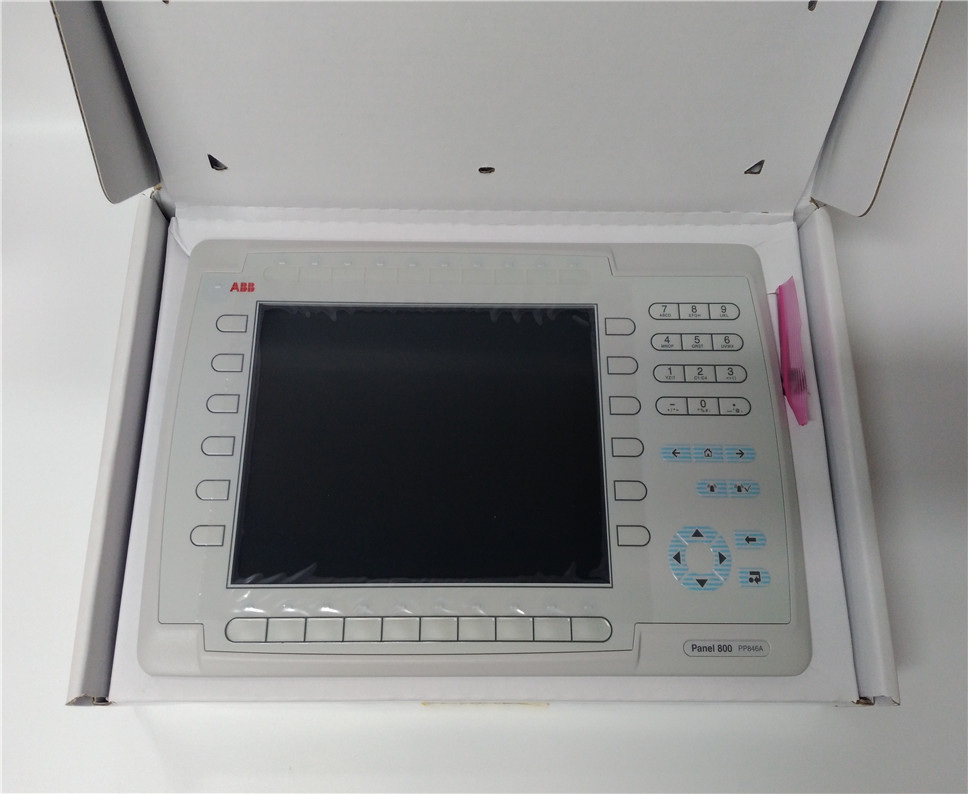
- Model: PP846A
- Part Number: 3BSE042238R2
- Brand: ABB
- Series: Panel 800 (Version 5/6)
- Core Function: Human-Machine Interface (HMI) / Operator Terminal
- Product Type: 10.4″ TFT Touchscreen Panel
- Key Specs: 800 x 600 pixel (SVGA), 65,536 colors, Intel XScale processor, Windows CE
- Display Size: 10.4-inch diagonal
- Resolution: 800 x 600 pixels (SVGA)
- Touch Technology: Analog Resistive (Supports gloved use)
- Processor: 400 MHz Intel XScale
- Memory: 64 MB Flash / 128 MB RAM
- Communication Ports:
- 2x Ethernet (10/100 Mbps)
- 2x Serial Ports (RS232/RS422/RS485)
- 1x USB 2.0 Host
- Input Voltage: 24 V DC (18–32 V DC range)
- Operating System: Windows CE
- IP Rating: IP65 / NEMA 4 (Front panel when mounted)
PP846A 3BSE042238R2
Application Scenarios & Pain Points
The PP846A is a versatile HMI used extensively with ABB’s AC 800M and S800 I/O systems. Its primary role is to visualize complex industrial processes and allow operators to input setpoints and acknowledge alarms. The biggest pain point for maintenance teams is Touchscreen Wear. In high-cycle environments like bottling or material handling, the resistive touch membrane can develop “dead spots” or cracks. Additionally, since this model is based on older Windows CE technology, finding units with the correct firmware version to match your existing Panel Builder 800 project is critical to avoid “Communication Link” errors.
1. AC 800M Controller Visualization
Providing the primary interface for plant operators to manage 800xA or Compact Control Builder systems.
2. Food & Beverage Production
Utilizing its IP65 front rating for washdown environments where stainless steel and moisture protection are required.
3. Marine and Offshore
Monitoring engine vitals or cargo handling systems where robust vibration resistance is necessary.
Case Study: The “Blind” Control Room
Background: A chemical processing facility was using a PP846A to manage their batch reactor. During a shift change, the HMI screen went dark. The AC 800M controller was still running the process, but the operators had no way to monitor temperatures or stop the batch safely.
The Problem: The CCFL (Cold Cathode Fluorescent Lamp) backlight in the PP846A had reached its end of life (typically 50,000 hours). The display was technically working, but it was invisible to the naked eye.
The Solution: We supplied a certified refurbished 3BSE042238R2. Before shipping, we updated the firmware to the customer’s specific revision and performed a 24-hour “burn-in” test.
The Result: The facility swapped the panel during a 30-minute maintenance window.
- Avoided Loss: Prevented a potential reactor overheat scenario that would have ruined a $50,000 batch of chemicals.
- Takeaway: HMIs are the most visible point of failure. If your PP846A screen looks dim or flickers, the backlight is failing—replace it before it goes completely black.
Compatible Replacement Models
| Original Model | Replacement Model | Compatibility | Key Differences | Workload |
| PP846 | PP846A | ✅ Direct | “A” version has improved hardware/CPU | Plug & Play |
| PP836A | PP846A | ⚠️ Partial | 846A is larger (10.4″ vs 6.5″) | Cutout modification |
| PP882 | PP846A | ❌ No | Newer “Panel 800 Version 6” series | Full project migration |
Engineer’s Advice: The 3BSE042238R2 is the specific hardware revision. If you are replacing an older R1 version, your project will likely run fine, but you should always verify your Panel Builder 800 version. Version 5.1 or higher is generally recommended for the “A” series panels.
Troubleshooting Quick Reference
| Symptom | Possible Cause | PP846A Related? | Quick Check | Action |
| Touch Not Responding | Membrane Wear | ✅ High | Clean screen / Calibrate in WinCE | Replace Panel |
| “Comm Error” | Incorrect IP/Protocol | ⚠️ Medium | Ping the HMI from a laptop | Check Ethernet settings |
| Screen is Dim | Backlight Aging | ✅ High | Increase brightness in settings | Replace Panel |
| Boots to WinCE Desktop | Application Missing | ✅ High | Check CompactFlash card seating | Reload HMI project |
Expert Maintenance Tips:
- Back up the CF Card: ❗ Critical! The HMI project is stored on an internal CompactFlash card. Use a card reader to mirror this card to your server today. If the panel fails, you can simply move the card to the new panel to be back up and running in minutes.
- Resistive Touch Care: Never use sharp objects (pens, screwdrivers) on the screen. The PP846A uses a resistive film that can be permanently punctured, leading to ghost touches.
- USB Support: You can plug a standard USB mouse into the back of the PP846A. If your touchscreen fails in the middle of a shift, a $5 mouse can keep your plant running until the replacement arrives.