
Description
🌐 Product Overview
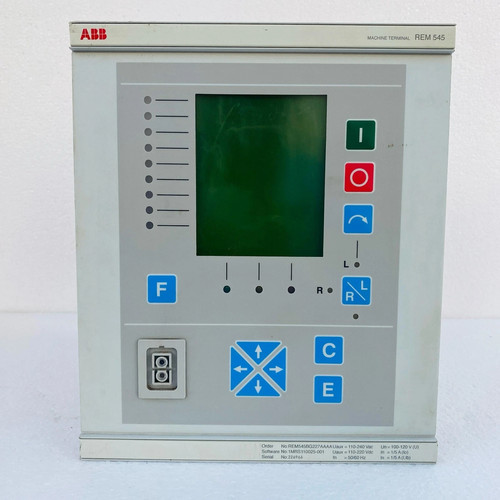
The ABB REM545BG227AAAA is an advanced, microprocessor-based machine terminal designed for the comprehensive protection, control, measurement, and supervision of feeder systems, medium-sized generators, and large synchronous or asynchronous motors in distribution networks. Integrating extensive protection functions with programmable logic control (PLC) capabilities, this terminal serves as a central component for substation automation, ensuring high system reliability and seamless grid integration.
Xiongba Automation
⚙️ Technical Specifications
- Series: REM 545 Machine / Feeder Terminal Series
Automation-Warehouse.com
- Dimensions: 225mm x 180mm x 215mm
- Weight: 5.00 kg
Automation-Warehouse.com
- Origin: Finland / European Union
- Current Inputs (In): 1 / 5 Amp (Configured for matching transformers)
Automation-Warehouse.com
- Auxiliary Power Supply (Uaux): 110-240 V AC / 110-220 V DC
Automation-Warehouse.com
- Analog Channels: 9 physical analogue channels configured for conventional matching transformers
- Supported Protocols: SPA bus, LON bus, IEC 60870-5-103, DNP 3.0, Modbus, and IEC 61850 (via extension module)
🚀 Application Fields
- Motor Protection: Comprehensive monitoring, differential, and thermal overload protection for large 3-phase industrial motors.
- Generator Control: Main protection and control system for generator units in small to medium-sized hydroelectric, diesel, and steam power plants.
- Feeder & Substation Automation: Distribution network protection supporting isolated neutral, resonant-earthed, and partially earthed networks.
- Power Quality Compensation: Protection and management of shunt capacitor banks used for reactive power compensation.
📖 Product Instructions
- Mounting: Install the terminal securely into the switchgear panel cutout using the provided flush mounting kits. Ensure adequate ventilation space around the enclosure.
- Wiring Connections: Connect analogue current and voltage transformer signal inputs to the rear terminal blocks. Adhere strictly to the 1A/5A rating specification.
- Communication Setup: Configure the required bus interface (such as Modbus or LON) via the front Human-Machine Interface (HMI) or through the designated configuration software on a connected PC.
✅ Initial Startup Checklist
- Verify that the auxiliary power supply matches the terminal hardware configuration (110-240V AC/110-220V DC).
Automation-Warehouse.com
- Confirm that all current and voltage transformer secondary circuits are safely landed and tightened.
- Power up the device and ensure the green “Ready” LED illuminates on the front panel display.
- Download and verify the specific relay configuration parameters and logic sequences using the CAP 501 / CAP 505 configuration tool.
🛠️ Maintenance & Care
- Terminal Tightening: Perform an annual physical inspection to check all screw terminals for loosening due to operational vibrations.
- Dust and Cleanliness: Clean the front graphical display with a soft, dry cloth; do not use liquid solvents or abrasive cleaners.
- Self-Supervision Review: Periodically extract and review the internal self-supervision error logs to catch hardware or internal power supply degradation early.
⚠️ Safety Precautions
- CT Secondary Open Circuits: Never open-circuit a current transformer secondary circuit while the primary side is energized, as high hazardous voltages can develop.
- Isolation Check: Ensure all auxiliary power and measuring circuits are completely isolated before removing the terminal card or chassis.
- ESD Warning: Handle inner plug-in boards with proper grounding straps to avoid electrostatic discharge damage to internal processors.
🔍 Troubleshooting & FAQ
- Q: The display indicates an “ACFail” internal alarm code. What does this mean?
- A: This indicates that the internal power supply module has detected a drop in the auxiliary voltage of approximately 10% or more below the lowest rated DC input threshold. Check your external grid voltage stability.
- Q: An internal overtemperature indication alarm has been triggered. What step should be taken?
- A: The internal supervision generates this warning when the temperature inside the enclosure reaches +78∘C. Inspect the substation cabinet cooling fans and check for excessive ambient heat.
- Q: How can I change the terminal operating mode from Remote to Local control?
- A: Press the local/remote control button on the front interface panel, input the correct password via the navigation arrows when prompted, and confirm the selection.