Description
- Model: ABB TP852 (3BSC950263R1)
- Brand: ABB (Sweden)
- Series: S800 I/O / AC800M Controller Series
- Core Function: Provides the mounting base and electrical connections for S800 I/O communication modules.
- Product Type: Module Termination Unit (MTU)
- Key Specs: 24 V DC Rated Supports CI801/CI840 Bus Modules DIN-rail mounting
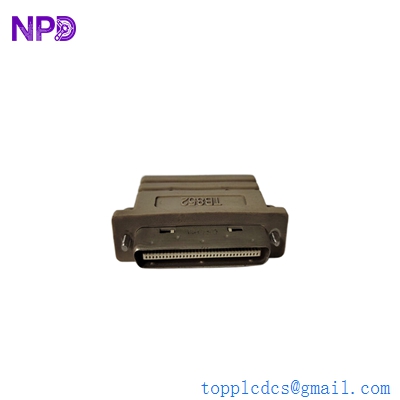
ABB TP852 3BSC950263R1
Key Technical Specifications
- Rated Insulation Voltage: 50 V
- Power Distribution: Dual 24 V DC inputs for redundancy
- Maximum Current: 5 A (per power supply connection)
- Mounting: Horizontal or Vertical DIN-rail (35 mm)
- Module Compatibility: Specifically designed for CI801, CI810, CI820, or CI840 Profibus/AF100 units
- Connectors: Screw terminal blocks for power and ModuleBus extension
- Mechanical Keying: Built-in to prevent insertion of incorrect module types
- Environmental Rating: IP20
- Operating Temperature: 0°C to +55°C
Application Scenarios & Engineering Insights
In an ABB AC800M architecture, the TP852 is the literal foundation of your I/O rack. It’s a passive component, meaning it doesn’t have “brains” (no firmware), but it’s the most common point of failure for mysterious “Module Missing” or “Bus Error” alarms. If the gold-plated pins on the TP852 get oxidized or bent, your entire I/O station drops off the network. I’ve seen engineers spend days chasing software bugs when the real culprit was a loose terminal screw on the MTU.
Typical Application Scenarios:
- Distributed I/O Stations (Profibus DP) The TP852 holds the CI801 or CI840 module that converts Profibus signals into local ModuleBus signals for the rest of the I/O rack.
- Redundant Communication Links In critical DCS environments, two TP852 units are used side-by-side to support redundant CI840 modules, ensuring the PLC doesn’t lose contact with field sensors.
- Remote Pump Stations Used in water treatment or oil pipelines where I/O must be distributed over long distances and mounted in small, localized cabinets.
Case Study: The “Intermittent Flap” at a Pulp Mill
Background: A pulp and paper mill in Finland was plagued by intermittent “I/O Station Failure” alarms on their bleaching line. The communication would drop for 2 seconds and then recover automatically.
The Problem: The site was using TP852 bases. During a shutdown, we inspected the backplane connectors. We found that high-frequency vibrations from a nearby motor were causing “micro-arcing” on the 24V power terminals because the MTU wasn’t properly snapped onto the DIN rail.
The Solution: We replaced the TP852 with a fresh 3BSC950263R1 from stock. We ensured the grounding clips on the back of the MTU were making solid contact with the mounting rail.
The Result: * Uptime: The intermittent alarms stopped immediately.
- Cost Avoidance: The mill avoided an unplanned emergency shutdown which would have cost roughly €40,000 in lost production.
- Lesson learned: Always check the mechanical “click” when installing these MTUs. If they wiggle, they will eventually fail.
Compatible Replacement Models
The TP852 has a few siblings in the S800 family, but they are not always interchangeable.
| Model | Compatibility | Key Differences | Action Required |
| TP852 | (Current) | 3BSC950263R1 – Standard base | – |
| TP851 | ❌ Incompatible | For single communication modules only | Cannot be used for redundant setups |
| TP850 | ❌ Incompatible | Older version; different terminal layout | Requires rewiring of power leads |
| TP830 | ❌ Incompatible | For I/O modules (AI/DI/DO), not Comms | Physically different footprint |
Engineer’s Note: Make sure you verify the “R” suffix. The 3BSC950263R1 is the standard commercial version. If you see a version with a “C” coating (e.g., G3 coating), it’s for corrosive environments (H2S gas). Standard TP852 units work fine in 90% of plant environments.
Troubleshooting Quick Reference
| Symptom | Possible Cause | Part Relevance | Quick Check |
| CI Module “Power” LED Off | Blown fuse or loose 24V | ⚠️ Medium | Measure voltage at the MTU screw terminals |
| Communication “Jitter” | Dirty ModuleBus pins | ✅ High | Inspect the male/female pins for grey oxidation |
| Module won’t seat properly | Mechanical Keying mismatch | ⚠️ Medium | Check if the white plastic key matches the module |
| Ground Fault Alarm | MTU grounding clip loose | ✅ High | Ensure DIN rail is unpainted and grounded |
| Adjacent I/O modules dead | ModuleBus cable fault | ✅ High | Check the ribbon cable connection on the right side |
❗ Installation Warning: The Ribbon Cable
The TP852 connects to the rest of the I/O rack via a small, fragile ModuleBus ribbon cable on the right-hand side.
- Never pull the cable by the wires; always use the plastic pull-tab.
- If the cable is bent at a sharp 90-degree angle, the internal copper will fracture.
- If you’re replacing the MTU, check the pins on the next module in the row to ensure they weren’t bent during the removal of the old TP852.