Description
- Model: UCD224A102
- Ordering Code: 3BHE023681R0102
- Brand: ABB (Switzerland)
- Series: UNITROL 6000 / ACS6000
- Core Function: High-speed control and signal processing module for excitation systems and medium voltage drives.
- Product Type: Central Control Unit / Processor Board (New Surplus)
- Key Specs: Integrated FPGA/DSP architecture | Fiber optic communication ports | High-reliability industrial design.
- Module ID: UCD224
- Hardware Revision: A102 (Optimized for improved logic processing and thermal efficiency)
- Architecture: Combines FPGA for real-time firing pulse generation and high-speed DSP for complex control algorithms.
- Interfaces:
- Fiber Optics: Multiple ports for high-speed, noise-immune data exchange with gate units (GVC series).
- Internal Bus: Proprietary high-bandwidth backplane interface for multi-processor synchronization.
- Isolation: Reinforced galvanic isolation to protect logic circuits from high-power transients.
- Diagnostics: Comprehensive onboard self-test routines and front-panel status LEDs (Power, Run, Fault, Communication).
- Environment: Designed for harsh industrial environments with high electromagnetic interference (EMI).
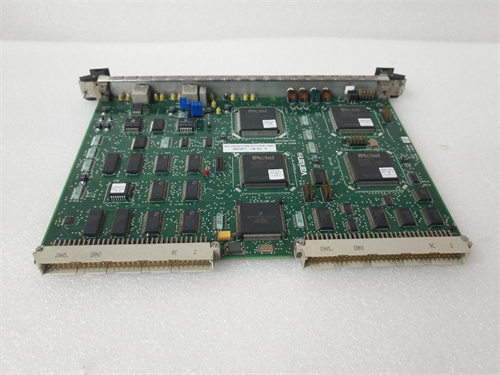
UCD224A102 3BHE023681R0102
Installation & Configuration Guide
Phase 1: Preparation (Pre-Installation)
⚠️ Safety First:
- Ensure the system (UNITROL or ACS) is completely de-energized and locked out.
- Firmware Matching: The UCD224A102 is a programmable platform. Verify if the module requires a specific application firmware download from the AC 800PEC master controller upon startup.
- ESD Protocol: Use a grounded wrist strap. The high-speed logic components on this board are sensitive to electrostatic discharge.
Phase 2: Removal of Faulty Module
- Cable Labeling: Label all fiber optic cables before removal. Use protective caps on the cable ends and module ports immediately to prevent dust contamination.
- Mounting: Loosen the top and bottom retaining screws on the front panel.
- Extraction: Pull the module straight out using the ejector handles. Avoid touching the rear multi-pin DIN connector.
Phase 3: New Module Installation
- Connector Inspection: Check the rear 96-pin connector for any bent or oxidized pins.
- Insertion: Slide the UCD224A102 into the card guides until it seats firmly into the backplane.
- Securing: Tighten the faceplate screws to ensure a proper ground connection to the rack chassis.
Phase 4: Commissioning & Testing
- Control Power: Apply 24V control power. The “Power” LED should turn green.
- System Sync: Monitor the “Active” or “Link” LEDs. The module should automatically synchronize with the master controller.
- Validation: Use the Excitation Tool or DriveWindow software to confirm the hardware revision is correctly identified and no “Processor Mismatch” errors are present.
Customer Cases & Industry Applications
Case 1: Restoring Generation Capability at a Thermal Power Plant
Situation: A thermal power plant in Southeast Asia suffered a trip on their 300MW generator. The diagnostics indicated a fatal processing error on the UCD224 module in the UNITROL 6000 excitation system.
Task: The plant was losing significant revenue for every hour offline. The OEM quoted a lead time that would have kept the generator down for nearly a month.
Action: We provided a New Surplus UCD224A102 (3BHE023681R0102). Because the unit was in our Xiamen stock, it was dispatched via international priority and reached the site in 3 days.
Result: The module was installed, and the application firmware was successfully synchronized. The generator was back on the grid within 96 hours of the initial failure.
Case 2: Reliability Upgrade for a Mining Mill Drive
Situation: A copper mine used ACS6000 drives for their SAG mill. During an audit, the UCD224 boards were identified as being from an older hardware revision prone to intermittent communication timeouts in high-vibration environments.
Task: The mine needed to proactively upgrade to the A102 revision to ensure maximum uptime during the peak production season.
Action: We supplied two units of the 3BHE023681R0102. These units were verified as New Surplus, ensuring they had zero thermal fatigue.
Result: The proactive swap-out during a scheduled maintenance window eliminated the intermittent “Comm Fault” alarms, resulting in a 15% increase in mill availability over the following quarter.
Frequently Asked Questions (FAQ)
Q: Can a UCD224A102 replace an older UCD224A101? A: In most UNITROL 6000 and ACS6000 applications, the A102 is a backward-compatible replacement for the A101. However, it is always recommended to verify that your system software supports the newer hardware revision.
Q: Does this module require an external power supply? A: It draws its power from the sub-rack backplane (typically +5V and +/-15V). Ensure your rack power supply is healthy before installing a new control board.
Q: Why choose “New Surplus” for control modules? A: Control boards handle high-speed data and are susceptible to component aging even when idle. “Refurbished” boards often have significant run hours under heat. Our New Surplus 3BHE023681R0102 units are “fresh,” providing the highest MTBF (Mean Time Between Failures) for your critical systems.
Q: How do I troubleshoot a “Fault” LED? A: A steady red Fault LED typically indicates an internal hardware failure. A blinking LED often indicates a firmware mismatch or a missing configuration. Check the system event logger for specific error codes.