Description
⚙️ Product Overview
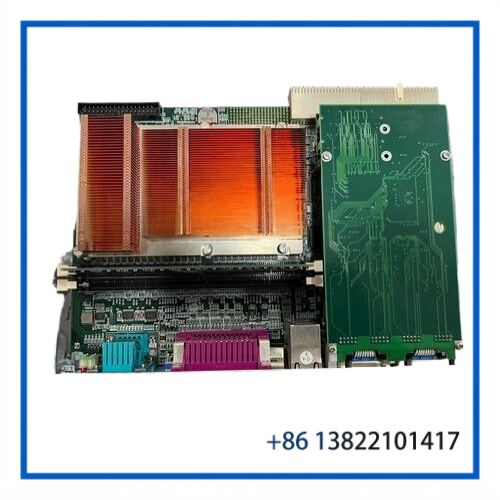
The ADLINK CPCI-6842 is a 6U CompactPCI single-board computer designed for industrial control, embedded computing, automation equipment, and other systems that require a full-size CompactPCI host processor. ADLINK identifies the cPCI-6842 as a dual-slot 6U CompactPCI system host SBC based on Intel Pentium M or Celeron M processors. The platform uses the Intel 855GME chipset and supports a 32-bit/33 MHz CompactPCI bus.
The configuration CPCI-6842/PM16/M512/H40G(G)-0110 is particularly useful for identification because it specifies a Pentium M 1.6 GHz configuration with 512 MB DDR memory and a 40 GB hard disk. The published ADLINK ordering information lists the corresponding /PM16/M512/H40G configuration as a 6U dual-slot Pentium M 1.6 GHz CompactPCI host SBC with 512 MB DDR and a 40 GB HDD.
🔧 Key Features
- 6U CompactPCI dual-slot host computer
- Intel Pentium M processor platform
- 1.6 GHz CPU configuration for this ordering code
- Intel 855GME / ICH4 chipset architecture
- 512 MB DDR memory configuration
- 40 GB hard disk configuration
- 32-bit / 33 MHz CompactPCI bus
- Dual Gigabit Ethernet interfaces
- Two RS-232 serial interfaces
- VGA graphics output
- USB 2.0 interfaces
- Parallel printer interface
- CompactFlash support
- 32-bit / 33 MHz PMC expansion site
- PXE network boot support
- Suitable for industrial control and embedded computing applications
📋 Product Datasheet
| Parameter | Specification |
|---|---|
| Brand | ADLINK |
| Model | CPCI-6842 |
| Configuration | CPCI-6842/PM16/M512/H40G(G)-0110 |
| Product Type | 6U CompactPCI Host SBC |
| Form Factor | 6U CompactPCI |
| Slot Width | Dual-slot / 8HP |
| CPU | Intel Pentium M |
| CPU Frequency | 1.6 GHz |
| Chipset | Intel 855GME with ICH4 |
| Memory | 512 MB DDR |
| Maximum Supported Memory | Up to 2 GB DDR-333 ECC non-registered |
| CompactPCI Bus | 32-bit / 33 MHz |
| Ethernet | 2 × 10/100/1000 Mbps |
| Serial | 2 × COM |
| USB | USB 2.0 |
| Graphics | VGA |
| Parallel Port | LPT |
| Storage | 40 GB HDD configuration |
| CompactFlash | Supported |
| PMC | 1 × 32-bit / 33 MHz PMC site |
| Boot | Intel PXE |
| Status | End of Life |
| Manufacturer | ADLINK Technology |
The 2 GB maximum memory capability refers to the cPCI-6842 platform; the specific configuration listed here is the 512 MB version. Exact installed storage hardware and board revision should be confirmed from the physical unit.
⚡ Operating Function
The CPCI-6842 functions as the central computing board inside a CompactPCI-based industrial system.
A typical system architecture is:
CompactPCI Chassis → CPCI-6842 Host SBC → CompactPCI/PMC Modules → Field I/O / Motion / Communication → Industrial Equipment
During operation, the Pentium M processor executes the host operating system and application software. The CompactPCI interface provides communication with installed peripheral boards, while the Ethernet ports can be used for plant networks, equipment communication, remote diagnostics, or data transfer.
The two serial ports are useful for legacy controllers, instruments, service terminals, and other RS-232 devices. VGA, USB, keyboard/mouse, and LPT interfaces provide additional local equipment access. The CompactFlash interface and onboard hard-disk support also make the platform suitable for older embedded operating environments.
🔩 Installation & Configuration
Before installing the board, confirm that the chassis supports a 6U CompactPCI dual-slot board and that the backplane provides the required CompactPCI bus connections.
Recommended installation procedure:
- Shut down the CompactPCI chassis and disconnect power.
- Check the board for bent pins, damaged connectors, loose components, or corrosion.
- Verify the CPU, memory, HDD, and board revision against the required system configuration.
- Insert the board carefully into the correct CompactPCI slot.
- Secure the front-panel retaining screws.
- Connect the required Ethernet, serial, VGA, USB, and other peripheral cables.
- Power up the chassis and check the POST/BIOS screen.
- Confirm that the installed memory and hard disk are detected correctly.
- Verify the operating system and application software.
- Test communication with the other CompactPCI modules before returning the system to production.
For a replacement installation, it is important to record the original BIOS settings, boot sequence, disk configuration, and communication parameters before removing the existing board.
🧰 Maintenance Recommendations
Because the CPCI-6842 is an older Pentium M platform and ADLINK now lists the product as End of Life, maintenance planning is particularly important.
Keep the board in an ESD-safe environment when it is outside the chassis. Pay close attention to the CompactPCI connector, memory sockets, storage connections, cooling path, and front-panel connectors.
For an installed unit, useful checks include:
- Verify that the CPU cooling path is unobstructed.
- Check system temperature and unexpected thermal shutdowns.
- Inspect CompactPCI connector contacts during scheduled maintenance.
- Check HDD health and back up application data.
- Record BIOS settings before replacing the board.
- Verify Ethernet link status and communication stability.
- Check serial-port communication with connected equipment.
- Keep a tested spare available for legacy equipment where downtime is costly.
When replacing a board, matching the exact CPU, memory, storage, board revision, and software environment is preferable to relying only on the CPCI-6842 family number.
❓ FAQ
Q: What is the CPCI-6842?
It is a 6U dual-slot CompactPCI host single-board computer from ADLINK, based on Intel Pentium M/Celeron M processors.
Q: What does PM16 mean in the configuration?
For the published ordering configuration, PM16 identifies the Pentium M 1.6 GHz processor option.
Q: What does M512 indicate?
M512 refers to the 512 MB DDR memory configuration.
Q: What does H40G indicate?
H40G identifies the 40 GB hard-disk configuration in the published ordering information.
Q: Is the CPCI-6842 still an active ADLINK product?
No. ADLINK currently lists the cPCI-6842 as End of Life.
Q: Can a different CPCI-6842 configuration replace this board?
Possibly, but CPU, memory, storage, BIOS, board revision, operating system, and application requirements should be checked first. A board with the same family number is not automatically a drop-in replacement for every configuration.
Q: Is it suitable for legacy industrial equipment?
Yes. Its CompactPCI architecture, serial interfaces, Gigabit Ethernet, PMC expansion, and legacy storage options make it useful for maintaining older industrial and embedded systems.
🔄 Related ADLINK Models
- ADLINK cPCI-6842
- ADLINK cPCI-6842-2
- ADLINK cPCI-6841
- ADLINK cPCI-6600
- ADLINK cPCI-6842/PM16/M512/H40G
- ADLINK cPCI-6842/PM18/M512/H40G
- ADLINK cPCI-6840
- ADLINK cPCI-3500
- ADLINK cPCI-3500A
- ADLINK cPCI-6765
These models belong to related ADLINK CompactPCI computing platforms, but they should not be treated as direct substitutes without checking mechanical, electrical, bus, I/O, and software compatibility.
🏭 Application Summary
The ADLINK CPCI-6842/PM16/M512/H40G configuration is best suited to legacy CompactPCI systems where maintaining the original hardware architecture is more practical than redesigning the control computer.
Typical applications include industrial automation, machine control, test equipment, data acquisition, communication systems, semiconductor equipment, factory automation, and other embedded systems using CompactPCI backplanes.
For replacement projects, the most important identification points are CPCI-6842 + Pentium M 1.6 GHz + 512 MB DDR + 40 GB HDD, followed by the board revision and installed software environment.