Description
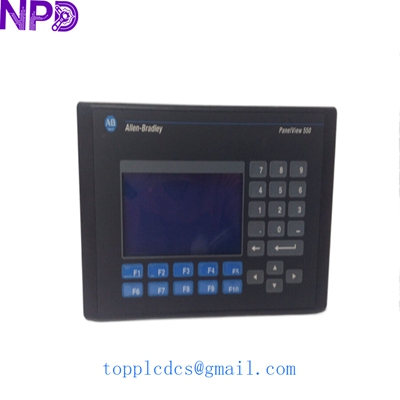
Model: Allen Bradley 2711-K5A8 · Brand: Rockwell Automation / Allen Bradley · Series: PanelView 550 (Standard) · Core Function: Industrial Operator Interface (HMI) for machine control · Condition: Brand New Surplus (Original New), non-refurbished · Type: Keypad Operator Terminal · Key Specs: 5.5-inch Monochrome Display DH-485 Comm Port AC Power (85-264 V)
- Manufacturer: Rockwell Automation
- Display Type: Monochrome Blue Mode LCD
- Display Size: 5.5-inch (Diagonal)
- Operator Input: Tactile Keypad (Stainless Steel Domed)
- Communication Port: DH-485 (RJ-45 Connector)
- Input Voltage: 85-264 V AC (47-63 Hz)
- Internal Memory: 170 KB Application Flash Memory
- Backlight: Replaceable Halogen (Service Life: 100,000 hours)
- Enclosure Rating: NEMA 4X (Indoor use only), IP65
- Programming Software: PanelBuilder32 (Legacy)
ALLEN BRADLEY 2711-K5A8
Installation & Configuration Guide
Phase 1: Pre-Installation (Preparation)
⚠️ Safety Protocol:
- Confirm the machine is in a safe state and production is halted.
- Disconnect the AC power source. These units operate on high-voltage AC, and internal components can hold charge.
- Check your PanelBuilder32 project file. Ensure you have the
.PVAor.PVPfile ready for download.
Tools Required:
- Standard Phillips head screwdriver.
- Panel gasket (Included with our New Surplus units).
- Programming cable (1747-PIC or 1747-UIC for DH-485).
Phase 2: Mounting the Terminal
- Cutout Verification: Ensure your panel cutout matches the 2711-K5A8 dimensions (approx. 167 x 264 mm).
- Gasket Placement: Align the sealing gasket on the back of the terminal. If the old gasket is stuck to the panel, clean it off completely with isopropyl alcohol.
- Seating: Slide the terminal into the cutout.
- Mounting Clips: Secure the four mounting clips. Tighten them evenly to 1.1 N·m. Do not over-tighten, or you might crack the plastic bezel.
Phase 3: Wiring and Communication
- Power Wiring: Connect Line, Neutral, and Ground to the terminal block. Double-check that you aren’t plugging 24 V DC into this AC model!
- DH-485 Connection: Plug your RJ-45 communication cable into the DH-485 port. If connecting to an SLC 500 or MicroLogix, ensure the node address on the network is unique.
- Memory Card (Optional): If using an ATA PCMCIA card for backup, insert it into the side slot before powering up.
Phase 4: Configuration & Startup
- Power-Up: Apply power. The self-test screen should appear.
- Terminal Setup: Press the “Left” and “Right” arrows simultaneously to enter the Configuration Menu.
- Node Address: Set the DH-485 node address to match your PLC’s expectation.
- Contrast Adjustment: Use the keypad to adjust the blue monochrome contrast until the text is sharp.
- Download: Use PanelBuilder32 to download the application. Once the “Download Successful” message appears, the terminal will reboot into Run Mode.
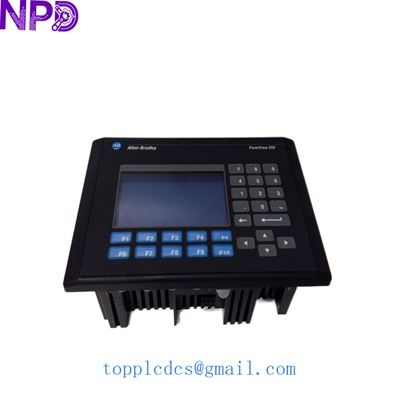
ALLEN BRADLEY 2711-K5A8
Customer Cases & Industry Applications
Case 1: Textile Factory Legacy Recovery
A spinning mill in South Carolina had a 2711-K5A8 keypad failure on a critical bale opener. The keypad buttons for “Start” and “E-Stop Reset” had worn through. Because the system was built in the late 90s, the OEM suggested a full control system migration costing $40,000. By sourcing a New Surplus 2711-K5A8 from us, the mill was back at 100% capacity within 48 hours for a fraction of the cost, extending the life of their existing SLC 500 control architecture.
Case 2: Water Treatment Facility Spare Strategy
A municipal water plant in the UK relies on PanelView 550 terminals for their pump station monitoring. They noticed that these monochrome units are becoming scarce on the secondary market. To avoid a catastrophic failure during a storm event, the plant manager proactively purchased two of our 2711-K5A8 units to keep in their climate-controlled stores. This “Insurance Buy” gives them peace of mind that they won’t be forced into an emergency software rewrite if an old screen dims out.
Frequently Asked Questions (FAQ)
Q: Is the 2711-K5A8 compatible with 24 V DC power? A: No. The “A” in the part number indicates AC Power (85-264 V). If you need the DC version, you would be looking for the 2711-K5A1. Connecting DC to this unit will not work, and connecting AC to a DC unit will destroy it.
Q: Can I replace the backlight if it burns out? A: Yes, the backlight in the PanelView 550 series is replaceable. However, in my experience, if the screen is flickering or very dim, it’s often more cost-effective to replace the whole unit with a New Surplus module to ensure the power supply and keypad are also fresh.
Q: How do I transfer my old program to the new unit? A: You have two main options:
- Use a PC with PanelBuilder32 software and a 1747-UIC converter.
- If your old unit still powers up, you can copy the program to a PCMCIA memory card and “Restore” it onto the new terminal via the Configuration Menu.
Q: Is this a “Touchscreen” or “Keypad” model? A: This is a Keypad-only model. The “K” in 2711-K5A8 stands for Keypad. If you need the touch version, look for 2711-T5A8.
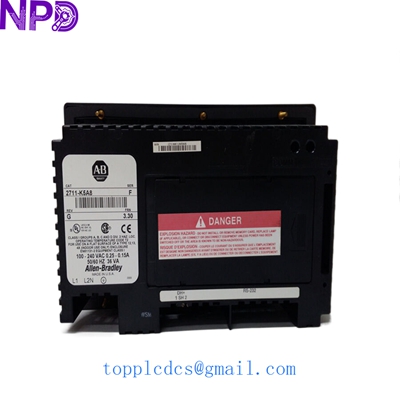
ALLEN BRADLEY 2711-K5A8
Related Inventory Models
- Allen Bradley 2711-K5A1
- Allen Bradley 2711-T10C20L1
- ABB 3BSE018161R1
- Siemens 6AV6642-0AA11-0AX1
- Schneider MAGELIS HMIGTO5310
- Fanuc A06B-6114-H105
- Honeywell TK-FTEB01
- Proface PFXGP4501TADW
For real-time stock levels and volume discounts, check out newplcdcs www.newplcdcs.com.