Description
🔧 Product Overview
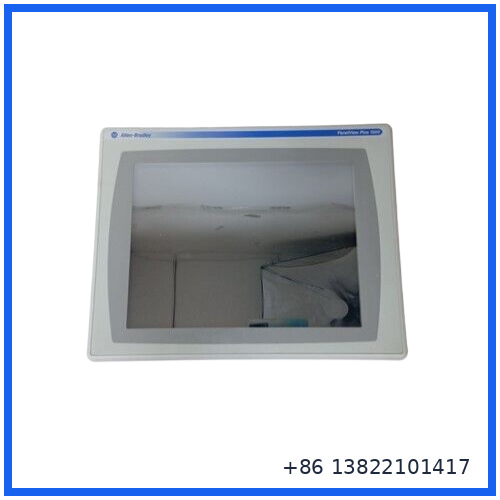
The Allen-Bradley 2711P-T15C4D2 is a PanelView Plus 1500 Human-Machine Interface terminal designed for industrial machine and process control applications.
This model features a 15-inch color active-matrix TFT display with an analog resistive touchscreen. It provides a 1024 × 768 display resolution and 18-bit color graphics, allowing operators to monitor equipment status, view alarms, enter commands, and interact with machine-level control systems.
The terminal uses a 24 VDC nominal power supply and supports Ethernet and RS-232 communication. It is designed for PanelView Plus applications using FactoryTalk View Machine Edition software. The 2711P-T15C4D2 belongs to the earlier PanelView Plus 1500 generation and should be treated as a legacy HMI platform when planning replacement or migration projects.
⚙️ Main Features
🔹 15-inch industrial touchscreen display
🔹 Color active-matrix TFT LCD
🔹 Analog resistive touchscreen
🔹 1024 × 768 XGA resolution
🔹 18-bit color graphics
🔹 Ethernet communication
🔹 RS-232 serial communication
🔹 USB connectivity
🔹 24 VDC nominal power input
🔹 Designed for machine-level operator interface applications
🔹 Compatible with PanelView Plus system architecture
🔹 Supports industrial monitoring and control applications
📋 Product Datasheet
Brand: Allen-Bradley
Model: 2711P-T15C4D2
Series: PanelView Plus 1500
Product Name: Touchscreen Terminal
Product Type: Human-Machine Interface (HMI)
Display Size: 15 inches
Display Type: Color Active-Matrix TFT LCD
Operator Input: Analog Resistive Touchscreen
Display Resolution: 1024 × 768 pixels
Color Graphics: 18-bit
Display Area: Approximately 304 × 228 mm
Typical Brightness: Approximately 300 cd/m²
Communication: Ethernet and RS-232
USB Interface: USB connectivity supported
Nominal Supply Voltage: 24 VDC
Input Voltage Range: 18–32 VDC
Power Consumption: Application and configuration dependent
Operating Function: Machine and process operator interface
Memory Configuration: Verify from the installed logic/display module configuration
Enclosure Rating: NEMA Type 12, 13, 4X indoor use, IP54/IP65 depending on the applicable installation configuration
Product Condition: New Surplus / Used Surplus, depending on the actual unit supplied
Country of Origin: Verify from the physical product nameplate
Dimensions: Approximately 420 × 320 × 80 mm for the complete unit; verify the exact revision before installation
Weight: Approximately 5 kg; verify the actual shipping unit
The PanelView Plus 1500 platform uses a 15-inch color TFT display with 1024 × 768 resolution, a 304 × 228 mm viewing area, approximately 300 cd/m² luminance, and analog resistive touch operation.
🖥️ Touchscreen Operator Interface
The 2711P-T15C4D2 provides a graphical operator interface between personnel and the automation system.
Typical functions include:
🔹 Machine status monitoring
🔹 Alarm viewing
🔹 Alarm acknowledgment
🔹 Process value display
🔹 Setpoint entry
🔹 Production monitoring
🔹 Operator commands
🔹 Recipe selection
🔹 Maintenance diagnostics
🔹 System status information
The touchscreen interface allows operators to interact directly with configured HMI screens without requiring a separate keypad.
🌐 Communication Interfaces
The terminal supports industrial communication for connection to compatible controllers and automation networks.
🔌 Ethernet
Ethernet communication can be used for connection to compatible industrial automation systems and engineering environments.
🔧 RS-232
The RS-232 interface supports serial communication with compatible industrial controllers and equipment.
💻 USB
USB connectivity can be used with supported peripheral devices and engineering functions.
The exact available interface arrangement should be confirmed from the installed terminal hardware and module configuration before replacement.
🏭 Typical Applications
The Allen-Bradley 2711P-T15C4D2 can be used in applications such as:
🔹 Packaging machinery
🔹 Production lines
🔹 Automated assembly systems
🔹 Material handling equipment
🔹 Conveyor systems
🔹 Water and wastewater facilities
🔹 Food and beverage production
🔹 Automotive manufacturing
🔹 Machine control systems
🔹 Industrial process monitoring
🔹 Legacy Allen-Bradley automation systems
🛠️ Installation Notes
Before replacing an existing 2711P-T15C4D2 terminal, record the complete HMI configuration.
Recommended checks include:
- Confirm the complete catalog number: 2711P-T15C4D2.
- Record the existing communication settings.
- Back up the HMI application.
- Record Ethernet parameters.
- Check RS-232 communication settings.
- Verify the 24 VDC power supply.
- Inspect the touchscreen condition.
- Check the display module and logic module configuration.
- Inspect the panel cutout and mounting hardware.
- Verify communication with the controller after installation.
- Test alarms, operator commands, and screen navigation.
- Confirm normal machine operation before returning the equipment to service.
For legacy systems, backing up the original HMI application before replacing hardware is strongly recommended.
⚠️ Important Replacement Note
Do not select a replacement terminal based only on display size.
Before replacing the 2711P-T15C4D2, verify:
- Exact catalog number
- Hardware series
- Display module
- Logic module
- HMI application version
- Communication protocol
- Controller type
- Ethernet settings
- Serial communication settings
- Power supply requirements
- Panel cutout dimensions
- Firmware compatibility
A newer PanelView terminal may require application conversion or migration before it can replace an existing PanelView Plus 1500 installation.
❓ Common Questions & Answers
Q: What is the Allen-Bradley 2711P-T15C4D2?
A: It is a PanelView Plus 1500 industrial touchscreen HMI terminal used for operator interaction with automation and control systems.
Q: What size is the display?
A: The terminal uses a 15-inch display.
Q: What type of display does it use?
A: It uses a color active-matrix TFT LCD display.
Q: What is the display resolution?
A: The PanelView Plus 1500 display resolution is 1024 × 768 pixels with 18-bit color graphics.
Q: Is the 2711P-T15C4D2 touchscreen operated?
A: Yes. The “T” version uses an analog resistive touchscreen.
Q: What power supply does it require?
A: The model uses a nominal 24 VDC power supply, with the legacy PanelView Plus DC configuration specified for an 18–32 VDC input range.
Q: Does it support Ethernet communication?
A: Yes. The catalog number configuration identifies Ethernet communication capability.
Q: Does it support serial communication?
A: Yes. The PanelView Plus communication configuration includes RS-232 capability.
Q: Is this a PLC processor?
A: No. The 2711P-T15C4D2 is an HMI terminal. It provides the operator interface, while the PLC or controller performs the main machine-control program.
Q: Can a newer PanelView terminal directly replace it?
A: Not always. A replacement may require application migration, communication changes, firmware verification, and panel modification.
Q: Is the touchscreen replaceable separately?
A: Depending on the PanelView Plus modular configuration, the display and logic sections may be serviced as separate components. The exact replacement procedure should be confirmed for the installed hardware version.
📦 Recommended Allen-Bradley Models
- Allen-Bradley 2711P-T15C4D2 — PanelView Plus 1500 Touchscreen Terminal
- Allen-Bradley 2711P-T15C4D1 — PanelView Plus 1500 Touchscreen Terminal
- Allen-Bradley 2711P-B15C4D2 — PanelView Plus 1500 Keypad and Touch Terminal
- Allen-Bradley 2711P-K15C4D2 — PanelView Plus 1500 Keypad Terminal
- Allen-Bradley 2711P-T12C4D2 — PanelView Plus 1250 Touchscreen Terminal
- Allen-Bradley 2711P-B12C4D2 — PanelView Plus 1250 Keypad and Touch Terminal
- Allen-Bradley 2711P-T10C4D2 — PanelView Plus 1000 Touchscreen Terminal
- Allen-Bradley 2711P-B10C4D2 — PanelView Plus 1000 Keypad and Touch Terminal
- Allen-Bradley 2711P-T7C4D2 — PanelView Plus 700 Touchscreen Terminal
- Allen-Bradley 2711P-B7C4D2 — PanelView Plus 700 Keypad and Touch Terminal
Always verify the complete catalog number, communication type, display configuration, application software, and power requirements before selecting a replacement.
🔍 Inspection Before Shipment
Recommended inspection for an Allen-Bradley 2711P-T15C4D2 includes:
🔹 Model and nameplate verification
🔹 Display and bezel inspection
🔹 Touchscreen response test
🔹 LCD image inspection
🔹 Backlight condition check
🔹 Ethernet port inspection
🔹 RS-232 interface inspection
🔹 USB interface inspection
🔹 24 VDC power-up test
🔹 HMI startup verification
🔹 Communication test where possible
🔹 Final visual inspection before packaging
For maintenance and replacement applications, the most important preparation step is to back up the existing HMI application and record all communication settings before removing the original terminal.
:::