Description
🔹 Product Introduction
The Allen-Bradley 6180W-15BP2KHDC is a VersaView 1500W industrial workstation designed for industrial visualization, operator interaction, process monitoring, and plant-floor computing applications.
This model features a 15-inch color TFT display, 1024 × 768 resolution, touchscreen capability, and a DC-powered industrial workstation configuration. The published VersaView specifications identify a 19–32 VDC input, approximately 180 W DC power consumption, and a 1500W mechanical size of approximately 354 × 482 × 225 mm.
The 6180W platform was designed for demanding industrial environments and can be used as an HMI or industrial computer within existing automation systems. Its enclosure and display configuration make it suitable for control-room, machine-interface, process-monitoring, and other industrial workstation applications.
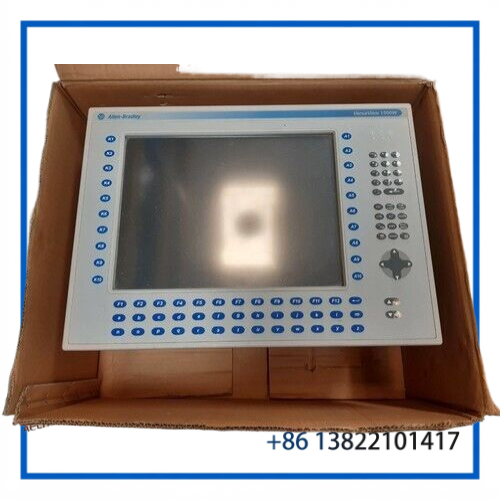
⚙️ Main Features
🔹 15-inch Color TFT Display — Provides 1024 × 768 native resolution for industrial visualization applications.
🔹 Touchscreen Interface — The 6180W-15BP2KHDC configuration supports touchscreen operator interaction.
🔹 DC Power Input — Designed for a 19–32 VDC supply, with approximately 180 W DC power consumption.
🔹 Industrial Workstation Platform — Combines display, computing hardware, storage and industrial I/O capabilities in a single workstation.
🔹 Legacy Automation Support — Useful for maintaining existing Allen-Bradley VersaView installations where matching hardware is required.
🔹 Industrial Mounting Format — The 1500W version has an overall size of approximately 354 × 482 × 225 mm.
📋 Product Datasheet
| Parameter | Value |
|---|---|
| Brand | Allen-Bradley |
| Model | 6180W-15BP2KHDC |
| Series | VersaView 1500W |
| Product Name | Industrial Workstation |
| Display | 15-inch Color TFT |
| Resolution | 1024 × 768, 24-bit color |
| Origin | Taiwan |
| Condition / Status | Used / Pre-Owned |
| Dimensions | Approx. 354 × 482 × 225 mm |
| Weight | Approx. 18.5–20.15 kg |
| Power | 19–32 VDC, approx. 180 W |
🏭 Typical Applications
• Industrial HMI and operator stations
• Factory automation systems
• Machine monitoring and control
• Process visualization
• Production-line supervision
• Industrial control rooms
• Power and utility automation
• Marine automation systems
• Legacy Rockwell Automation workstation replacement
🔧 System Integration
The 6180W-15BP2KHDC can serve as the operator-side computing and visualization platform within an industrial control environment.
When replacing an existing workstation, verify the complete catalog number, Series, Revision, display configuration, power input, touchscreen configuration, mounting dimensions, communication interfaces, storage configuration, and required operating system/application software.
The 1500W platform uses a 15-inch display with 1024 × 768 resolution. Published specifications also identify expansion capability and industrial environmental ratings for the VersaView 1500W family.
❓ Common Questions & Answers
Q: What is Allen-Bradley 6180W-15BP2KHDC?
A: It is a VersaView 1500W industrial workstation designed for industrial computing, visualization, monitoring, and operator-interface applications.
Q: What display size does it use?
A: The workstation uses a 15-inch color TFT display with a native resolution of 1024 × 768 pixels.
Q: Does the 6180W-15BP2KHDC support touchscreen operation?
A: Yes. This catalog configuration is associated with a touchscreen interface.
Q: What is the required DC input voltage?
A: The published VersaView specification is 19–32 VDC. DC power consumption is approximately 180 W, equivalent to about 7.5 A at 24 VDC.
Q: What are the approximate dimensions?
A: The 1500W workstation is approximately 354 × 482 × 225 mm (H × W × D).
Q: How much does the workstation weigh?
A: The published 1500W specification lists approximately 18.5 kg. Actual shipped or installed weight can vary according to the exact configuration.
Q: Can this model replace another VersaView workstation?
A: Compatibility should be checked carefully. The catalog number, Series, Revision, display type, power configuration, mounting cutout, internal hardware and software requirements should all match the existing installation.
Q: What should be checked before installation?
A: Confirm the model and revision, DC supply voltage, touchscreen operation, mounting dimensions, communication connections, storage device, operating system and application software.
🛠️ Maintenance Notes
Before installation, inspect the display, touchscreen, power connector, cooling openings, storage device and internal connections.
Use an appropriately rated 19–32 VDC power source and verify polarity before energizing the workstation.
For an existing system replacement, record the original workstation’s software configuration and application environment before removing the unit.
After installation, check display operation, touchscreen response, boot sequence, network communication and HMI application performance.
⭐ Recommended Allen-Bradley Models
- Allen-Bradley 6180W-12BPXPHDC
- Allen-Bradley 6180W-15BPXPHDC
- Allen-Bradley 6180W-15KPXPHDC
- Allen-Bradley 6180W-12KPXPHDC
- Allen-Bradley 6180W-15BSXPH
- Allen-Bradley 6180W-15KSXPH
- Allen-Bradley 6180W-12BPXPH
- Allen-Bradley 6180W-12KPXPH
- Allen-Bradley 6180W-12BSXPH
- Allen-Bradley 6180 Industrial Workstation