Description
Product Overview
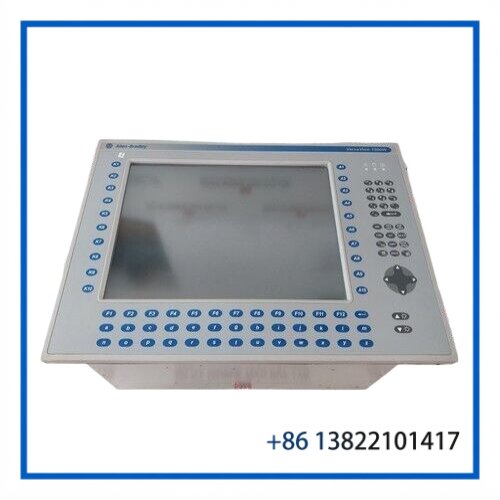
The ALLEN-BRADLEY 6180W-15BP2KHDC is a VersaView 1500W industrial workstation/display assembly featuring a keypad and touchscreen interface. The listed unit is Revision E, Series A, with an IP65 rating and a 19–32 VDC, 7.5 A, 180 W electrical specification.
Designed for industrial operator-interface applications, the workstation combines display visualization with direct keypad and touchscreen operation. It can support HMI, process monitoring, equipment status, alarm visualization, and other plant-floor workstation functions.
The model is associated with a Windows-based industrial workstation configuration and is suitable for legacy Allen-Bradley VersaView system maintenance and replacement projects.
Key Features
🔹 Allen-Bradley VersaView 1500W industrial workstation
🔹 Model 6180W-15BP2KHDC
🔹 Revision E, Series A
🔹 Keypad and touchscreen operator interface
🔹 19–32 VDC input range
🔹 7.5 A rated current
🔹 180 W rated power
🔹 IP65-rated enclosure/interface specification
🔹 Industrial operator visualization platform
🔹 Suitable for legacy workstation replacement and system maintenance
Product Datasheet
| Parameter | Specification |
|---|---|
| Brand | Allen-Bradley |
| Model | 6180W-15BP2KHDC |
| Series | VersaView 1500W |
| Revision | Rev. E |
| Product Name | Industrial Workstation / Display Panel |
| Product Type | Keypad & Touchscreen Workstation |
| Power Supply | 19–32 VDC |
| Current Rating | 7.5 A |
| Power Rating | 180 W |
| Protection Rating | IP65 |
| Weight | Approx. 18.2 kg |
| Condition / Status | Used |
Operator Interface
The 6180W-15BP2KHDC combines a touchscreen display with a physical keypad, providing operators with two complementary methods of interacting with the workstation.
The touchscreen can be used for graphical process visualization and direct operator selection, while the keypad provides physical controls for applications where dedicated keys are preferred.
This configuration is useful for:
- Process monitoring
- HMI visualization
- Alarm and event display
- Equipment status monitoring
- Machine operation
- Marine automation workstations
- Industrial control-room applications
Electrical & System Integration
The listed electrical specification is 19–32 VDC, 7.5 A, 180 W. The DC supply should therefore be appropriately sized for the workstation and protected according to the original installation design.
When replacing an existing 6180W workstation, verify:
- Complete catalog number.
- Series and revision.
- DC supply voltage.
- Current and power requirements.
- Keypad configuration.
- Touchscreen functionality.
- Communication and peripheral connections.
- Mounting dimensions and cabinet cutout.
- Operating-system and application requirements.
- Compatibility with the existing control architecture.
Typical Applications
🏭 Factory Automation
Operator visualization for machinery, production lines, and automated equipment.
⚙️ Process Control
Display of process parameters, alarms, equipment status, and operator commands.
⚓ Marine Automation
Suitable for shipboard and marine control workstation applications where industrial operator interfaces are required.
⚡ Power & Utilities
Can be used for equipment monitoring and control-station visualization.
🛢️ Oil & Gas / Industrial Plants
Applicable to workstation installations requiring a combined touchscreen and keypad interface.
Installation & Maintenance
Before installation, inspect the unit for physical damage, connector condition, touchscreen surface condition, and keypad operation.
Recommended checks include:
- Confirm 19–32 VDC supply compatibility.
- Verify DC polarity before energizing.
- Inspect power and communication connectors.
- Check touchscreen response across the active area.
- Test keypad keys individually.
- Verify display brightness and image quality.
- Confirm workstation boot and operating-system operation.
- Check communication with connected automation equipment.
- Confirm enclosure and mounting integrity.
- Verify proper grounding and cabinet installation.
For replacement projects, the complete catalog number should be matched rather than relying only on the display size or general VersaView family.
Troubleshooting
Unit does not power on:
Check the DC supply, polarity, protective devices, and power connections.
Touchscreen does not respond:
Inspect the touchscreen interface, calibration, software configuration, and associated input hardware.
Keypad is partially inoperative:
Check the keypad connection and individual key operation for mechanical or electrical faults.
Display is blank or unstable:
Verify DC voltage under load and inspect the display, internal connections, and workstation electronics.
Workstation starts but does not communicate:
Check communication interfaces, software configuration, network connections, and the connected control system.
Frequently Asked Questions
Q1: What is the 6180W-15BP2KHDC?
It is an Allen-Bradley VersaView 1500W industrial workstation/display assembly with keypad and touchscreen functionality.
Q2: What is the power requirement?
The listed specification is 19–32 VDC, 7.5 A, 180 W.
Q3: What is the protection rating?
The listed unit is specified as IP65.
Q4: What revision is this unit?
The listed configuration is Revision E, Series A.
Q5: Is this a touchscreen-only display?
No. The 6180W-15BP2KHDC is identified as a keypad and touchscreen workstation configuration.
Q6: What should be checked before replacement?
Confirm the exact catalog number, revision, Series A configuration, power requirements, mounting arrangement, keypad/touchscreen configuration, and compatibility with the existing VersaView workstation installation.
Related Allen-Bradley Models
- Allen-Bradley 6180W-15BP2KHDC VersaView 1500W
- Allen-Bradley 6180W VersaView Industrial Workstations
- Allen-Bradley VersaView 1500W Workstation
- Allen-Bradley 6180W Industrial Computer
- Allen-Bradley 6180 Industrial Workstation
- Allen-Bradley VersaView Operator Interface Systems
- Allen-Bradley PanelView Industrial Terminals
- Allen-Bradley VersaView Touchscreen Displays
- Allen-Bradley VersaView Keypad Workstations
- Allen-Bradley Industrial HMI and Operator Interface Components
Spare-Part Recommendation
For legacy VersaView installations, maintaining a compatible workstation or display assembly as a spare can reduce downtime when an operator interface fails. Before ordering a replacement, compare the 6180W-15BP2KHDC catalog number, revision, power rating, keypad/touchscreen configuration, mounting arrangement, and connected system requirements.