Description
AMK SYMAC AMKASYN AS‑CP21‑512 … VERSION 01.00 WINDOWS … WSR1 ad. 110 WSR2 ad. 210
Product overview
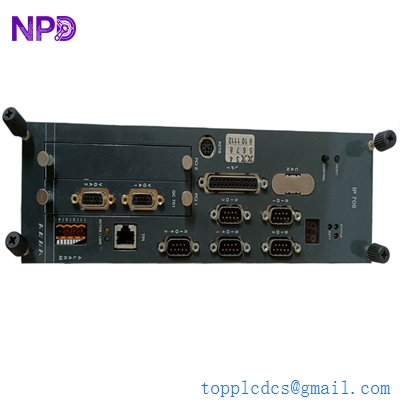
This unit is a compact Windows-based control platform designed for motion control, visualization, and higher-level logic in AMKASYN systems.
It combines industrial PC hardware with field interfaces that link to AMK servo drives and I/O modules.
Main parameters (typical PC-based controller class)
- CPU: Embedded x86-compatible industrial processor for real-time control.
- RAM: 512 MB system memory, suitable for HMI and control runtime.
- Storage: Solid-state or hard-disk storage for OS, control project, and logging.
- Operating system: Microsoft Windows-based platform (VERSION 01.00, SYMAC runtime environment).
- Interfaces:
- Ethernet for fieldbus / network communication.
- Serial ports (e.g., RS232/RS485) for service and legacy devices.
- USB ports for data backup and engineering tools.
- Optional digital/analog I/O interface via AMKASYN bus.
- Power supply: Industrial 24 V DC supply (typical for panel PCs and embedded controllers).
- Mounting: Panel or cabinet mounting in control enclosure.
- Environmental: Designed for industrial ambient temperature and vibration conditions.
The associated datasheet typically documents CPU type, memory, interfaces, supply voltage, power dissipation, and environmental limits.
Country of origin
AMK (now part of AMKmotion / Arburg Group) is a German manufacturer; this controller is generally produced in Germany for global export.
Basic usage method
- Installation and wiring
- Mount the controller in the electrical cabinet or panel according to AMK’s mechanical guidelines (sufficient cooling and access to front connectors).
- Connect 24 V DC power to the power terminals, with proper fusing and grounding.
- Wire Ethernet and fieldbus connections to the AMKASYN drive system and plant network.
- Attach any required serial/USB peripherals and local HMI hardware.
- System setup and commissioning
- Power the unit and allow Windows plus the SYMAC/AMKASYN runtime to start.
- Using the engineering software on a service PC or directly on the unit, download the control project (axis configuration, logic, and HMI pages).
- Configure IP addresses, bus parameters, and node IDs for all connected drives and I/O modules.
- Test communication with each drive and verify that all axes can be enabled and homed safely.
- Operation
- During normal operation, the controller executes motion sequences, interlocks, and process logic cyclically.
- The integrated HMI (or connected display) shows machine status, alarms, and process variables.
- Operators can start/stop cycles, select recipes, and acknowledge alarms via the configured HMI screens.
- Maintenance
- Periodically back up the application project and system image.
- Monitor system diagnostics (CPU load, communication status, drive error codes) and follow AMK’s maintenance schedule.
- Ensure adequate cooling and keep ventilation paths free of dust.
Typical technical notes
- Designed for tight integration with AMKASYN AN/AZ/AW power and inverter modules as the central logic platform.
- Real-time communication with drives allows synchronized multi‑axis motion control.
- Windows environment simplifies integration of third‑party SCADA, MES connectors, or database logging.
Related / similar models (5 examples)
These are example models in the same AMKASYN / AMK SYMAC family or closely related roles (exact availability and details depend on the supplier):
- AS‑CP21‑256 – Similar controller with smaller memory footprint for less demanding applications.
- AS‑CP22‑512 – Next‑generation CPU with higher processing power and identical RAM size.
- AZ‑PSx central module – Programmable central controller card for AMKASYN drive systems.
- AMKASYN AZ xx – Central modules for coordinating multiple AW inverter modules on a DC bus.
- AMKASYN AW xx – Inverter/drive modules that typically operate under control of AS‑CP21‑512 or AZ central modules.