Description
🖥️ Product Overview
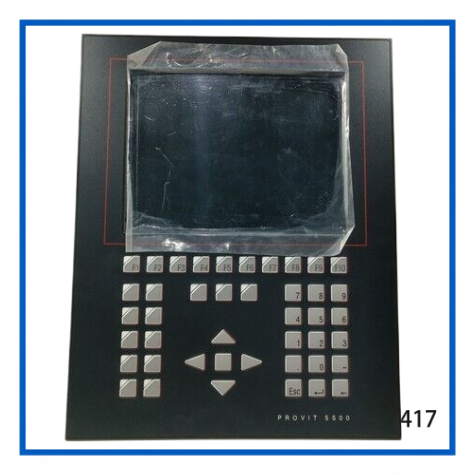
The B&R AUTOMATION 5D5500.10 is a PROVIT 5500 operator control and display panel designed for industrial automation and machine-control applications. It features a 10.4-inch VGA color TFT display combined with dedicated operator keys for direct interaction with industrial control systems.
The panel provides 10 soft keys, 13 function keys, and 20 system keys, giving operators direct access to machine commands, menus, status information, alarms, and process displays. The front of the unit provides IP65 protection, making it suitable for panel-mounted industrial environments.
With its established PROVIT 5000 architecture, the 5D5500.10 is particularly useful for maintaining existing B&R automation installations where an original operator panel is required for system compatibility and restoration.
⭐ Key Features
- 🖥️ 10.4-inch VGA color TFT display
- ⌨️ 10 programmable soft keys
- 🔢 13 dedicated function keys
- ⚙️ 20 system keys for operator navigation
- 🛡️ IP65-rated front panel protection
- 🏭 Designed for industrial operator-control applications
- 🔌 Panel-mounted HMI architecture
- 📐 Compact installation footprint
- 🔧 Suitable for legacy PROVIT 5000 system maintenance
- 📦 Useful as an original replacement or spare operator panel
📊 Technical Datasheet
| Parameter | Specification |
|---|---|
| Brand | B&R AUTOMATION |
| Model | 5D5500.10 |
| Series | PROVIT 5000 / PROVIT 5500 |
| Product Name | HMI Operator Control and Display Panel |
| Display Type | VGA Color TFT |
| Display Size | 10.4 inch diagonal |
| Operator Controls | 10 Soft Keys + 13 Function Keys + 20 System Keys |
| Front Protection | IP65 |
| Overall Dimensions | Approx. 310 × 387 mm (W × H) |
| Certifications | CE, UKCA, UL/cULus |
⚙️ HMI Operation
The PROVIT 5500 panel combines graphical process visualization with dedicated physical operator controls. The soft keys can be assigned to functions according to the application software, while the function and system keys provide navigation and machine-operation commands.
Typical operator functions include:
- Process status monitoring
- Machine parameter display
- Alarm and diagnostic information
- Production status visualization
- Operator menu navigation
- Machine command input
- System configuration access
- Maintenance and service functions
The actual screen layout and key functions depend on the application software installed in the associated B&R control system.
🏭 Industrial Applications
The 5D5500.10 can be used as an operator interface in a wide range of automation equipment, including:
- Manufacturing machinery
- Packaging machines
- Production lines
- Material-handling systems
- Machine tools
- Process equipment
- Industrial control cabinets
- Factory automation systems
- Legacy B&R machine-control systems
- Marine and specialized automation equipment
For an existing machine, retaining the original PROVIT panel can simplify maintenance because the replacement preserves the original operator interface and physical installation format.
🔌 System Integration
When replacing a 5D5500.10, verify the complete HMI installation rather than relying only on the model number.
Important points include:
- Confirm the exact B&R material number.
- Check the panel revision and identification label.
- Verify the existing cable arrangement.
- Confirm the associated controller and visualization system.
- Inspect the panel connector and cable condition.
- Verify the original mounting dimensions.
- Confirm that the application software supports the replacement panel.
- Check display and keypad operation before returning the machine to service.
The panel itself provides the operator interface; machine-control functions depend on the connected B&R automation system and application software.
🛠️ Installation & Commissioning
Before installation, disconnect the relevant control-system power and follow the machine manufacturer’s safety procedures.
After mounting the panel:
- Inspect the front bezel and sealing surface.
- Secure the panel correctly in the cabinet cutout.
- Connect the original communication/interface cable.
- Verify power and system connections.
- Start the automation system.
- Check the display for correct initialization.
- Test soft keys and function keys.
- Verify system-navigation keys.
- Confirm alarm and process-screen operation.
- Test communication with the host control system.
A commissioning record should include the panel model, revision, connected controller, cable configuration, and application software version.
🔍 Troubleshooting
No display
Check power connections, cable connections, controller status, and the panel’s internal condition.
Display is present but the application does not start correctly
Check the host controller, visualization software, communication connection, and configuration.
Some keys do not respond
Inspect the membrane/keypad area and verify whether the problem affects individual keys or an entire key group.
Display image is unstable
Check the video/interface connection and inspect the cable and connectors for damage or poor contact.
Panel operates intermittently
Inspect power stability, connectors, cabinet temperature, and aging components.
Replacement panel does not operate correctly
Compare the material number, revision, cable configuration, and application compatibility with the original installation.
🔧 Maintenance Recommendations
For long-term operation of a PROVIT 5500 panel:
- Keep the display surface clean.
- Avoid aggressive cleaning chemicals.
- Inspect the front sealing area periodically.
- Check cables and connectors for wear.
- Inspect the keypad for damaged or permanently pressed keys.
- Keep the control cabinet free from excessive dust and moisture.
- Monitor unusual display flickering or backlight degradation.
- Record the installed panel revision for future replacement.
- Maintain a compatible spare panel when machine downtime is costly.
For legacy machinery, retaining an original spare HMI can reduce the risk associated with an unexpected operator-panel failure.
⚠️ Replacement Considerations
The 5D5500.10 belongs to the established PROVIT 5000/5500 generation. When replacing a panel in an existing machine, physical compatibility alone is not sufficient.
The most important items to compare are:
- Material number
- Hardware revision
- Display configuration
- Cable type
- Controller compatibility
- Visualization software
- Key configuration
- Mounting dimensions
- Existing machine configuration
For older machines, it is recommended to document the complete HMI configuration before removing the original unit.
❓ Frequently Asked Questions
Q1: What is the B&R 5D5500.10?
It is a PROVIT 5500 operator control and display panel used as an HMI for industrial automation systems.
Q2: What size display does it have?
The 5D5500.10 uses a 10.4-inch diagonal VGA color TFT display.
Q3: How many operator keys are provided?
The panel has 10 soft keys, 13 function keys, and 20 system keys.
Q4: Is the front panel protected against dust and water?
The front of the panel is specified with IP65 protection.
Q5: Is 5D5500.10 suitable as a replacement part?
Yes, it can be used for replacement and maintenance of compatible PROVIT 5000/5500 installations, subject to configuration verification.
Q6: Does the panel itself contain the machine-control program?
The HMI provides the operator interface. Machine-control and visualization functions depend on the connected automation controller and application configuration.
Q7: What should I check before ordering?
Confirm the exact material number, hardware revision, cable arrangement, controller type, and existing application configuration.
Q8: Can the panel be used in a new automation project?
It is primarily valuable for existing and legacy installations where compatibility with the PROVIT platform is required.
Q9: What is the overall panel size?
The manufacturer’s listed outer dimensions are approximately 310 × 387 mm (W × H).
Q10: Why is the original panel useful for legacy machines?
Using the matching operator panel helps preserve the original mounting arrangement, operator controls, and established machine interface.
📦 Recommended Related B&R Models
- B&R 5D5500.32 – PROVIT 5500 HMI/Keypad Related Part
- B&R 5D5501.01 – PROVIT Operator Panel
- B&R 5D5510.10 – PROVIT 5500 Panel Component
- B&R 5D5600.01 – PROVIT 5600 Operator Panel Component
- B&R 5D5600.02 – PROVIT 5600 Keypad/Touch Component
- B&R 5D5600.03 – PROVIT 5600 Panel Component
- B&R 5D5201.03 – PROVIT 5200 Touch Panel
- B&R 5D5211.03 – PROVIT 5200 Touchscreen Component
- B&R 4D1164.00-590 – PANELWARE Graphic Display Module
- B&R 451M.00-01 – Simulation/Operator Panel
🏁 Product Summary
The B&R AUTOMATION 5D5500.10 PROVIT 5500 is a 10.4-inch VGA color TFT operator control and display panel with dedicated soft keys, function keys, and system keys. Its IP65 front protection and established PROVIT architecture make it a practical spare or replacement component for compatible B&R industrial automation equipment.
For replacement projects, matching the 5D5500.10 material number, revision, cable configuration, and host-system compatibility is recommended before installation.