Description
Product Overview
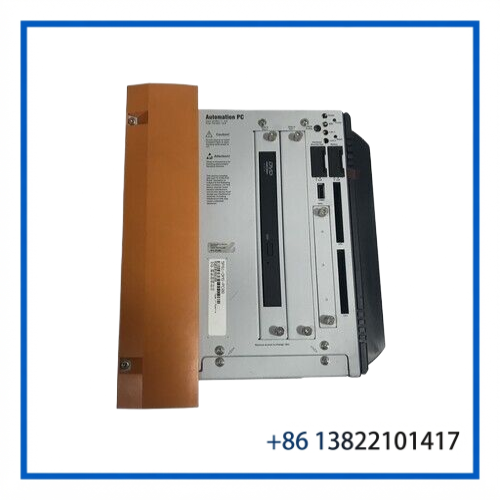
The B&R AUTOMATION PC 5P81 DMS-PC08 is an industrial computer from the B&R Automation PC 810 family, commonly identified by the 5P81 hardware prefix. It is intended for industrial machine control, HMI/visualization, production equipment and other automation applications where a dedicated industrial computing platform is required. B&R Community references identify IPC 5P81 as part of the Automation PC 810 family.
The exact configuration can vary considerably between 5P81 units. Different examples are associated with different complete B&R part numbers, so the DMS-PC08 designation should not be used to assume a specific CPU, memory capacity, storage device or communication configuration.
Technical Specifications
| Parameter | Specification |
|---|---|
| Brand | B&R AUTOMATION |
| Model | PC 5P81 DMS-PC08 |
| Product Family | Automation PC 810 / APC810 family |
| Product Type | Industrial Computer / Automation PC |
| Hardware Prefix | 5P81 |
| Configuration | DMS-PC08 |
| Application | Industrial automation and machine control |
| CPU | Configuration-dependent — verify actual unit |
| RAM | Configuration-dependent — verify actual unit |
| Storage | Configuration-dependent — verify actual unit |
| Operating System | Configuration-dependent |
| Communication Interfaces | Configuration-dependent |
| Display Interface | Configuration-dependent |
| Power Supply | Verify from the installed power-supply module / nameplate |
| Dimensions | Configuration-dependent |
| Weight | Configuration-dependent |
| Condition of Referenced Unit | Used |
B&R 5P81 units appear with different complete part numbers, including examples such as 5P81:406055.004-00 and 5P81:479502.000-00. This is why the complete hardware identification label should be checked before specifying replacement components.
Key Features
- B&R Automation PC platform for industrial environments
- 5P81 hardware family / Automation PC 810 architecture
- Suitable for machine-level computing and industrial visualization
- Intended for integration with B&R automation systems
- Configuration can include different processor, memory and storage options
- Suitable as a replacement unit where the original 5P81 configuration is matched
- Compact industrial-computer format compared with conventional office PCs
- Useful for maintaining older B&R-controlled production equipment
For replacement work, matching the complete B&R part number and hardware revision is recommended rather than relying only on the 5P81 prefix.
Typical Applications
The 5P81 platform can be encountered in industrial equipment such as:
- Machine control systems
- Production and assembly equipment
- Industrial HMI and visualization stations
- Packaging machinery
- Material-handling systems
- Semiconductor manufacturing equipment
- Motion-control systems
- Factory automation
- Process monitoring stations
- Legacy B&R automation installations
For an existing machine, the PC may be tied to a specific operating-system image, application software, storage device or B&R Runtime configuration. Replacing the hardware with another 5P81 does not automatically guarantee software compatibility.
Installation & Configuration
Before replacing an installed 5P81, record the information from the original computer.
Recommended replacement procedure
- Record the complete B&R part number from the identification label.
- Record the serial number and hardware revision.
- Photograph the rear-panel connectors and installed modules.
- Record CPU, RAM and storage configuration where accessible.
- Back up the existing operating-system and application data whenever possible.
- Verify the supply voltage and connector arrangement.
- Confirm display and communication connections.
- Install the replacement PC with appropriate grounding.
- Reconnect peripherals according to the original machine configuration.
- Restore the required operating system and machine application.
- Check communication with the PLC, HMI, drives and other controllers.
- Perform a complete machine-level functional test.
A particularly important point with older industrial PCs is the storage device. If the original machine software depends on a specific OS image, drivers, licensing or configuration files, transferring or cloning the original storage media may be necessary.
Maintenance
The following checks are recommended for an installed 5P81 system:
Cooling
- Keep ventilation openings clear.
- Remove accumulated dust from cooling paths.
- Check fans for abnormal noise or intermittent operation.
- Verify that cabinet temperature remains within the installed hardware specifications.
Storage
- Monitor aging HDD/SSD/CF media where applicable.
- Maintain a current backup of the machine image.
- Check storage devices for read/write errors before they become a production problem.
Electrical
- Inspect the power connector.
- Check protective grounding.
- Look for loose internal connections.
- Inspect the unit for corrosion or contamination.
Software
- Record the operating-system version.
- Keep application and configuration backups.
- Document B&R Runtime and machine-control software versions.
- Preserve software licenses and activation information where applicable.
Inspection & Testing
For a used B&R 5P81, a practical inspection should include:
1. Visual Inspection
- Check the enclosure for cracks, dents and corrosion.
- Inspect mounting points.
- Check connectors for bent or damaged contacts.
- Verify the B&R identification label.
- Record the complete part number and revision.
2. Power-On Test
- Apply the correct supply voltage.
- Check startup behavior.
- Verify display output where applicable.
- Observe BIOS or system startup messages.
- Check for abnormal fan or drive noise.
3. Hardware Check
- Verify installed memory.
- Identify the processor.
- Check installed storage media.
- Inspect available communication interfaces.
- Check removable media or expansion hardware where fitted.
4. System Test
- Boot the installed operating system where available.
- Check basic I/O and communication.
- Verify network connectivity.
- Confirm application startup if the original software is available.
The exact test scope depends on the software and configuration installed on the individual unit. The referenced eBay listing identifies the item as used, while another 5P81 listing explicitly describes a unit as power-on tested but not fully function tested.
Important Replacement Note
5P81 is a family designation, not a complete configuration number.
Different 5P81 units can have different hardware configurations. For example, public listings show multiple complete B&R 5P81 part numbers and configurations.
For a machine replacement, compare:
- Complete part number
- Hardware revision
- CPU
- RAM
- Storage device
- Installed operating system
- Expansion hardware
- Display interface
- Communication interfaces
- Software image
- Machine-specific configuration
This prevents a physically compatible PC from becoming a software or configuration mismatch after installation.
Frequently Asked Questions
What is the B&R 5P81?
The 5P81 is a B&R Automation PC hardware family associated with the Automation PC 810 platform.
Is 5P81 the same as APC810?
The 5P81 prefix is used on B&R Automation PC 810 hardware. The complete product identification still needs to be checked because different configurations use different full part numbers.
Can I replace any 5P81 with another 5P81?
Not necessarily. The chassis/family may be similar, but CPU, memory, storage, interfaces and software configuration can differ.
Is DMS-PC08 a complete B&R part number?
No. DMS-PC08 identifies the configuration shown in the supplied listing, but a complete B&R hardware identification should be taken from the actual nameplate.
What should I send when requesting a replacement?
The best information is a clear photograph of the B&R label showing the 5P81 part number, revision and serial number, plus photos of the rear connectors.
Related B&R Models
The following are related B&R industrial PC or Automation PC references:
- B&R Automation PC 810 / 5P81
- B&R 5P81:406055.004-00
- B&R 5P81:479502.000-00
- B&R 5P81:408833.001-01
- B&R 5PC810.SX01-00
- B&R Automation PC 910
- B&R 5PC910.SX01-00
- B&R Automation PC 620
- B&R Automation Panel 900
- B&R 5ACPCI.RAIC-05 RAID controller
- B&R Automation PC system accessories
These should be considered related products, not automatic substitutes. The complete configuration must be compared before selecting a replacement.
Identification & Ordering Notes
When purchasing this B&R industrial PC, please provide the following whenever possible:
- Full 5P81 part number
- DMS-PC08 designation
- Hardware revision
- Serial number
- CPU information
- RAM capacity
- Storage type/capacity
- Photos of the front and rear panels
- Existing machine application requirements
The referenced eBay item is currently identified as B&R AUTOMATION PC 5P81 DMS-PC08, model 5P81 DMS-PC08, and is listed as used.
Suggested eBay SEO Title:
B&R AUTOMATION 5P81 DMS-PC08 | Automation PC 810 Industrial Computer