Description
Product Overview
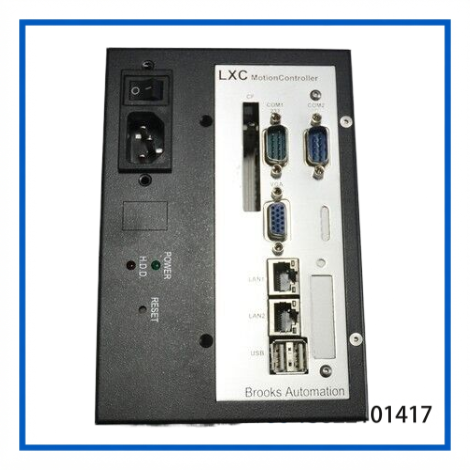
The BROOKS LXC Motion Controller identified as EBC-1000GB/ACE-890AP is based on the IEI EBC-1000G industrial embedded chassis platform. IEI documentation identifies EBC-1000GB/ACE-890AP as an industrial embedded chassis for its 3.5-inch WAFER series single-board computers, supplied with the ACE-890AP-RS power-supply configuration.
The EBC-1000G uses a heavy-duty metal enclosure, supports one 2.5-inch HDD, and includes a 4 cm cooling fan. The platform was designed to accept different WAFER-series SBCs and corresponding I/O brackets, so the exact processor, memory, storage and interface configuration of a complete Brooks LXC controller depends on the SBC installed inside the chassis.
Technical Specifications
| Parameter | Specification |
|---|---|
| Brand / System | BROOKS LXC |
| Identified Model | EBC-1000GB/ACE-890AP |
| Hardware Platform | IEI EBC-1000G |
| Product Type | Industrial Embedded Chassis / Motion Controller Computer |
| SBC Form Factor | 3.5-inch WAFER series SBC |
| Chassis Construction | Heavy-duty metal |
| Drive Bay | 1 × 2.5-inch HDD |
| Cooling | 1 × 4 cm cooling fan |
| Indicators | Power LED, HDD LED |
| Controls | Power switch |
| Mounting | Wall mount |
| Operating Temperature | 0 to 50 °C |
| Operating Humidity | 10–90% RH |
| Chassis Color | Black |
| Net / Gross Weight | Approx. 1.2 kg / 2.2 kg |
| Dimensions (D × W × H) | Approx. 130 × 172.2 × 116 mm |
| Power Configuration | ACE-890AP-RS |
| Power Rating | 86 W |
| Input Type | AC |
| SBC / CPU | Configuration-dependent |
| RAM | Configuration-dependent |
| Storage | Configuration-dependent |
| Communication Interfaces | Configuration-dependent |
The enclosure dimensions, weight, environmental ratings and 86 W ACE-890AP power configuration are from IEI’s EBC-1000G documentation.
A separate equipment listing for the exact EBC-1000GB/ACE-890AP identifies the assembly as an IEI Technology industrial embedded chassis and records a 100–240 VAC, 50/60 Hz input specification. Because the power-supply configuration and complete controller assembly can vary, the actual nameplate should be checked before applying power.
Key Features
- Industrial embedded computer chassis
- Used in Brooks LXC motion-controller equipment
- Compatible with 3.5-inch WAFER-series SBC architecture
- Heavy-duty metal enclosure
- Integrated 4 cm cooling fan
- One 2.5-inch HDD bay
- Power and HDD status indicators
- Wall-mount installation
- ACE-890AP-RS AC power configuration
- Compact footprint for equipment integration
- Suitable for legacy semiconductor and automation equipment
The WAFER architecture allows different SBC configurations to be installed in the same basic chassis platform. IEI documentation lists multiple supported WAFER boards and matching I/O brackets.
Typical Applications
The Brooks LXC configuration can be encountered in equipment where a dedicated industrial computer is used for motion control or equipment-level coordination.
Potential application areas include:
- Semiconductor manufacturing equipment
- Wafer-handling systems
- Industrial motion control
- Robot and material-handling equipment
- Automated production systems
- Equipment controller stations
- Legacy factory automation
- Industrial HMI and control applications
The exact application depends on the Brooks equipment in which the controller was originally installed.
Installation & Configuration
Before installing a replacement EBC-1000GB/ACE-890AP assembly, identify the complete controller configuration.
Recommended procedure
- Record the Brooks equipment model and controller identification.
- Photograph the front, rear and side panels.
- Record the IEI and Brooks part numbers.
- Check the installed WAFER SBC model.
- Record the CPU and memory configuration where accessible.
- Identify the installed storage device.
- Photograph all external connectors before disassembly.
- Confirm the input-voltage rating from the nameplate.
- Check the cooling fan and ventilation path.
- Install the replacement in the original mounting position.
- Reconnect all communication and control cables.
- Restore the original controller software or storage image.
- Verify communication with the motion-control system.
- Perform a machine-level functional test.
Configuration warning
The EBC-1000GB/ACE-890AP chassis does not by itself define the CPU or software configuration. IEI documentation lists several WAFER-series SBC options for the EBC-1000G platform, including different Intel, AMD and VIA-based boards.
For this reason, replacing only the chassis with another EBC-1000G does not necessarily reproduce the original Brooks controller.
Maintenance
For equipment that remains in service, several simple checks can prevent avoidable failures.
Cooling system
- Keep the fan and ventilation openings clean.
- Check the 4 cm cooling fan for abnormal noise.
- Remove accumulated dust from the chassis.
- Verify that cabinet temperature remains controlled.
Storage
- Back up the controller software and machine configuration.
- Check the installed 2.5-inch storage device for aging or errors.
- Preserve the original storage image before replacing the drive.
Electrical
- Inspect the AC input connection.
- Check protective grounding.
- Inspect internal connectors for oxidation or looseness.
- Verify that the power supply starts normally.
Mechanical
- Check wall-mount hardware.
- Inspect the chassis for corrosion or deformation.
- Ensure that airflow around the enclosure is not blocked.
Inspection & Testing
For a used Brooks LXC EBC-1000GB/ACE-890AP controller, the following inspection sequence is recommended.
Visual Inspection
- Verify the Brooks and IEI labels.
- Check the EBC-1000GB/ACE-890AP identification.
- Inspect the metal enclosure.
- Check the power connector.
- Inspect the fan.
- Check the HDD/storage assembly.
- Inspect all external connectors.
Power Test
After confirming the correct input voltage:
- Power on the controller.
- Check the Power LED.
- Listen for abnormal fan or drive noise.
- Observe the boot sequence.
- Check for BIOS or hardware errors.
Controller Test
Where the original software is available:
- Boot the installed operating system.
- Check storage recognition.
- Verify communication interfaces.
- Confirm controller software startup.
- Check communication with the connected Brooks equipment.
- Perform a controlled motion-system test where appropriate.
Because the exact SBC and software configuration are not defined by EBC-1000GB alone, a full functional test should be performed using the original equipment configuration.
Frequently Asked Questions
Is EBC-1000GB/ACE-890AP a Brooks-made computer?
The identification is associated with a Brooks LXC motion-controller assembly, but the EBC-1000GB/ACE-890AP hardware itself is documented by IEI as an industrial embedded chassis using the WAFER-series SBC platform.
What CPU does the EBC-1000GB/ACE-890AP use?
There is no single CPU specification for the chassis. The EBC-1000G platform supports multiple WAFER-series SBC configurations, so the actual CPU must be identified from the installed SBC.
Does it include a hard drive?
The chassis provides one 2.5-inch HDD bay. The presence and capacity of an actual installed HDD depends on the individual controller assembly. IEI documentation also notes that the HDD is not inherently included with the chassis.
What is the power rating?
The ACE-890AP-RS configuration is specified at 86 W in IEI documentation.
Can another EBC-1000G replace this controller?
Not automatically. The chassis may be mechanically compatible, but the installed SBC, storage image, I/O bracket, operating system and Brooks application must also match.
Is this suitable for semiconductor equipment?
The hardware platform is suitable for industrial embedded computing, and the supplied item is identified in the market as a Brooks LXC motion-controller assembly. Its suitability as a replacement depends on matching the original Brooks equipment configuration.
Related Models & Components
Related EBC/WAFER platform references include:
- IEI EBC-1000G
- EBC-1000GB/ACE-890A
- EBC-1000GB/ACE-890AP
- ACE-890A-RS
- ACE-890AP-R20-RS
- ACE-890V-RS
- ACE-890C-RS
- ACE-890T-RS
- ACE-890P-RS
- WAFER-C400-RS
- WAFER-9371A
- WAFER-6612
- WAFER-LX
- WAFER-GX
- WAFER-LX2
These are related platform components and configurations, not guaranteed direct replacements. IEI documentation specifically lists different WAFER SBCs and I/O brackets for the EBC-1000G platform.
Identification & Ordering Notes
For a replacement Brooks LXC controller, the most useful information is:
- Brooks equipment model
- EBC-1000GB/ACE-890AP identification
- IEI part number
- Complete serial number
- Installed WAFER SBC model
- CPU type
- RAM capacity
- Storage type and capacity
- I/O bracket model
- Power-supply label
- Photos of the rear connectors
If the unit is being used as a replacement for a semiconductor tool, matching the complete controller assembly is preferable to matching the EBC-1000GB chassis number alone.
Suggested eBay SEO Title:
BROOKS LXC EBC-1000GB/ACE-890AP | Motion Controller Industrial PC Chassis
:::writing_continue?