
Description
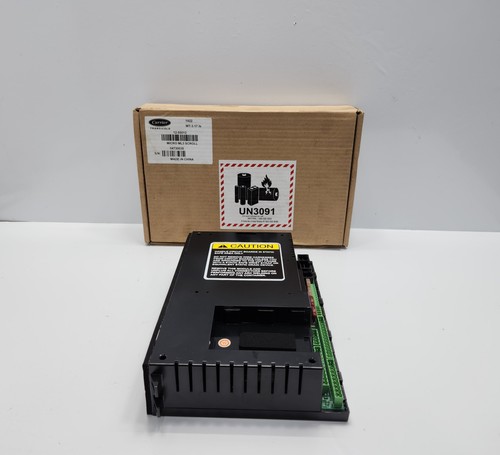
The Carrier 12-55012 Micro-Link3 is a highly advanced microprocessor-based controller specifically designed for refrigerated container (reefer) applications. Integrated with the DataCorder feature, it ensures precise temperature management and comprehensive logging of trip data, complying with the EN12830 standard for temperature recorders in transport, storage, and distribution of chilled or frozen foods. This controller is the “brain” of the refrigeration unit, managing compressors, fans, and heaters to maintain optimal cargo conditions.
📋 Technical Specifications
- Model Number: 12-55012
- Series: Micro-Link3
- Compliance: EN12830 (Temperature monitoring for cold chain)
- Function: Reefer unit control, diagnostics, and data logging
- Display: Multi-line backlit LCD
- Dimensions: Standard modular reefer controller size (approx. 10 x 8 x 5 inches)
- Weight: 3.0 lbs (1.36 kg)
- Country of Origin: United States / Singapore (depending on manufacturing facility)
⚙️ Application Areas
- Intermodal Refrigerated Containers
- Maritime Cold Chain Logistics
- Perishable Goods Transportation
- Pharmaceutical Temperature-Controlled Shipping
- Reefer Service and Maintenance Centers
🛠️ Operating Instructions & Guidelines
- Installation: Ensure the controller is mounted in a weather-protected housing. Verify that all cable harness connections (CAN bus, sensors, power) are clean and free of corrosion. Ensure the battery for the DataCorder is fresh to prevent data loss during power outages.
- Environmental Requirements: Designed for outdoor maritime use. Operating temperature range is typically -30°C to +70°C. Ensure the enclosure seal is intact to prevent moisture ingress.
- Maintenance: Periodically download the DataCorder logs to a PC for verification. Clean the screen with a non-abrasive cloth and check the internal real-time clock (RTC) for accuracy during pre-trip inspections (PTI).
⚡ Power Sequence & Operation
- Power-On Sequence: 1. Connect the unit to a stable 380V/440V power source. 2. Switch on the unit power switch. 3. The controller performs a self-test (check the LCD for boot progress). 4. Verify that no critical alarms are present on the display.
- Power-Off Sequence: 1. If the unit is active, select the “Off” mode via the interface to allow for orderly component shutdown. 2. Disconnect the main power supply from the power cable.
- Step-by-Step Operation: 1. Navigate using the keypad to set the desired setpoint temperature. 2. Initiate a Pre-Trip Inspection (PTI) to ensure all components are operational before loading cargo. 3. Use the DataCorder menu to configure log intervals. 4. Monitor the “In-Range” light to confirm the controller is effectively maintaining the set temperature.
❓ Frequently Asked Questions (Q&A)
- What does the EN12830 certification mean? It signifies that the controller meets strict European standards for the accuracy, reliability, and security of temperature data logging, which is essential for insurance and compliance in the food and pharmaceutical supply chain.
- How do I retrieve data from the DataCorder? You can extract data through the front-facing data port using a specialized Carrier communication cable and software, or via the integrated RS232/CAN connection.
- What should I do if the controller displays an alarm? Note the alarm code immediately. Consult the Carrier service manual for that specific code, as it could indicate anything from a sensor failure to a compressor low-pressure issue.
- Can I update the firmware? Yes, firmware updates can be performed via the data port using authorized Carrier service tools to ensure compatibility with the latest refrigerated unit requirements.