
Description
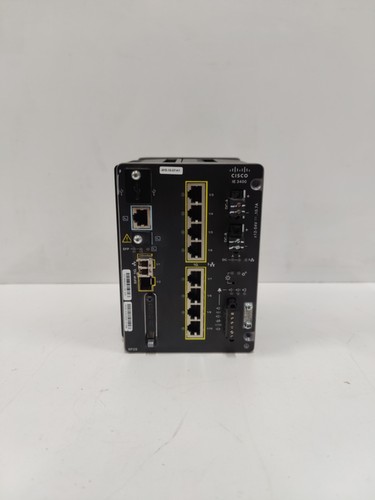
The Cisco IE-3400-8P2S-E is a high-performance, modular Industrial Ethernet switch designed to provide secure, reliable connectivity in harsh industrial environments. Built for the Internet of Things (IoT) edge, it delivers advanced Layer 2 and Layer 3 switching capabilities, high-bandwidth throughput, and Power over Ethernet (PoE) support to mission-critical applications in manufacturing, energy, and transportation sectors.
📋 Technical Specifications
🔹 Model: IE-3400-8P2S-E 🔹 Total Ports: 8 x 10/100/1000 Gigabit PoE+ ports; 2 x 1G SFP uplink ports 🔹 Switching Layer: Layer 2/3 Managed (Advanced feature set) 🔹 Input Voltage: 12V to 48V DC redundant power inputs 🔹 Operating Temperature: -40°C to +75°C 🔹 Mounting: DIN Rail mountable 🔹 Origin: Global (Cisco Systems)
🚀 Application Fields
⚡ Industrial Automation and Control Networks 🏭 Smart Factory Connectivity 🚂 Transportation and Rail Signaling Systems ⛽ Utility and Energy Grid Infrastructure
🛠️ Product Instructions
The IE-3400-8P2S-E is designed for deployment in industrial control cabinets. Use standard 35mm DIN rail mounting for installation. Ensure the unit has at least 50mm of clearance on all sides to allow for convection cooling, as the device is fanless. For network stability, always use shielded twisted-pair (STP) industrial-grade Ethernet cabling to minimize electromagnetic interference (EMI) typical in factory floors.
⚙️ Communication & Configuration Steps
⚙️ Management Access: Access the device initially via the RJ-45 console port or the front-panel USB management port. ⚙️ IP Configuration: Use the Cisco IOS-XE command-line interface (CLI) to set the management IP address. ⚙️ VLAN Setup: Configure Virtual LANs to segment traffic between PLC communication, HMI control, and general facility data. ⚙️ PoE Management: Configure power budgets for each port to ensure cameras, sensors, and wireless access points do not exceed the switch’s total PoE capacity.
🔋 Power-up Debugging Process
✅ Step 1: Verify DC power input wiring; ensure redundant power supplies are connected for high availability. ✅ Step 2: Observe the “SYS” and “STAT” LEDs; a solid green status indicates a successful Power-On Self-Test (POST). ✅ Step 3: Connect to the CLI; if the switch does not boot, check the status of the “ALM” (Alarm) LED for hardware fault indicators. ✅ Step 4: Perform a connectivity test (ping) from a connected workstation to verify Layer 2 link establishment.
📋 First-time Operation Checklist
✔️ Ensure the latest Cisco IOS-XE firmware is installed to benefit from the latest security patches. ✔️ Lock down physical ports that are not in use to prevent unauthorized network access. ✔️ Confirm that the PoE budget is sufficient for all connected powered devices. ✔️ Secure the configuration with an encrypted password and enable SSH for remote management.
❓ Frequently Asked Questions (Q&A)
❓ Q: How does the “E” in the model number affect features? 💡 A: The “E” stands for the “Essentials” or “Advanced” feature set (depending on the license level). This enables higher-level Layer 3 routing protocols like OSPF or EIGRP, which are not available on base-level models.
❓ Q: Can I replace the SFP modules while the switch is powered? 💡 A: Yes, the IE-3400 supports hot-swappable SFP transceivers, allowing you to change fiber uplinks without rebooting the switch.
❓ Q: What is the benefit of the modular design? 💡 A: The modularity allows you to add specific expansion modules (such as additional PoE or fiber ports) as your industrial network grows, providing a cost-effective way to scale infrastructure.