Description
Product Overview
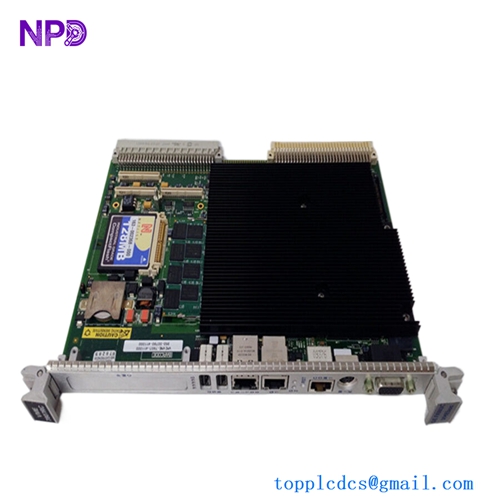
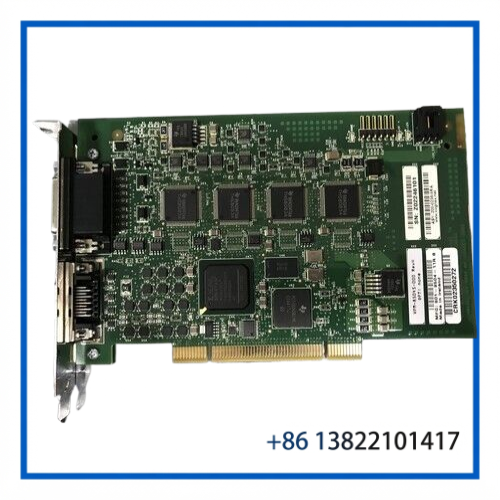
The COGNEX VPM-8504S-000 is an industrial machine-vision board associated with the Cognex VPM 8500 Series. Public repair and parts references identify the VPM 8500 family as a vision frame-grabber platform used for acquiring image data from industrial cameras and transferring it into a vision-processing system.
The VPM-8504S-000 is intended for machine-vision applications where stable image acquisition is required as part of an automated inspection or manufacturing system. It is especially relevant when maintaining older Cognex-based vision installations and replacing an original board with the same model and revision.
Cognex’s current product catalog continues to provide part-number-based product identification, although older VPM-series products may not appear as currently available products.
Key Features
- Cognex VPM 8500 Series vision hardware
- Model: VPM-8504S-000
- Designed for industrial machine-vision image acquisition
- Suitable for frame-grabber / vision-system applications
- Supports integration between industrial cameras and vision-processing hardware
- Appropriate for maintenance of legacy Cognex vision systems
- Exact board revision should be checked before replacement
Technical Datasheet
| Parameter | Specification |
|---|---|
| Manufacturer | Cognex |
| Model | VPM-8504S-000 |
| Product Family | VPM 8500 Series |
| Product Type | Vision / Frame Grabber Board |
| Main Function | Industrial image acquisition |
| Application | Machine vision and automated inspection |
| Camera Interface | Verify from board revision and original system |
| Bus / Host Interface | Verify from exact hardware revision |
| Input Power | Verify from original equipment documentation |
| Board Revision | Check physical label; listings may show different revisions |
| Dimensions | Verify before installation |
| Operating Temperature | Verify from applicable hardware documentation |
Note: Public sources confirm the VPM 8500 frame-grabber family, but I did not find a sufficiently reliable OEM specification sheet for the exact VPM-8504S-000 that would justify publishing specific voltage, camera-interface, resolution, frame-rate, or connector specifications. Those values should therefore be verified from the actual board or Cognex documentation rather than estimated from similar VPM models.
Functional Description
In a machine-vision system, a frame grabber sits between the imaging hardware and the host vision-processing environment.
The basic signal path can be understood as:
Industrial Camera → VPM-8504S-000 → Host Vision System → Image Processing → Inspection Result
The board’s job is to acquire camera image data and make that data available to the vision-processing system. This allows the controller or vision software to perform tasks such as inspection, measurement, positioning, alignment, and defect detection.
The actual camera interface and supported operating configuration depend on the particular VPM board revision and the surrounding Cognex system.
Typical Applications
The VPM-8504S-000 can be relevant to machine-vision installations used for:
- Automated visual inspection
- Component inspection
- Manufacturing quality control
- Camera-based measurement
- Part positioning and alignment
- Production-line inspection
- Industrial image acquisition
- Legacy Cognex vision-system maintenance
Cognex’s broader product portfolio covers machine vision applications including inspection, measurement, defect detection, guidance, and identification.
Installation & Configuration Guide
1. Confirm the Exact Board
Before replacement, compare:
- VPM model number
- Full part number
- Revision marking
- PCB layout
- Connector locations
- Mounting arrangement
- Existing camera/interface configuration
Do not assume that VPM-8501, VPM-8504, VPM-8504VX, or other VPM variants are interchangeable. Similar product-family numbers can represent different hardware configurations.
2. Power Down the System
Shut down the host computer and associated vision equipment according to the machine manufacturer’s procedure.
Disconnect power before removing or installing the board.
3. Use ESD Protection
The board contains electronic components that can be damaged by electrostatic discharge.
Use:
- Grounded ESD wrist strap
- ESD-safe work surface
- Anti-static packaging
- Proper handling of PCB edges
Avoid touching connector contacts and exposed components.
4. Install the Replacement
Install the board in the same slot and orientation as the original unit. Make sure the board is fully seated and all retaining hardware is secure.
Reconnect the camera and other system connections exactly as documented for the original installation.
5. Verify the Vision System
After installation, check:
- Board recognition by the host system
- Camera communication
- Image acquisition
- Image quality
- Trigger operation
- Vision software operation
- Inspection program execution
- Communication with the machine controller
A known-good test image or production sample is useful for confirming that the complete vision chain is operating correctly.
Maintenance & Inspection
For spare-stock storage, keep the board inside an ESD-safe bag and protect it from moisture, dust, and mechanical shock.
Before installation, inspect:
- PCB for cracks or physical damage
- Connectors for bent pins or contamination
- Components for discoloration or overheating
- Solder joints for visible damage
- Corrosion or oxidation
- Mounting hardware
- Model and revision labels
If the board has been stored for an extended period, perform a controlled functional test before returning it to production service.
Troubleshooting Reference
| Symptom | Possible Area to Check |
|---|---|
| Board not detected | Slot seating, host configuration, board power |
| No camera image | Camera connection, interface compatibility, configuration |
| Intermittent image | Cable, connector, grounding, board condition |
| Poor image quality | Camera setup, acquisition configuration, signal path |
| Trigger failure | Trigger wiring and system configuration |
| Vision software error | Driver/software compatibility and board recognition |
These checks are intended as a maintenance starting point. Exact diagnostic procedures depend on the host computer, Cognex software, camera type, and machine configuration.
Compatibility Notes
The exact model number is important when sourcing a replacement. Other Cognex VPM-8500 family boards exist, including VPM-8501 and VPM-8504 variants, but they should not be treated as direct substitutes without confirming the system configuration.
A public parts listing also identifies VPM-8504S-related hardware such as ASP-8504S-SMD4 within the VPM 8500 Series frame-grabber family.
For purchasing, compare the complete model number, revision, PCB markings, connectors, and original system application rather than relying only on the VPM-8504 family designation.
Product Identification
Manufacturer: Cognex
Model: VPM-8504S-000
Product Family: VPM 8500 Series
Product Type: Industrial Vision / Frame Grabber Board
Primary Function: Image Acquisition
Application: Machine Vision / Automated Inspection
Recommended eBay SEO Title
COGNEX VPM-8504S-000 VPM 8500 Series Industrial Vision Frame Grabber Board
Short Chinese Title
COGNEX VPM-8504S-000 | 工业视觉图像采集卡