Description
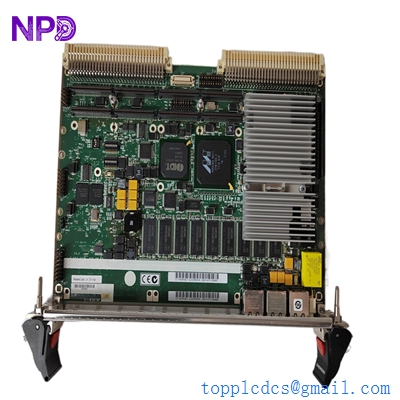
- Model: EMERSON MVME61006E-0163
- Brand: Emerson Network Power / Artesyn (formerly Motorola)
- Series: MVME6100 Series VMEbus Single Board Computer
- Core Function: High-performance VME64 Single Board Computer for mission-critical processing.
- Condition: Brand New Surplus (Original New), Factory Sealed or Certified Tested.
- Product Type: Single Board Computer (SBC)
- Key Specs: 1.28 GHz MPC7447A Processor | 2GB DDR ECC RAM | 512MB Flash | Dual GigE.
EMERSON MVME61006E-0163
Key Technical Specifications
- Processor: Freescale MPC7447A (PowerPC) @ 1.28 GHz
- Memory (RAM): 2GB DDR ECC SDRAM (133 MHz)
- Flash Memory: 512MB User Flash + 1MB Boot Flash
- Bus Interface: VME64 (VMEbus Interface via Tundra Tsi148)
- Networking: Dual 10/100/1000Base-T Gigabit Ethernet ports
- I/O Interfaces: Two asynchronous serial ports (RJ45), one USB 2.0 port
- Expansion: Two 64-bit/100 MHz PMC slots (PCI Mezzanine Card)
- On-board Storage: One ATA-100 interface
- Operating System Support: VxWorks, LynxOS, and Linux
- Environmental: Standard 0°C to +55°C operating range
- Power Requirements: Typically +5V and +12V DC via VME backplane
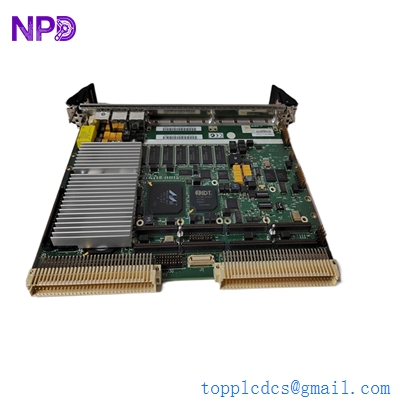
EMERSON MVME61006E-0163
Installation & Configuration Guide
Replacing an MVME61006E-0163 is more complex than a standard PLC module swap. You are dealing with an SBC that handles high-level operating systems (OS) and complex VMEbus arbitration.
Phase 1: Pre-Installation (Est: 30 mins)
⚠️ Configuration Prep:
- DIP Switch Verification: Before installing, compare the S1/S2/S3 DIP switch settings on the new board with your original. These control the VMEbus master/slave settings and boot sequences.
- Firmware Sync: Check the MOTLoad (firmware) version. If your application depends on a specific VME map, the MOTLoad settings must be exported from the old board and imported to the new MVME61006E-0163.
- PMC Transfer: If your old board has PMC mezzanine cards (for extra I/O or graphics), move them to the new board using proper ESD grounding.
Phase 2: Mechanical Installation (Est: 10 mins)
- Power Down: Ensure the VME chassis is completely powered off. VMEbus is NOT hot-swappable.
- Alignment: Align the board with the card guide rails. Ensure the P1 and P2 connectors are perfectly straight.
- Seating: Use the top and bottom injector/ejector handles to press the board firmly into the backplane. A partial seat will cause a VMEbus “System Fail” (SYSFAIL).
Phase 3: Boot & Debug (Est: 20 mins)
- Console Connection: Connect a serial cable to the COM1 port (9600, 8, N, 1).
- Power Up: Monitor the MOTLoad boot messages. If the board hangs at “Testing RAM,” verify the ECC settings in the firmware.
- OS Loading: Once MOTLoad is clear, the board should attempt to boot your OS (VxWorks/Linux) from the network or on-board Flash.
Customer Cases & Industry Applications
Case 1: Semiconductor Fab – Restoring Production Background: A major wafer fabrication facility used an MVME6100 series board to control a legacy lithography tool. The board suffered a catastrophic memory controller failure. Task: The tool was “Down,” costing the fab 20,000 per hour. The OEM declared the tool “End of Life” and suggested a 200k upgrade. Action: We located an MVME61006E-0163 in our New Surplus stock and delivered it within 24 hours. Result: The site engineer mirrored the firmware settings and the tool was back online by the next morning. Total cost was a fraction of the upgrade price.
Case 2: Defense Radar System Maintenance Background: A defense contractor maintained a ground-based radar system using VME64 architecture. They needed to replace aging MVME6100 units during a scheduled refit. Task: The client required “New” condition parts to meet strict reliability MTBF (Mean Time Between Failure) standards—used parts were not an option. Action: We provided certified New Surplus units, including original factory test reports. Result: The refit was completed on schedule. The contractor noted that our ability to provide “New” stock for an “Obsolete” part saved them from a multi-year re-certification process for a newer CPU model.

EMERSON MVME61006E-0163
Frequently Asked Questions (FAQ)
Q: What is the difference between the “6E” and non-“6E” versions? A: The “6E” suffix indicates that the board is RoHS compliant (Lead-Free). Technically, they are functionally identical to the older versions, but many industrial and defense standards now require the 6E designation for environmental compliance.
Q: Can I use this board to replace a lower-clocked MVME6100 (e.g., 1.0 GHz)? A: Generally, yes. The MVME61006E-0163 @ 1.28 GHz is the high-performance variant. However, you must check your software’s timing loops. If your code uses CPU-cycle-based delays (common in older VxWorks apps), the faster clock might require a software patch.
Q: Does it come with an Operating System pre-installed? A: No. It comes with the MOTLoad firmware. You must load your own OS (VxWorks, Linux, etc.) onto the Flash or boot via the network. We sell the hardware; the software license and image are the user’s responsibility.
Q: Why is the price for this board so high compared to modern PC hardware? A: You aren’t just buying a CPU; you’re buying VMEbus compatibility, long-term industrial reliability, and a part that is no longer in mass production. The “New Surplus” status means you’re getting a board with 0 run-hours, which is incredibly rare for this specific Emerson model.