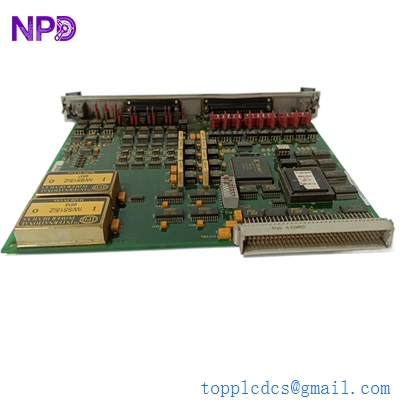

Description
- Model: GE DS200SIOBH1AAA
- Brand: General Electric (GE)
- Series: Speedtronic Mark V (Gas Turbine Control)
- Core Function: Primary I/O interface board for signal distribution and processing
- Product Type: Input/Output (SIOB) Board
- Key Specs: Supports digital/analog signals, high-density I/O, Mark V frame compatible
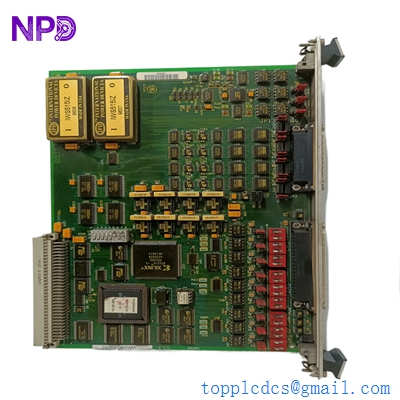
GE DS200SIOBH1AAA
Key Technical Specifications
- Part Number: DS200SIOBH1AAA
- Board Revision: H1AAA (Latest hardware revision)
- Signal Type: Discrete and Analog I/O
- Mounting: Rack-mounted within the Mark V control core
- Compatible Hardware: Mark V TMR and Simplex systems
- Communication Interface: Backplane connection to R, S, and T cores
- Operating Temperature: 0 to 60 °C (32 to 140 °F)
- Isolation: Optical isolation for noise immunity
- Power Requirements: Logic level power supplied via the backplane
- Indicator LEDs: On-board diagnostic status LEDs
- Connector Types: High-density pin headers for ribbon cable interface

GE DS200SIOBH1AAA
Installation & Configuration Guide
Phase 1: Pre-Installation (Estimated time: 15 minutes) ⚠️ Safety First:
- Ensure the turbine is in a safe, shut-down state and the “Lock-Out Tag-Out” procedure is complete.
- The Speedtronic Mark V system handles critical turbine logic; notify operations before cutting power.
- Use an anti-static wrist strap. These older SIOB boards are extremely sensitive to ESD (Electro-Static Discharge).
Phase 2: Removal (Estimated time: 10 minutes)
- Document Everything: Take high-resolution photos of all ribbon cables connected to the board. Many cables in the Mark V cabinet look identical.
- Disconnect Ribbon Cables: Gently pull the plastic tabs on the sides of the connectors. Do not pull on the cables themselves.
- Unscrew Mounting Hardware: Remove the four corner screws. Keep them in a magnetic tray; they are easily lost in the bottom of a control cabinet.
- Inspect the Backplane: Once the board is removed, look for any bent pins or dust buildup on the backplane connector.
Phase 3: Installation (Estimated time: 20 minutes)
- Verify Jumpers: In my experience, the most common mistake is forgetting to match the jumper settings. Check the jumpers (e.g., J1, J2, JP1) on the new board and match them exactly to the old board.
- Insert Board: Align the board with the card guides and push firmly until the backplane connector “seats” with a click.
- Reconnect Cables: Follow your photos. Ensure the red stripe on the ribbon cable aligns with Pin 1 on the board.
- Secure Screws: Hand-tighten the mounting screws to avoid stripping the threads.
Phase 4: Power-On & Testing (Estimated time: 30 minutes)
- Power up the control core and watch the diagnostic LEDs on the SIOB board.
- Connect your <i><I>GE Mark V Controlist</I></i> software or equivalent maintenance tool.
- Check for “Board Mismatch” or “I/O Fault” alarms in the diagnostic log.
- If the system is redundant (TMR), verify that the “R”, “S”, and “T” cores are all communicating with the new module without voting errors.
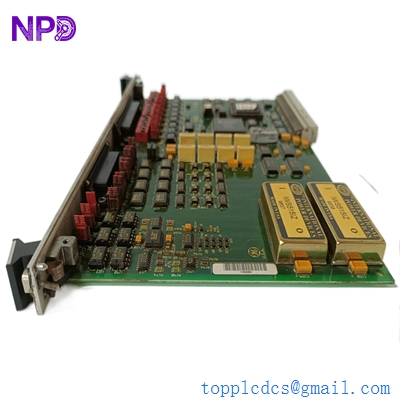
GE DS200SIOBH1AAA
Customer Cases & Industry Applications
Case 1: Emergency Turbine Repair in a Power Plant A combined-cycle power plant in Southeast Asia experienced a sudden trip on their Frame 7 turbine. The diagnostics pointed to an intermittent failure on the SIOB board in the “R” core. Because the GE DS200SIOBH1AAA is long since obsolete, the original manufacturer quoted a lead time of 22 weeks for a “best effort” repair. By utilizing our New Surplus inventory, we delivered the board via international priority in just 4 days. The plant avoided nearly three weeks of downtime, saving an estimated $450,000 in lost power generation revenue.
Case 2: Strategic Reserve for an Aging Infrastructure A mid-sized oil refinery using Mark V systems for gas compressor control realized their buffer stock was depleted. They faced the choice: spend $2 million on a full system upgrade or maintain the current system. They opted for a “Last-time-buy” strategy, purchasing two DS200SIOBH1AAA boards from us. This proactive move extended the life of their control system by another 5-10 years, allowing them to defer capital expenditure until their next scheduled major overhaul.
GE DS200SIOBH1AAA
Frequently Asked Questions (FAQ)
Q: Is the DS200SIOBH1AAA fully compatible with all Mark V systems? A: Yes, it is designed for the Speedtronic Mark V, but you must ensure the “H1AAA” revision matches or is compatible with your specific core software. In my experience, these boards are generally backward compatible with earlier “G” revisions, but always check your control settings first.
Q: Why should I buy “New Surplus” instead of a refurbished board? A: Honestly, refurbished Mark V boards are a gamble. These boards have been in service for decades. In a refurbished unit, the capacitors are often near the end of their lifecycle, and the traces might have microscopic heat damage. Our New Surplus units have zero runtime, meaning you get the full MTBF (Mean Time Between Failure) rating.
Q: How do I know this board isn’t a “pull” from a used cabinet? A: We provide high-resolution photos of the solder side and the connector pins before shipping. A “used” board will show distinct wear marks on the pins. Furthermore, our units come in original anti-static packaging with the factory serial numbers intact, which you can verify.
Q: Can you help with the software configuration after I install it? A: While we are primarily a hardware supplier, we can provide the technical datasheets and pinout diagrams. For deep logic changes or “Controlist” software troubleshooting, we recommend having a certified turbine engineer on-site, as incorrect settings can lead to a turbine trip.
Q: Does the board include the ribbon cables? A: No, the DS200SIOBH1AAA is the PCB only. You should reuse your existing cables if they are in good condition. If your cables are frayed or showing signs of “brittleness” from heat, we suggest replacing those separately to ensure a reliable connection.