Description
- Model: DS200TCQCG1BGF
- Brand: General Electric (GE)
- Series: Mark V Speedtronic
- Core Function: Inter-core communication and signal “training” (voting logic)
- Type: Common Training and Communication Board (TCQC)
- Key Specs: Multi-layer PCB, high-density ribbon headers, supports voting logic
- Microprocessors: Onboard logic for ARCNET and inter-processor data bus management
- Voting Logic: Facilitates the 2-out-of-3 (TMR) voting consensus between cores
- Connectors: Multiple 50-pin ribbon cable headers (typically 3PL, 4PL, etc.)
- Configuration: Extensive jumper settings (J-headers) for site-specific signal routing
- Communication: Direct interface with the <I> processor and Stage Link
- Signal Support: Handles critical trip signals and “common” alarm points
- Diagnostic LEDs: Onboard status indicators for communication health
- Revision Level: “G1BGF” (High-level revision with improved thermal stability)
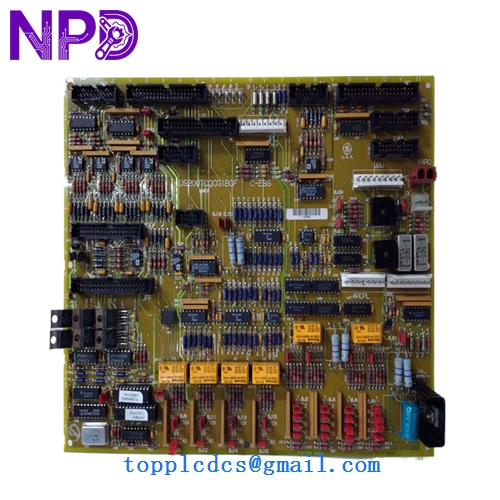
GE DS200TCQCG1BGFDS200TCQCG1BGF
Installation & Configuration Guide
Phase 1: Pre-Installation (Preparation: 25 minutes)
⚠️ Critical Warning: The TCQC board handles the “voting” between control cores. Replacing this while the turbine is running—even if you think you are only in one core—is extremely risky.
- Full Backup: Ensure you have a recent “EEPROM” backup of all three cores (<R>, <S>, <T>).
- Jumper Audit: This is the most common failure point in installation. The DS200TCQCG1BGF has dozens of jumpers. You must mirror the jumper positions from your old board exactly. Use a pair of needle-nose pliers and a bright flashlight to verify every single one.
- ESD Protocol: Use a grounded mat. This board contains high-density CMOS components that are easily “bruised” by static electricity.
Phase 2: Removal (Step-by-Step)
- Power Down: Disconnect the 125V DC and 24V DC power to the control cabinet.
- Ribbon Cable Management: The TCQC has a high concentration of ribbon cables. Label them 1 through 10 (or by their GE designation like ‘3PL’). These cables become brittle over 20 years; do not bend them at sharp angles.
- Hardware Removal: Unscrew the four corner mounting screws. Carefully pull the board straight back to avoid bending any pins on the backplane interface (if applicable).
Phase 3: Installation & Commissioning
- Jumper Double-Check: Before sliding the board in, have a second technician verify the jumper settings against your “Audit Sheet.”
- Seating: Press the board firmly into the mounting standoffs. Reattach ribbon cables, ensuring the red stripe (Pin 1) is aligned correctly.
- Power-On Sequence: Power up the <R> core first, then <S> and <T>.
- Diagnostic Check: Navigate to the “Logic Forced” or “Diagnostic” screen on your HMI. Verify that “Cores Desynchronized” alarms have cleared.
Customer Cases & Industry Applications
Case 1: The “Voting” Conflict during Peak Season A power plant in the Middle East reported that their Mark V system would randomly trip on “Voting Mismatch” errors. After weeks of chasing sensor faults, our engineers identified a thermal failure on the TCQC board’s voting logic circuit. We provided a New Surplus DS200TCQCG1BGF board. Once installed, the inter-core communication stabilized, and the plant completed its 90-day peak run without a single nuisance trip.
Case 2: Recovering from a “Total Blackout” During a control system upgrade gone wrong, a technician accidentally shorted the communication bus, blowing the transceiver chips on the TCQC board. The plant was effectively “blind.” Because we maintain local stock, we bypassed the 12-week factory lead time and delivered the board in 24 hours. The plant manager noted that the cost of the board was less than 1% of the revenue they would have lost waiting for a factory-order part.
Frequently Asked Questions (FAQ)
Q: My current board is a “G1A” version. Can I use the “G1BGF”? A: Yes. The “BGF” version is a later, more robust revision. GE designed these to be backward compatible. However, you must carefully replicate the jumper settings, as the later revisions sometimes have additional jumper options that the “A” version did not.
Q: Why does this board have so many jumpers? A: The TCQC board is a “universal” communication board for the Mark V. The jumpers tell the board which sensors are connected and how to handle signal voting (TMR vs. Simplex). Incorrect jumper settings can lead to “I/O Configuration Mismatch” errors.
Q: Does “New Surplus” mean it has been sitting in a box for 20 years? A: Yes, but in a climate-controlled environment. Unlike “Refurbished” boards which have been subjected to decades of heat stress and vibration inside a turbine cabinet, our New Surplus boards have zero “run hours.” We perform a full diagnostic test before shipping to ensure the capacitors and logic gates are performing within original factory specs.
Q: What if the board doesn’t fix my communication issue? A: Inter-core communication issues can also be caused by faulty ribbon cables or a failing <I> Processor. If the DS200TCQCG1BGF doesn’t clear the fault, we recommend checking the 50-pin cables for continuity, as the insulation on legacy cables can degrade over time.