Description
Product Overview
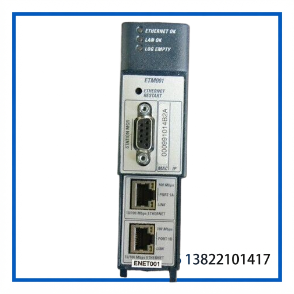
The GE FANUC IC695ETM001-CD is an Ethernet Interface Module for the PACSystems RX3i PLC platform. It provides Ethernet networking between an RX3i controller and other PACSystems equipment, Series 90 and VersaMax controllers, programming computers, and supervisory systems.
The module supports TCP/IP-based industrial communication, including SRTP, Modbus TCP, and Ethernet Global Data (EGD). It also provides an embedded Ethernet switch, allowing Ethernet nodes to be daisy-chained through the two network ports.
The exact unit supplied is marked IC695ETM001-CD. GE’s documented release history identifies the -CD hardware/firmware revision with firmware version 3.81, released in May 2006.
Technical Specifications
| Item | Specification |
|---|---|
| Manufacturer | GE Fanuc / GE Intelligent Platforms |
| Series | PACSystems RX3i |
| Model | IC695ETM001-CD |
| Product Type | Ethernet Interface Module |
| Ethernet Processor | 200 MHz |
| Ethernet Ports | 2 |
| Ethernet Interface | 10Base-T / 100Base-TX |
| Ethernet Connector | Shielded RJ-45 |
| Ethernet Speed | 10/100 Mbps |
| Ethernet Switch | Built-in |
| Serial Interface | RS-232 Station Manager port |
| Serial Connector | 9-pin female D-sub |
| Serial Speed | 1,200–115,200 bps |
| IP Addresses | 1 normal IP address |
| Communication Protocols | SRTP, Modbus TCP, EGD |
| Installation | RX3i main CPU rack |
| Backplane | RX3i Universal Backplane |
| Hardware Revision | CD |
| Documented Firmware for -CD | 3.81 |
| Condition | Used — see actual listing condition |
The two RJ-45 interfaces are auto-sensing 10Base-T/100Base-TX ports. The internal switch supports daisy-chaining, while the Station Manager interface provides RS-232 access for Ethernet interface supervision and configuration.
Key Features
- Original GE Fanuc PACSystems RX3i Ethernet module.
- Exact catalog number: IC695ETM001-CD.
- 200 MHz Ethernet processor.
- Two auto-sensing 10/100 Mbps RJ-45 Ethernet ports.
- Built-in Ethernet switch for network daisy-chaining.
- Supports SRTP communications.
- Supports Modbus/TCP Client and Server functions.
- Supports Ethernet Global Data (EGD).
- Dedicated RS-232 Station Manager interface.
- Front-panel status LEDs for Ethernet and LAN diagnostics.
- Firmware is field-upgradeable through the RX3i CPU using GE’s firmware utility.
Typical Applications
The IC695ETM001 is used where an RX3i PLC needs Ethernet connectivity to control networks, engineering stations, HMIs, supervisory computers, or other industrial controllers.
Typical applications include:
- PLC-to-PLC Ethernet communication
- Industrial automation networks
- HMI and SCADA communication
- Modbus/TCP systems
- SRTP-based PACSystems communication
- EGD data exchange
- Engineering and programming access
- Legacy RX3i system maintenance and repair
Installation & Configuration
The ETM001 is intended for installation in the main CPU rack of a PACSystems RX3i system using a compatible Universal Backplane. GE documentation identifies backplanes such as the IC695CHS007, CHS012, and CHS016 as examples. The module is compatible with RX3i CPU models.
Before installation:
- Confirm the complete catalog number and hardware revision.
- Verify compatibility with the existing RX3i CPU and backplane.
- Inspect the backplane connector and module connector for contamination or damage.
- Install the module firmly into the correct RX3i rack position.
- Connect the Ethernet cable to the appropriate RJ-45 port.
- Configure the module’s IP address and network parameters.
- Verify LAN and Ethernet status LEDs.
- Test communication using the required SRTP, Modbus/TCP, or EGD configuration.
The module’s default IP configuration requires proper network configuration before normal Ethernet communication can begin.
Maintenance & Troubleshooting
If an installed module does not communicate, check the basics first:
No Ethernet communication
- Confirm the IP address.
- Check Ethernet cable and switch connections.
- Verify LAN status LEDs.
- Confirm that the network topology is correctly configured.
- Check for duplicate IP addresses.
Communication errors
- Verify SRTP, Modbus/TCP, or EGD configuration.
- Check controller firmware compatibility.
- Review Ethernet interface diagnostic/status information.
- Confirm that the connected equipment uses the expected protocol.
Module replacement
- Record the existing IP and network configuration before removal.
- Compare the replacement hardware revision with the original module.
- Confirm the RX3i CPU firmware requirements before using hot insertion/removal.
The older ETM001 documentation specifically notes that hot-swap operation depends on the CPU firmware level, so the installed system should be checked before removing or inserting a powered module.
Inspection & Testing
For a used IC695ETM001-CD, recommended inspection includes:
- Catalog number verification
- Hardware revision verification
- Front-panel and label inspection
- RJ-45 connector inspection
- Backplane connector inspection
- RS-232 connector inspection
- PCB and housing inspection
- LED diagnostic test
- Ethernet link test
- IP communication test
- SRTP / Modbus TCP communication test where applicable
Where a compatible RX3i test rack is available, a power-up and network communication test provides a much stronger verification than visual inspection alone.
Compatibility Notes
The IC695ETM001 family has undergone multiple hardware and firmware revisions. The documented revision history includes:
- IC695ETM001-AA — initial release
- IC695ETM001-AB — firmware 3.00
- IC695ETM001-CC — firmware 3.60
- IC695ETM001-CD — firmware 3.81
- IC695ETM001-DE — firmware 5.00
- IC695ETM001-DF — firmware 5.01
- IC695ETM001-DG — firmware 5.50
- Later revisions through the E/F/G/H/J/K series
Therefore, a later IC695ETM001 revision should not automatically be assumed to have identical firmware behavior or compatibility with an older RX3i installation. The original CPU firmware and application requirements should be checked before substitution.
Frequently Asked Questions
Q: What is GE Fanuc IC695ETM001-CD?
A: It is an Ethernet Interface Module for the GE Fanuc PACSystems RX3i PLC platform.
Q: How many Ethernet ports does it have?
A: It has two auto-sensing 10Base-T/100Base-TX RJ-45 Ethernet ports.
Q: Does it support Modbus TCP?
A: Yes. The ETM001 supports Modbus/TCP as well as SRTP and Ethernet Global Data.
Q: What does the “-CD” suffix mean?
A: It identifies a specific hardware/firmware revision. GE’s release history lists IC695ETM001-CD with firmware version 3.81, released in May 2006.
Q: Can I replace an IC695ETM001-CD with another ETM001 revision?
A: Potentially, but compatibility should be checked against the RX3i CPU firmware, application software, and required Ethernet functions. Do not treat every ETM001 revision as automatically identical.
Identification & Ordering Notes
When sourcing a replacement, compare the following information on the existing module:
- GE Fanuc / GE Intelligent Platforms marking
- IC695ETM001-CD
- Hardware revision
- Firmware revision, if available
- Front-panel layout
- Ethernet port arrangement
- RS-232 Station Manager connector
For older RX3i systems, matching the exact catalog number and revision is preferable to selecting a visually similar ETM001 module.
Recommended eBay Title:
GE FANUC IC695ETM001-CD | RX3i Ethernet Interface Module