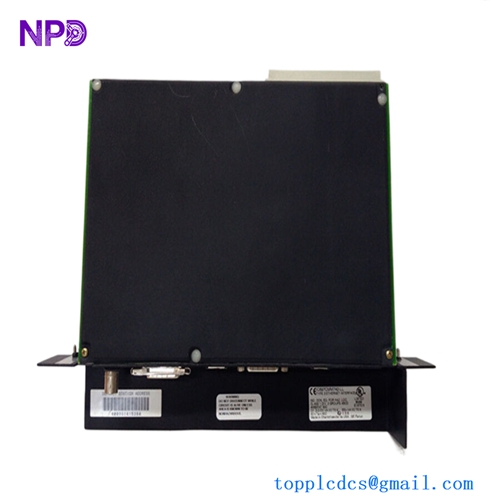

Description
- Model: GE IC697CMM742
- Brand: GE Fanuc (Emerson)
- Series: Series 90-70 PLC
- Core Function: High-performance Ethernet TCP/IP interface for network communication
- Type: Communications Coprocessor Module
- Key Specs: Supports SRTP and Modbus TCP protocols, 10 Mbps data rate (AUI/10Base-T)
- Processor: Dedicated onboard processor to minimize CPU overhead
- Protocols: SRTP (Service Request Transfer Protocol), Modbus TCP (Server/Client)
- Network Interface: AUI port (requires transceiver for RJ-45/10Base-T)
- Data Rate: 10 Mbps (Half-duplex)
- Configuration: Via MS-DOS or Windows-based Logicmaster 90, VersaPro, or Proficy ME
- Bus Interface: VMEbus standard (Series 90-70 backplane)
- Current Draw: 1.5 Amps @ +5 V DC (from backplane)
- Operating Temp: 0°C to +60°C (32°F to 140°F)
- Diagnostics: Front-panel LEDs for module status and network activity
- Mounting: Single slot in any Series 90-70 rack
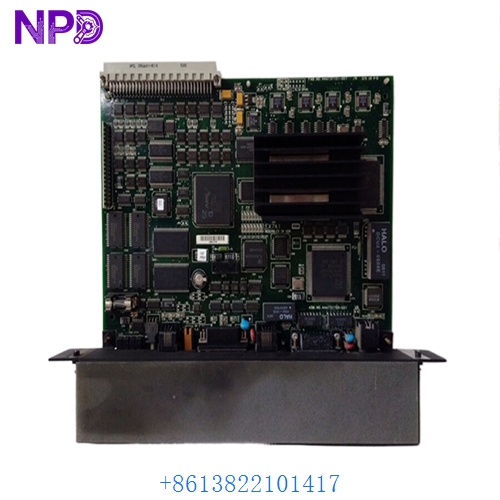
GE IC697CMM742-LL
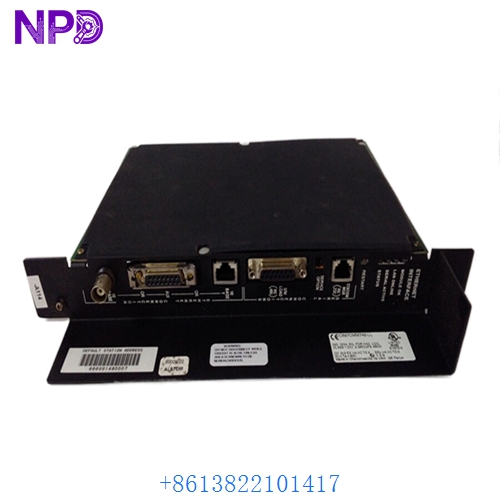
GE IC697CMM742-LL
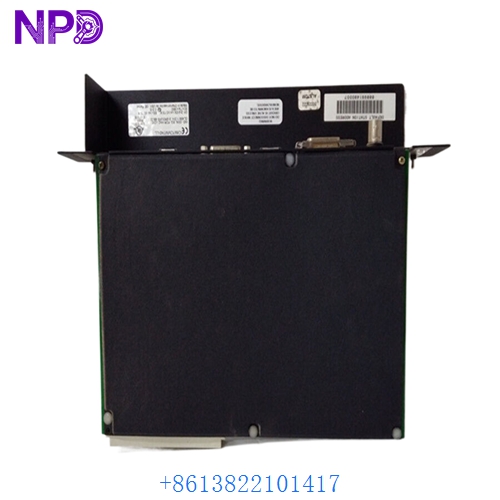
GE IC697CMM742-LL
Installation & Configuration Guide
Phase 1: Preparation (15 minutes)
⚠️ Safety Warning: The IC697CMM742 is a VME-based module for the Series 90-70 PLC. These systems are often critical to plant-wide operations. Since the 90-70 rack does not support hot-swapping, you must power down the rack before removing or inserting the module to prevent electrical damage to the backplane.
Required Items:
- Grounded anti-static wrist strap.
- AUI-to-RJ45 Transceiver (if connecting to a modern Ethernet switch).
- Engineering PC with Proficy Machine Edition or Logicmaster 90-70.
Phase 2: Hardware Installation (10 minutes)
Steps:
- Power Down: Turn off the Series 90-70 rack power supply.
- Alignment: Align the GE IC697CMM742 with the plastic guide rails in the chosen slot.
- Insertion: Slide the module in until the VME connectors meet the backplane. Use the top and bottom levers to firmly seat the module.
- Fastening: Tighten the two captive screws to ensure the module is secure and properly grounded to the rack frame.
- Transceiver: Attach your AUI transceiver to the 15-pin port on the front of the module and secure the sliding latch.
Phase 3: Software Configuration (25 minutes)
The Integration Steps:
- Hardware Configuration (HWC): In your software, add the IC697CMM742 to the correct slot in the rack.
- IP Assignment: Set the IP Address, Subnet Mask, and Gateway. Note that these older modules sometimes require a “Store” to the CPU to activate network settings.
- LED Diagnostics:
- MODULE OK: Solid green indicates the module passed internal self-tests.
- LAN ONLINE: Indicates successful connection to the Ethernet network.
- STATUS: Flashing indicates data transfer activity.
- Ping Test: From your engineering PC, ping the assigned IP address to verify the physical layer and IP stack are functioning.
Customer Cases & Industry Applications
Case 1: Automotive Assembly Plant Data Link
Situation: A large automotive plant relied on a Series 90-70 PLC for their paint shop conveyor system. The existing IC697CMM742 failed, cutting off the SCADA system from real-time production data. Task: Find an immediate replacement to restore data logging and HMI visibility. Action: We shipped a New Surplus unit via international express. Result: The module arrived and was installed during a scheduled shift change. Data flow was restored in under 30 minutes of downtime. The plant avoided an estimated $50,000 in lost production tracking and quality reporting.
Case 2: Water Treatment Facility SCADA Upgrade
Situation: A municipal water facility wanted to integrate their legacy 90-70 controllers into a modern Ignition SCADA platform using Modbus TCP. Task: Add Ethernet capability to racks that were previously using serial communications. Action: The customer purchased three GE IC697CMM742 modules from our inventory. Result: By using New Surplus modules, the facility avoided the massive cost of a full PLC hardware migration. They successfully modernized their network infrastructure for a fraction of the budget.
Frequently Asked Questions (FAQ)
Q: Does the IC697CMM742 have a built-in RJ-45 port? A: No. It uses a 15-pin AUI (Attachment Unit Interface) port. To connect to a standard Ethernet cable (RJ-45), you will need an external AUI-to-10Base-T transceiver (often called a “Transceiver Dongle”).
Q: Can I use this module to program the PLC? A: Yes. Once configured with an IP address, you can use Proficy Machine Edition or Logicmaster over the Ethernet network to download logic, monitor variables, and perform diagnostics.
Q: Why buy “New Surplus” for a Series 90-70 system? A: The Series 90-70 was discontinued by the manufacturer several years ago. “New Surplus” modules are original, unused parts that have been stored in a controlled environment. They provide the longest possible lifespan compared to used/refurbished units, which may have thousands of hours of thermal wear on their internal capacitors.
Q: My “Module OK” light is off. Is the card dead? A: Not necessarily. First, ensure the rack power is sufficient (the CMM742 draws a lot of current). If it still won’t turn on, check the hardware configuration in your software. If the slot configuration doesn’t match the physical module, the CPU may hold the module in a “Reset” state.
Q: Does it support 100 Mbps or 1 Gbps? A: No. The IC697CMM742 is limited to 10 Mbps. However, it is fully compatible with modern 10/100/1000 Mbps switches, provided the switch port can auto-negotiate down to 10 Mbps half-duplex.