
Description
📋 Product Overview
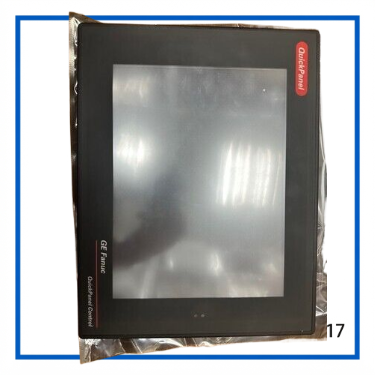
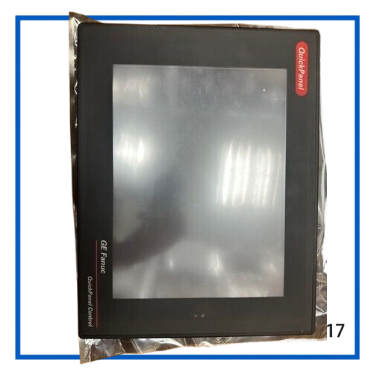
The GE Fanuc IC754CSL12CTD-EC is a 12.1-inch QuickPanel Control operator interface designed for industrial machine control and visualization. It combines a color TFT touch display with an embedded control platform, allowing operators to monitor process values, acknowledge alarms, enter parameters, and interact with machine-control applications from a single panel.
The IC754CSL12CTD family uses an 800 × 600 SVGA color TFT display and was designed to work with GE Fanuc Proficy Machine Edition software. The QuickPanel Control architecture integrates visualization and control rather than functioning as a conventional passive HMI screen.
⚙️ Key Features
- GE Fanuc QuickPanel Control platform
- 12.1-inch color TFT touch display
- 800 × 600 SVGA resolution
- Embedded industrial control and visualization functions
- Intel XScale-based QuickPanel hardware platform
- Windows CE.NET operating environment on the legacy QuickPanel View/Control platform
- 32 MB DRAM
- RS-232/RS-485 serial communication
- 10/100 Mbps Ethernet
- USB connectivity
- Proficy Machine Edition programming environment
- Supports HMI functions such as data display, alarms, data entry, animation, trending, and scripting
- Designed for industrial panel mounting
- Suitable for machine-control and operator-interface applications
📊 Product Datasheet
| Parameter | Specification |
|---|---|
| Brand | GE Fanuc |
| Model | IC754CSL12CTD-EC |
| Product Family | QuickPanel Control |
| Product Type | Industrial HMI / Operator Interface |
| Display | Color TFT |
| Display Size | 12.1 in |
| Resolution | 800 × 600 pixels |
| Touchscreen | Touch operator interface |
| Processor Platform | Intel XScale PXA255 family |
| DRAM | 32 MB |
| Serial Port 1 | RS-232 / RS-485 |
| Serial Port 2 | RS-232 |
| Ethernet | 10/100 Mbps |
| Operating System | Windows CE.NET on the legacy QuickPanel View/Control platform |
| Input Voltage | 12 VDC ±20% or 24 VDC ±20% |
| Power Consumption | Less than 48 W |
| Panel Cutout | Approx. 302 × 228 × 60 mm |
| Front Bezel | Approx. 337 × 263 × 10 mm |
| Operating Temperature | 0 to 50°C |
| Storage Temperature | -20 to 70°C |
| Operating Humidity | 10–90% non-condensing |
| Programming Environment | Proficy Machine Edition |
| eBay Condition | Used |
| Seller Note | In good condition / In box |
The published GE Fanuc controller catalog gives the 12-inch QuickPanel Control family a 12.1-inch TFT display, 800 × 600 resolution, 32 MB DRAM, 10/100 Ethernet, and 12/24 VDC input. The catalog also lists less than 48 W power consumption and a 0–50°C operating range for the 12-inch unit.
🔌 Operating Function
The QuickPanel Control is intended to sit between the operator and the machine-control system.
A typical application can be arranged as:
Operator → IC754CSL12CTD-EC → PLC / Controller / Field Devices
The touchscreen provides the visual interface, while the embedded QuickPanel Control platform handles the HMI application and associated control functions.
Typical screen functions include:
- Process-value display
- Status monitoring
- Alarm indication
- Parameter entry
- Push buttons and pilot-light functions
- Graphic symbols
- Drop-down and list controls
- Animation
- Trend displays
- Data collection
- Operator prompts
GE Fanuc documentation also identifies support for scripting, web publishing, remote connectivity, and remote desktop functions within the QuickPanel Control platform.
🖥️ Display and Touch Interface
The 12.1-inch color TFT panel provides an 800 × 600 pixel working area. This resolution was widely used in legacy industrial HMI applications and is suitable for process screens containing buttons, numerical values, alarms, and graphical objects.
The touch interface eliminates the need for a separate operator keyboard for normal machine interaction.
For replacement work, the physical panel cutout is particularly important. The published specification for the 12-inch QuickPanel Control gives a panel cutout of approximately 302 × 228 mm, while the front bezel is approximately 337 × 263 mm.
🔧 Installation & Configuration Guide
1. Verify the complete part number
Before installation, compare the existing panel label with:
IC754CSL12CTD-EC
The suffix matters. Different IC754 QuickPanel variants can have different display, communication, software, or hardware configurations.
2. Check the panel cutout
Confirm that the existing cabinet opening matches the 12-inch QuickPanel dimensions before removing the old HMI.
The published 12-inch family specification gives approximately:
- Panel cutout: 302 × 228 mm
- Front panel: 337 × 263 mm
3. Verify the power supply
The 12-inch QuickPanel Control specification supports either 12 VDC ±20% or 24 VDC ±20%. Verify the machine’s actual supply arrangement before connecting power.
Do not assume that every IC754 variant uses the same power range.
4. Connect communications
Depending on the installed configuration, the QuickPanel platform provides serial and Ethernet communications.
Typical connections include:
- RS-232
- RS-485
- 10/100 Ethernet
- USB
The exact application determines which port is used for PLC communication, programming, or maintenance.
5. Load or verify the application
The QuickPanel Control platform was designed around Proficy Machine Edition software. Before replacing a failed panel, back up the existing application and verify that the replacement unit can run the required project and communication drivers.
This is especially important for older installations because the HMI hardware may be available while the original project file or software environment is not.
🏭 Application Scenarios & Typical Pain Points
The IC754CSL12CTD-EC can be used in legacy machine-control systems where the original QuickPanel platform is still part of the production line.
Typical applications include:
- Packaging machinery
- Assembly machines
- Material handling systems
- Production lines
- Process-control panels
- Machine tool interfaces
- Conveyor systems
- Industrial automation equipment
- Legacy PLC operator stations
Common replacement issue
A replacement HMI can power up normally but still fail to communicate with the PLC because the problem is not the screen itself. Communication settings, serial wiring, Ethernet addressing, application files, and PLC driver configuration all need to match the original installation.
For this reason, keeping a backup of the original QuickPanel application is just as important as keeping the hardware spare.
🧰 Maintenance Recommendations
For an older QuickPanel Control unit, maintenance should focus on the display, touch interface, connectors, and internal storage.
Recommended checks include:
- Inspect the touchscreen for cracks or dead areas.
- Check display brightness and uniformity.
- Inspect the bezel and panel seal.
- Check Ethernet and serial connectors.
- Verify the 12/24 VDC supply.
- Check for abnormal rebooting or startup errors.
- Back up the HMI application whenever possible.
- Keep ventilation around the rear of the panel unobstructed.
- Avoid opening the unit while energized.
The QuickPanel hardware manual specifically warns that power should be removed before opening the rear of the unit and recommends anti-static precautions when accessing internal electronics.
❓ Frequently Asked Questions
Q1: What is the IC754CSL12CTD-EC?
It is a GE Fanuc QuickPanel Control industrial HMI/operator interface with a 12.1-inch color TFT touchscreen.
Q2: What is the display resolution?
The 12-inch QuickPanel Control uses an 800 × 600 pixel display.
Q3: Is this only an HMI display?
No. QuickPanel Control combines visualization with embedded control functionality. GE Fanuc positioned the QuickPanel Control as an integrated control and visualization platform.
Q4: What communication ports are available?
The IC754CSL12CTD family documentation identifies RS-232/RS-485 serial communication and 10/100 Mbps Ethernet. Additional interfaces can depend on the specific hardware configuration.
Q5: What software was used to program it?
The QuickPanel Control platform was designed for Proficy Machine Edition, including Logic Developer and View–Machine Edition functions.
Q6: What power supply does the 12-inch version use?
Published specifications list 12 VDC ±20% or 24 VDC ±20% for the 12-inch QuickPanel Control family.
Q7: What is the condition of the referenced listing?
The supplied eBay listing is Used, with the seller describing the unit as “In good condition In box.”
Q8: Is IC754CSL12CTD-EC the same as every IC754CSL12CTD?
Not necessarily. The base IC754CSL12CTD identifies the QuickPanel Control family, while suffixes such as EA/EB/EC can represent different hardware revisions or configurations. Check the complete nameplate and installed hardware before substituting a unit.
🔄 Related GE Fanuc QuickPanel Models
- IC754CSL06CTD — 6-inch Color TFT QuickPanel Control
- IC754CSL06MTD — 6-inch Monochrome QuickPanel Control
- IC754CSL12CTD — 12-inch Color TFT QuickPanel Control
- IC754VSL12CTD — 12-inch QuickPanel View
- IC754VBL12CTD — 12-inch QuickPanel View, blank-label version
- IC754PIF001 — Series 90-30 I/O Interface
- IC754GEN001 — Genius Interface
- IC754DVNM01 — DeviceNet Master Interface
- IC754PBM01 / IC754PBSM01 — PROFIBUS Master Interface family
- IC754 QuickPanel View/Control series
These products belong to the same broader GE Fanuc QuickPanel View/Control platform and related interface ecosystem.
📌 Application Summary
The GE Fanuc IC754CSL12CTD-EC is a legacy 12.1-inch QuickPanel Control HMI designed for industrial operator-interface and machine-control applications. Its 800 × 600 TFT touchscreen, embedded control platform, serial communications, Ethernet connectivity, and Proficy Machine Edition support make it suitable for maintaining older GE Fanuc automation systems.
For replacement projects, the complete IC754 part number should be matched rather than purchasing a visually similar QuickPanel. Pay particular attention to the suffix, power supply, communication interfaces, panel cutout, and application software.
The referenced unit is listed as Used / In good condition / In box, so the practical pre-installation checks should include power-up, touchscreen response, display condition, communication ports, and verification that the required HMI project can be loaded.