Description
🖥️ Product Overview
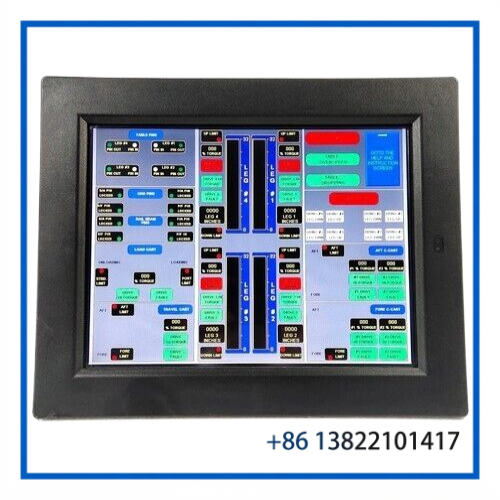
The GE FANUC IC754VBF15CTD-BA is an ES1522 QuickPanel View Operator Interface Panel designed for industrial machine control, process monitoring, and operator interaction. It combines a 15-inch color TFT display with resistive touchscreen operation in a compact industrial HMI platform.
The ES1522 provides operators with a practical interface for viewing process values, alarms, machine status, production information, and control screens. It can be used as an operator station within PLC, automation, machine-control, and process-monitoring systems.
The IC754VBF15CTD-BA identification is important when sourcing a replacement because QuickPanel View units can have different display sizes, configurations, and hardware revisions. For replacement projects, always compare the complete part number and existing system configuration before installation.
⚙️ Key Features
- 15-inch industrial color TFT display
- Resistive touchscreen interface
- 1024 × 768 display resolution
- QuickPanel View ES1522 platform
- Designed for industrial operator interface applications
- Suitable for PLC and machine-control visualization
- Supports operator monitoring and touch-based control
- Industrial DC power input
- Compact panel-mount form factor
- Suitable for legacy-system maintenance and HMI replacement projects
📊 Technical Datasheet
| Parameter | Specification |
|---|---|
| Brand | GE FANUC |
| Model | IC754VBF15CTD-BA |
| Series | QuickPanel View |
| Product Name | ES1522 Operator Interface Panel / HMI |
| Display Size | 15-inch |
| Display Type | Color TFT LCD |
| Resolution | 1024 × 768 pixels |
| Touch Technology | Analog Resistive Touchscreen |
| Power Supply | 9.6–28.8 VDC |
| Dimensions / Weight | Approx. 304 × 377.3 × 70.7 mm / 4.67 kg |
🔧 Industrial Application
The ES1522 can serve as the operator-facing layer between an industrial control system and plant personnel. Typical applications include:
- PLC machine-control interfaces
- Factory automation equipment
- Production-line monitoring
- Process visualization
- Alarm and status monitoring
- Manufacturing equipment
- Material handling systems
- Industrial packaging machinery
- Marine and industrial control equipment
- Legacy GE FANUC automation installations
The panel can display operating parameters and process information while providing touchscreen commands for authorized machine operators.
🔌 System Integration
When replacing an existing ES1522, the complete IC754VBF15CTD-BA part number should be checked against the installed HMI.
Before commissioning, verify:
- The incoming DC supply is within the permitted operating range.
- Existing communication cables match the replacement unit.
- The installed application/project is compatible with the replacement hardware.
- Touchscreen calibration is completed after installation when required.
- PLC communication parameters are retained or correctly restored.
- Alarm, screen-navigation, and operator-control functions are tested before production use.
For a legacy machine, it is recommended to record the original HMI configuration, communication settings, project files, and backup media before replacing the operator panel.
🛠️ Installation & Commissioning
1. Physical Inspection
Check the front display, touchscreen surface, rear connectors, mounting points, and enclosure for damage.
2. Power Verification
Measure the DC supply before connecting the HMI. Confirm polarity and voltage stability.
3. Panel Installation
Install the unit into the existing control-panel opening and secure the mounting hardware evenly.
4. Communication Connection
Reconnect the PLC, controller, or network communication cables according to the original system configuration.
5. Application Verification
Confirm that the correct HMI application or project is available before returning the equipment to service.
6. Functional Test
Test screen navigation, touch response, PLC data exchange, alarms, status indicators, and operator commands.
🔍 Troubleshooting Guide
Blank screen after power-up
Check DC input voltage, polarity, power wiring, connectors, and the internal power condition of the panel.
Touchscreen does not respond
Inspect the touchscreen surface and connection. If the display operates but touch commands are inaccurate, perform the appropriate touchscreen calibration procedure.
PLC data is not displayed
Check communication cables, controller address, communication parameters, protocol configuration, and HMI application settings.
Incorrect screen or application appears
Verify that the correct project/application is installed and that the stored configuration corresponds to the machine being serviced.
Intermittent operation
Inspect the DC supply for voltage fluctuations and check connectors, communication wiring, environmental conditions, and mounting integrity.
🧰 Maintenance Recommendations
- Keep the touchscreen clean and free from conductive contamination.
- Do not use abrasive materials on the display surface.
- Check power and communication connections during scheduled maintenance.
- Maintain backups of the HMI application and configuration.
- Record firmware/software information before making changes.
- Inspect the panel for excessive heat, moisture, vibration, or contamination.
- Keep a compatible replacement unit available for critical legacy equipment.
- For long-life installations, consider maintaining a spare HMI as part of the site’s critical-spares inventory.
🏭 Replacement & Spare-Part Considerations
The ES1522 is particularly relevant to maintenance projects involving older GE FANUC QuickPanel installations. When selecting a replacement, do not rely only on the ES1522 family designation.
The following should be checked:
- Complete IC754 part number
- Display size
- Touchscreen configuration
- Power requirements
- Communication interfaces
- Existing HMI application
- Controller/PLC communication settings
- Mechanical panel cutout
- Hardware revision
- Condition of the replacement unit
A replacement panel should be functionally tested before being placed into a production-critical application.
❓ Frequently Asked Questions
Q1: What is the GE FANUC IC754VBF15CTD-BA?
It is an ES1522 QuickPanel View industrial operator interface panel with a 15-inch color TFT touchscreen.
Q2: What type of touchscreen does the ES1522 use?
The ES1522 uses resistive touchscreen technology designed for industrial operator interaction.
Q3: What is the display resolution?
The ES1522 provides a 1024 × 768 pixel display resolution.
Q4: What power supply does the ES1522 use?
The ES1522 platform operates from a DC input in the approximately 9.6–28.8 VDC range.
Q5: Can the IC754VBF15CTD-BA replace another ES1522 unit?
Potentially, but the complete part number, hardware configuration, application, communications, and mechanical installation should be compared before replacement.
Q6: Is this panel suitable for PLC applications?
Yes. It is intended for industrial operator-interface applications where operators need to monitor and interact with automation equipment.
Q7: What should be checked before installation?
Verify the part number, power supply, communication connections, application/project compatibility, and panel dimensions.
Q8: What should be done if the touchscreen is inaccurate?
Inspect the screen and connections first, then perform the appropriate calibration procedure if supported by the installed configuration.
📦 Recommended GE FANUC / QuickPanel Models
- GE FANUC IC754VBF12CTD – QuickPanel View 12-inch HMI
- GE FANUC IC754VBF15CTD-CF – QuickPanel View 15-inch HMI
- GE FANUC IC754VSF15CTD-BA – ES1522 QuickPanel View
- GE FANUC IC754VBF15CTD – 15-inch QuickPanel View
- GE FANUC ES1201 – QuickPanel View 12-inch HMI
- GE FANUC ES1221 – QuickPanel View Operator Interface
- GE FANUC ES1222 – QuickPanel View Operator Interface
- GE FANUC ES1522R – 15-inch QuickPanel View
- GE FANUC ES1001 – QuickPanel View 10-inch HMI
- GE FANUC ES0822 – QuickPanel View 8-inch HMI
📌 Product Summary
The GE FANUC IC754VBF15CTD-BA ES1522 QuickPanel View is a 15-inch industrial operator interface designed for visualization and operator control in automation systems. Its resistive touchscreen, industrial DC power architecture, and established QuickPanel View platform make it a practical spare-part candidate for maintaining legacy GE FANUC HMI installations.
For replacement applications, confirm the complete part number and system configuration before installation to ensure electrical, mechanical, communication, and application compatibility.