Description
🔹 Product Overview
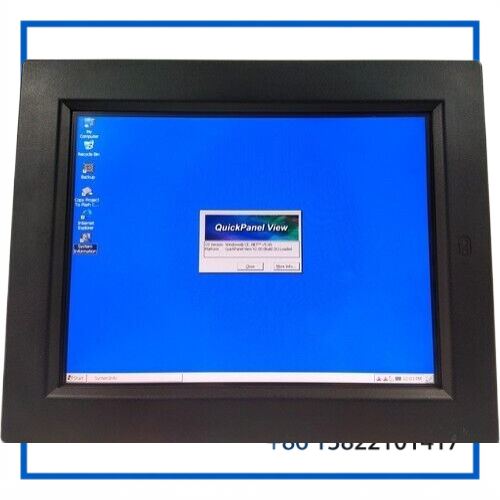
The GE Fanuc ES1522 QuickPanel View IC754VBF15CTD-CF is a 15-inch industrial operator interface panel designed for HMI applications in automation and control systems. It combines a color TFT display, resistive touchscreen, industrial communications and embedded computing functions in a panel-mount format.
The ES1522 platform provides a practical operator interface for monitoring process values, viewing alarms, entering commands and interacting with connected PLC or control-system equipment.
🔹 Main Features
🖥️ 15.1-Inch Color TFT Display
Provides a 1024 × 768 resolution for displaying process graphics, status information, alarms and operator screens.
👆 Resistive Touchscreen
The touch interface allows operators to interact directly with HMI screens and control functions.
🔗 Industrial Communication
The QuickPanel View family supports serial communication and Ethernet connectivity for integration with industrial control equipment.
⚡ 24 VDC Power
The 15-inch configuration uses a 24 VDC industrial power supply and has a maximum power consumption of approximately 30 W.
🏭 Panel-Mount Design
The unit is intended for installation in industrial control panels and operator stations.
🛡️ Industrial Front Protection
The QuickPanel View family supports NEMA 4/4X and IP65 protection when properly mounted in an appropriately rated enclosure.
🔹 Product Datasheet
| Parameter | Specification |
|---|---|
| Brand | GE Fanuc |
| Model | IC754VBF15CTD-CF |
| Series | QuickPanel View / ES1522 |
| Product Name | Operator Interface Panel |
| Display | 15.1-inch Color TFT |
| Resolution | 1024 × 768 pixels |
| Touchscreen | Resistive Touch |
| Origin | United States / GE Fanuc product line |
| Condition / Status | Industrial Spare / Legacy Equipment |
| Power | 24 VDC, 30 W max. |
🔹 Physical Specifications
📏 Front Panel Size: approximately 15.70 × 12.73 × 0.40 in (399 × 323 × 10 mm)
📐 Panel Cut-Out: approximately 14.93 × 12.03 × 2.78 in (379 × 305 × 71 mm)
🌡️ Operating Temperature: approximately 0 to 55°C
💧 Environmental Protection: NEMA 4/4X, IP65 when correctly installed in a suitable enclosure.
🔹 Application
The IC754VBF15CTD-CF is suitable for industrial HMI and operator-interface applications such as:
• PLC operator stations
• Machine control panels
• Process monitoring
• Factory automation
• Production-line control
• Alarm and status visualization
• Industrial equipment diagnostics
• Legacy GE Fanuc control-system maintenance
The QuickPanel View can serve as the operator-facing interface between personnel and an industrial control system, allowing process information and control commands to be presented through graphical HMI screens.
🔹 Installation Considerations
Before installation, verify the complete part number IC754VBF15CTD-CF and compare the replacement unit with the existing panel.
🔌 Confirm the 24 VDC supply and correct polarity.
🖥️ Verify the display size, panel cut-out and mounting arrangement.
🔗 Check Ethernet and serial communication connections.
💾 Confirm the required HMI application and configuration are compatible with the replacement panel.
🛡️ Ensure the cabinet provides the required environmental protection.
⚠️ Power should be removed before opening or servicing the QuickPanel hardware. Appropriate anti-static precautions should also be observed when accessing internal electronics.
🔹 Maintenance Guide
Regular maintenance should include inspection of the touchscreen, display surface, communication connectors, power terminals and cabinet environment.
Keep the touchscreen clean and free from oil, dust and abrasive particles. Check for damaged cables, loose connectors or abnormal heating.
If the display becomes difficult to read, inspect the backlight condition and system status indicators. The QuickPanel platform uses status LEDs to provide information about operating and backlight conditions.
For legacy equipment, retaining a correctly matched spare panel can help reduce downtime when an HMI unit fails.
🔹 Troubleshooting
🖥️ Display Does Not Turn On
Check the 24 VDC supply, wiring, fuse protection and power connections. If the supply is correct, inspect the panel status indicators and hardware.
👆 Touchscreen Does Not Respond
Check whether the HMI is operating normally and whether the touchscreen requires calibration. Inspect the screen for physical damage or contamination.
🔗 Communication Failure
Check Ethernet or serial cables, connector condition and the configuration of the connected PLC or control device.
💡 Backlight Problem
Inspect the panel status indication and display condition. A failed or degraded backlight can affect screen visibility even when the control electronics remain operational.
⚙️ HMI Application Does Not Operate Correctly
Verify the application, stored configuration and compatibility of the replacement QuickPanel with the original control-system configuration.
🔹 Common Questions & Answers
Q1: What is the GE Fanuc IC754VBF15CTD-CF?
It is a 15-inch GE Fanuc QuickPanel View operator interface panel used for industrial HMI and automation applications.
Q2: What is the ES1522?
ES1522 identifies the 15-inch QuickPanel View platform associated with this type of operator interface.
Q3: What is the display resolution?
The 15-inch QuickPanel View configuration uses a 1024 × 768 pixel color TFT display.
Q4: What type of touchscreen does it use?
It uses a resistive touchscreen, designed for direct operator interaction.
Q5: What is the power supply?
The unit uses 24 VDC, with approximately 30 W maximum power consumption for the applicable 15-inch configuration.
Q6: Can it communicate with PLC systems?
Yes. The QuickPanel View family was designed with serial and Ethernet interfaces for industrial control-system integration.
Q7: Is IC754VBF15CTD-CF still a current product?
The IC754VBF15CTD product family is associated with legacy GE Fanuc QuickPanel equipment, so it is commonly relevant to maintenance and replacement applications.
Q8: What should I verify before purchasing a replacement?
Verify the complete model suffix, display configuration, power requirement, communication interfaces, mounting dimensions and the existing HMI application configuration.
Q9: Can another 15-inch QuickPanel replace this model?
Not necessarily. Different QuickPanel versions can have different hardware, software and interface configurations. The complete part number should be matched before replacement.
Q10: Is this panel suitable as an industrial spare?
Yes. It can be useful as a replacement or maintenance spare for compatible GE Fanuc QuickPanel View installations.
🔹 Recommended GE Fanuc Models
- GE Fanuc IC754VBF15CTD – 15-Inch QuickPanel View
- GE Fanuc IC754VBF15CTD-BA – ES1522 QuickPanel View
- GE Fanuc IC754VBF15CTD-JH – ES1522R Operator Interface
- GE Fanuc IC754VGI15CTD – 15-Inch QuickPanel View
- GE Fanuc IC754VSI15CTD – 15-Inch QuickPanel View
- GE Fanuc IC754VBI12CTD – 12-Inch QuickPanel View
- GE Fanuc IC754VGI12CTD – 12-Inch QuickPanel View
- GE Fanuc IC754VSI12CTD – 12-Inch QuickPanel View
- GE Fanuc IC754VBF10CTD – QuickPanel View Operator Interface
- GE Fanuc IC754VSI10MTD – QuickPanel View Operator Interface
🔹 Spare Parts Selection Note
When purchasing the GE Fanuc ES1522 IC754VBF15CTD-CF, match the complete part number and suffix rather than relying only on the general ES1522 designation.