Description
⚙️ Product Overview
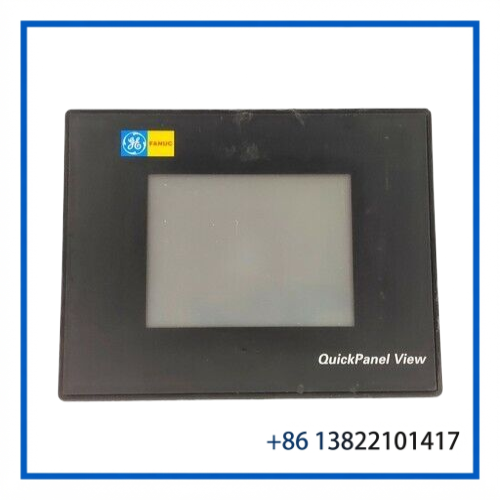
The GE FANUC IC754VGL06CTD-GJ is a QuickPanel View ES0622 industrial operator interface with a 6-inch color touchscreen. It is designed for machine operation, process visualization, alarm monitoring, parameter adjustment, and communication with industrial control equipment.
The unit uses a compact panel-mount design and provides a resistive touchscreen interface. The IC754VGL06CTD family supports serial and Ethernet-based industrial communication, making it suitable for legacy GE Fanuc automation installations and other compatible control architectures.
The specific -GJ suffix should be matched against the existing terminal configuration before replacement.
🔧 Key Features
- GE FANUC QuickPanel View ES0622
- Part number: IC754VGL06CTD-GJ
- 6-inch color TFT touchscreen
- 320 × 240 pixel QVGA display
- Resistive touchscreen technology
- Embedded Windows CE operating environment
- Proficy Machine Edition / QuickPanel View software environment
- Ethernet and serial communication interfaces
- USB connectivity on the IC754VGL06CTD platform
- Panel-mount industrial operator interface
- Suitable for legacy machine and process-control applications
📋 Product Datasheet
| Parameter | Specification |
|---|---|
| Brand | GE FANUC |
| Model | ES0622 |
| Part Number | IC754VGL06CTD-GJ |
| Series | QuickPanel View |
| Product Name | 6-Inch Touch Panel / Operator Interface |
| Display | 6-inch Color TFT LCD |
| Resolution | 320 × 240 pixels |
| Touchscreen | Resistive Touch |
| Communication | Ethernet, RS-232/RS-485, USB |
| Operating System | Windows CE-based embedded platform |
| Power Supply | 12–30 VDC |
| Power Consumption | Approx. 24 W |
| Mounting | Panel Mount |
| Condition / Status | Used; verify actual unit condition |
🖥️ Display & Operator Interface
The ES0622 provides a compact graphical interface for industrial operators. The 6-inch color display is suitable for displaying process values, equipment status, alarms, trends, configuration screens, and operator commands.
The resistive touchscreen allows operators to interact directly with configured control screens without requiring an external keyboard or mouse. This makes the QuickPanel View suitable for control cabinets and machine-side operator stations where installation space is limited.
🔌 Communication & System Integration
The IC754VGL06CTD platform supports industrial communication through Ethernet and serial interfaces. Depending on the installed application and system configuration, the terminal can communicate with PLCs, controllers, drives, remote I/O, and other automation devices.
The serial interface supports common RS-232/RS-485 configurations, while Ethernet can be used for network-based communication where supported by the application software.
Before replacement, compare the existing terminal’s communication configuration, application project, firmware/software version, and cable arrangement.
🏭 Typical Applications
The GE FANUC ES0622 can be used for:
- Industrial machine operator panels
- PLC monitoring and control
- Manufacturing equipment
- Process-control systems
- Generator and power-control equipment
- Packaging and material-handling machinery
- Pump and motor control
- Industrial automation cabinets
- Legacy GE Fanuc control systems
- Maintenance and replacement of QuickPanel installations
🛠️ Installation & Maintenance
Before replacing the QuickPanel, shut down the relevant control equipment and isolate the panel’s DC power supply.
- Record the existing communication and power connections.
- Verify the complete IC754VGL06CTD-GJ part number.
- Confirm panel cutout and mounting dimensions.
- Disconnect the DC power and communication cables.
- Remove the existing QuickPanel from the cabinet.
- Install the replacement terminal securely.
- Reconnect power and communication wiring.
- Load or verify the appropriate QuickPanel application.
- Check touchscreen operation and display performance.
- Test PLC/controller communication, alarms, and operator commands.
Keep the touchscreen surface clean and avoid excessive pressure or sharp objects. For a legacy replacement, application backup and firmware compatibility should be checked before commissioning.
🔍 Troubleshooting Guide
Display powers on but no control data is shown:
Check the communication cable, controller address, protocol configuration, and loaded application.
Touchscreen does not respond correctly:
Check the touchscreen surface, calibration settings, and application configuration.
Unit does not power on:
Verify the DC supply voltage, polarity, terminal connections, and protection device.
Communication is intermittent:
Inspect Ethernet/serial connectors and cables and verify the configured communication parameters.
Replacement terminal does not load the existing project:
Check the project version, operating environment, firmware, and application compatibility.
❓ Frequently Asked Questions
Q: What is GE FANUC IC754VGL06CTD-GJ?
A: It is a 6-inch QuickPanel View ES0622 industrial touchscreen operator interface.
Q: What is the display resolution?
A: The IC754VGL06CTD platform uses a 320 × 240 pixel color display.
Q: Is the touchscreen resistive?
A: Yes. The QuickPanel View platform uses a resistive touchscreen.
Q: What power supply does it use?
A: The IC754VGL06CTD platform is designed for low-voltage DC operation, commonly specified at 12–30 VDC. Verify the actual unit nameplate before energizing.
Q: Is the IC754VGL06CTD still a current product?
A: The IC754VGL06CTD is a legacy/discontinued QuickPanel View product, so it is primarily relevant to existing-system maintenance and replacement.
Q: What should I verify before purchasing a replacement?
A: Compare the complete part number, suffix, display size, communication ports, power requirements, firmware/application version, mounting arrangement, and connector configuration.
📦 Recommended GE FANUC QuickPanel Models
- GE FANUC IC754VGL06CTD-GJ – QuickPanel View ES0622
- GE FANUC IC754VGL06CTD – QuickPanel View 6-Inch HMI
- GE FANUC IC754VGL06CTD-JJ – QuickPanel View ES0622
- GE FANUC IC754VGL06CTD-NL – QuickPanel View
- GE FANUC IC754VGL06MTD – QuickPanel View
- GE FANUC IC754VGI10MTD – QuickPanel View HMI
- GE FANUC IC754VBI10MTD – QuickPanel View HMI
- GE FANUC IC754VSI10MTD – QuickPanel View HMI
- GE FANUC QuickPanel View 10-Inch Operator Interface
- GE FANUC QuickPanel View Industrial HMI Series
📌 Spare-Part Recommendation
For an existing ES0622 installation, the exact IC754VGL06CTD-GJ part number should be treated as the primary replacement reference. Before installation, verify the suffix, communication configuration, application software, firmware, power requirements, and physical mounting arrangement to ensure the replacement matches the existing QuickPanel system.