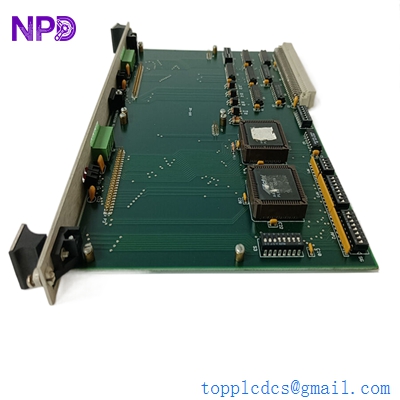

Description
- Model: HE700GEN200C
- Brand: GE Fanuc / Horner APG
- Series: Series 90-70 PLC / Genius I/O System
- Core Function: Genius I/O Gateway for high-speed distributed networking
- Product Type: Communication / Gateway Module (New Surplus)
- Key Specs: Supports 153.6 Kbaud Genius Bus | 6U VME form factor | Dual-port isolation
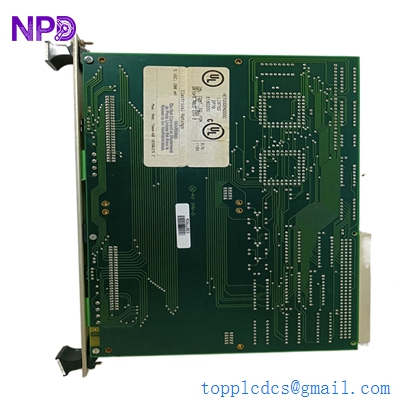
HORNER HE700GEN200C
Key Technical Specifications
- Module ID: HE700GEN200C
- Backplane Compatibility: GE Fanuc Series 90-70 (VME-based)
- Network Protocol: GE Genius Bus (Global Data and I/O)
- Data Rate: Selectable 153.6 Kbaud, 76.8 Kbaud, or 38.4 Kbaud
- Distance: Up to 7,500 feet (2,286 meters) depending on cable and baud rate
- Power Consumption: 550 mA @ +5 VDC (from backplane)
- Bus Isolation: 1,500 V RMS between Genius Bus and PLC logic
- Status Indicators: OK, Communications, and Circuit Fault LEDs
- Configuration: Via Proficy Machine Edition or Logicmaster 90 software
- Operating Temp: 0 °C to +60 °C (32 °F to 140 °F)
- Hardware Revision: Revision C (enhanced noise immunity)
Installation & Configuration Guide
Phase 1: Preparation (Pre-Installation)
⚠️ Safety First:
- Ensure the Series 90-70 rack is powered down before inserting or removing the module.
- Backup: Verify you have the current hardware configuration file (.hwc) for your PLC project.
- Genius Bus Addressing: Determine the Serial Bus Address (SBA) for this gateway (0–31). Address 31 is usually reserved for the Hand-Held Monitor (HHM).
Phase 2: Removal of Faulty Module
- Cable Management: The Genius Bus uses a shielded twisted pair. Label the “In” and “Out” wires. If this is the last device on the bus, note the 75-ohm or 150-ohm termination resistor.
- Unlocking: Use the top and bottom levers to eject the 6U module from the 90-70 rack.
- Visual Check: Inspect the 96-pin connector on the backplane for dust or bent pins. Use compressed air if necessary.
Phase 3: New Module Installation
- DIP Switches: The HE700GEN200C often has internal jumpers or switches for baud rate and address settings. Match these exactly to the original board settings before sliding it in.
- Seating: Align the module with the card guides and push firmly until the ejector handles click into place.
- Wiring: Reconnect the Genius Bus wires to the terminal block. Ensure the shield wire is properly grounded to the frame ground (GND) terminal to prevent data corruption.
Phase 4: Commissioning & Testing
- Power Up: Turn on the PLC rack. The “OK” LED should be solid green.
- Network Sync: The “COMM” LED should flicker, indicating active traffic on the Genius Bus. If it stays off, check your baud rate settings.
- Software Validation: In Proficy Machine Edition, check the “Target Diagnostics.” The HE700GEN200C should show as “Present” with no configuration mismatches.
- I/O Verification: Toggle a remote Genius I/O point to ensure the gateway is passing data to the CPU correctly.
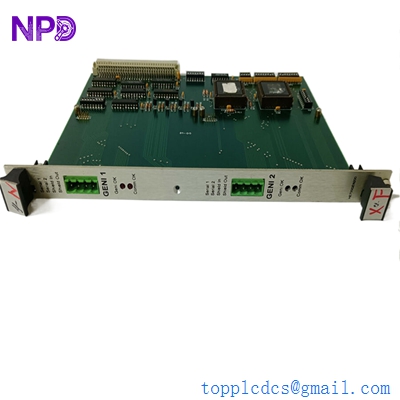
HORNER HE700GEN200C
Customer Cases & Industry Applications
Case 1: Automotive Assembly Line Downtime Recovery
Situation: A major automotive plant in the Midwest was using a legacy Series 90-70 PLC to control a critical conveyor system. The Genius I/O network suddenly dropped, tracing the fault to a “Dead” HE700GEN200C gateway module.
Task: The plant was losing $5,000 per minute in idle labor. Local distributors had zero stock of this obsolete Horner part, and GE Fanuc’s official support suggested a total system migration—a 3-week project.
Action: The plant engineer found our New Surplus unit online. We verified the “Revision C” status and shipped it via “Next Flight Out” service. The part arrived at the plant 14 hours after the initial call.
Result: The module was installed, the SBA was set, and the bus synchronized immediately. The plant was back in production in under 24 hours. The maintenance lead told us: “Honestly, we thought we were looking at a month of downtime. This spare saved our quarterly production targets.”
Case 2: Strategic Spares for Municipal Water Treatment
Situation: A municipal water treatment facility utilized Genius I/O for its distributed pump stations. The system was installed in 2002 and remains highly reliable, but the HE700GEN200C modules were becoming a single point of failure with no available spares.
Task: The facility needed to prove to their board of directors that they could maintain the system for another 5 years without a $2 million upgrade. They required “New Surplus” parts, as used parts from eBay lacked the necessary reliability for public infrastructure.
Action: We provided a pair of HE700GEN200C modules in their original packaging. These units had zero running hours, meaning the internal opto-isolators and capacitors were at peak health.
Result: The facility successfully extended its maintenance window. One spare was used during a scheduled upgrade of a remote terminal unit (RTU), and the other remains in the “Emergency Spares” locker, providing the city with critical operational security.
Frequently Asked Questions (FAQ)
Q: What is the difference between Horner and GE Fanuc for this part? A: Horner APG was a primary developer of specialized modules for the GE Series 90-70. While the PLC rack is GE, the HE700GEN200C is a Horner-branded product designed specifically to bridge Genius Bus technology into the VME backplane of the 90-70.
Q: Can I use this with the newer PACSystems RX7i? A: Yes, the RX7i is backward compatible with 90-70 VME modules. However, you must ensure your hardware configuration in the software specifically selects the Horner Genius Gateway driver.
Q: Is “Revision C” important? A: Very. “Revision C” included significant improvements in EMI (Electromagnetic Interference) shielding. If your PLC is located near large VFDs or motors, the Rev C board will be much more stable than older A or B revisions.
Q: Why choose New Surplus over refurbished? A: In my experience, refurbished communication boards are risky. Genius Bus communication relies on precise timing and clean signals. Refurbished boards often have aged components that can cause “ghost” errors or intermittent bus drops that are a nightmare to troubleshoot. New Surplus gives you a fresh start.
Q: How do I set the Baud Rate? A: On the HE700GEN200C, this is typically handled via software configuration in your PLC project. However, some older versions used internal jumpers. If you provide your project settings, I can verify the jumper positions for you before shipping.