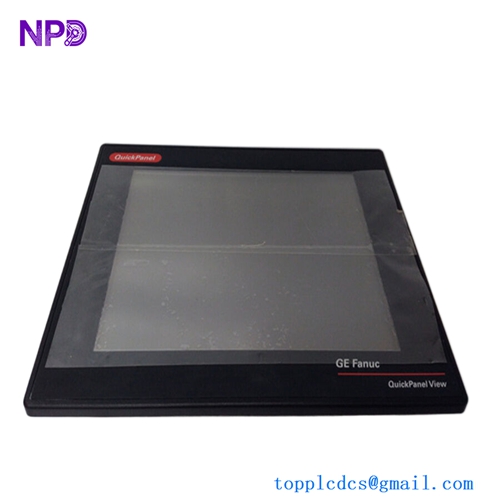


Description
The GE IC754VSI12VTD is an industrial Human Machine Interface (HMI) from the QuickPanel family, combining a 12‑inch color touchscreen display, embedded CPU, and communication interfaces in one panel for machine and process visualization. It is intended for panel mounting on control cabinets and provides operators with a graphical interface to monitor, control, and diagnose automation systems.

GE IC754VSI12VTD
Product description and key parameters
This model is a 12‑inch color TFT LCD operator panel with integrated touchscreen, designed for use with PLCs and other controllers in industrial environments. Typical characteristics for this family include:
- Display
- Approx. 12″ diagonal active area.
- Color TFT LCD, capable of showing detailed graphics and text.
- Resolution in the 800×600 class, suitable for complex process mimics.
- Backlit display for use in factory lighting conditions.
- Input
- Resistive touchscreen, allowing operation with finger or gloved hand.
- Processor and memory
- Embedded CPU suitable for HMI tasks (graphics, communication, basic scripting).
- Onboard RAM and flash storage for application screens, recipes, alarms, and logs (same family units commonly provide 32 MB RAM).
- Power
- DC supply, typically 12/24 VDC for this series.
- Power consumption under 50 W in normal operation.
- Interfaces
- One Ethernet port (10/100 Mbps) for connection to controllers or networks.
- At least one serial port (RS‑232/RS‑485 combo) for PLC or device communication.
- Possible USB port(s) for project download and data backup (depending on sub‑variant).
- Environmental
- Front panel rated to a NEMA / IP industrial protection level when correctly mounted in a suitable enclosure.
- Designed for continuous use in industrial ambient temperature and vibration conditions typical of control panels.
Even though exact numbers differ between suffixes (VTD vs CTD, etc.), IC754VSI12VTD belongs to this 12‑inch QuickPanel class, so its capabilities and limits are in this range.
Datasheet‑style summary
A datasheet for IC754VSI12VTD typically covers:
- Electrical:
- DC input voltage range around 12–24 VDC (with tolerance band).
- Maximum current draw / real power (tens of watts).
- Display:
- 12″ color TFT, resolution around 800×600 pixels.
- Viewing angle and brightness sufficient for control‑room / panel‑door usage.
- Computing:
- Embedded operating system in the QuickPanel family (commonly Windows CE on related part numbers).
- Application runtime for QuickPanel / Proficy Machine Edition View projects.
- Interfaces:
- Ethernet 10/100 Mbps.
- Serial port(s) RS‑232, RS‑485 (often via a shared connector).
- Mechanical:
- Panel‑mount unit with a cutout slightly smaller than the front bezel.
- Depth around 60–70 mm behind the panel.
- Weight in the several‑kilogram range.
The datasheet also lists allowable ambient temperature and humidity, vibration/shock resistance, and compliance with industrial standards.
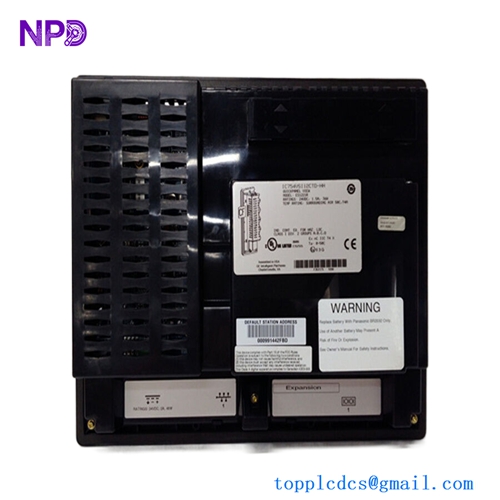
GE IC754VSI12VTD
Origin
This HMI is part of GE’s QuickPanel line (originally GE Fanuc), designed by GE for industrial automation markets. Production for this family has historically been associated with GE’s industrial controls manufacturing operations serving North America, Europe, and Asia; the unit is specified and supported as an industrial‑grade operator interface rather than a consumer product.
Typical application fields
The IC754VSI12VTD is used wherever a 12‑inch industrial HMI is appropriate:
- Factory automation
- Machine‑level control panels for packaging, assembly, material handling, and inspection systems.
- Process industries
- Local operator stations on skid‑mounted equipment, pumps, compressors, and small process units.
- Utilities and infrastructure
- Small substation panels, water treatment skids, and building services systems.
- OEM machinery
- As the main operator panel for custom equipment where a mid‑size touchscreen is required.
Its mix of Ethernet and serial ports makes it suitable both for newer Ethernet‑based PLCs and legacy serial PLCs.
Basic usage instructions
1. Mechanical installation
- Cut a rectangular opening in the panel door or mounting plate according to the dimensional drawing for 12‑inch QuickPanel units (the cutout is slightly smaller than the bezel).
- Insert the IC754VSI12VTD from the front and secure it using the provided clamp brackets or mounting hardware from the rear.
- Ensure the gasket on the bezel seats evenly against the panel to maintain the front protection rating.
- Provide enough space behind the panel for cabling and ventilation; avoid mounting directly above high‑heat devices without shielding.
2. Power and grounding
- Connect the DC power supply (12/24 VDC, as specified) to the power terminals, observing polarity.
- Use a power supply sized to cover the panel’s maximum power consumption with some margin.
- Connect protective earth / functional ground as recommended, bonding the panel to the cabinet ground to reduce noise and improve ESD immunity.
- Use a separate HMI supply or proper filtering if the PLC or drives generate significant electrical noise.
3. Communication wiring
- Ethernet:
- Connect the RJ‑45 port to an industrial Ethernet switch using twisted‑pair cable (Cat5e or better).
- Configure IP address and network settings in the HMI so it can communicate with PLCs and SCADA systems.
- Serial:
- If using RS‑232/RS‑485, wire the corresponding ports to the PLC or device according to the pinout.
- Match baud rate, parity, data bits, and stop bits with the PLC settings.
4. Application development and download
- Create the HMI project using GE’s configuration software (for this family, typically Proficy Machine Edition View).
- Design screens for status, alarms, trends, recipes, and diagnostics, and map graphic objects to PLC tags over Ethernet or serial protocols.
- Download the application to the IC754VSI12VTD via Ethernet, serial, or USB, depending on the supported options.
- After download, place the panel in run mode and verify that data is refreshing, alarms behave correctly, and navigation works as intended.
5. Operation and maintenance
- Operators interact via the touchscreen to start/stop equipment, adjust setpoints, acknowledge alarms, and view trends.
- Keep the screen clean with a soft, slightly damp cloth; avoid aggressive chemicals that may damage the touchscreen or bezel.
- Periodically check:
- That the screen backlight is bright enough (dim backlight may indicate aging).
- That connectors and cables are secure and free from damage.
- That panel ventilation is not obstructed.
- When servicing:
- Isolate power to the panel and any connected control equipment.
- Observe anti‑static precautions if the panel is opened or removed.
Recommended related GE HMI models
If you are considering the IC754VSI12VTD, other QuickPanel models from the same brand that are commonly used include:
- IC754VSI12CTD
12‑inch color TFT touchscreen QuickPanel with similar format and capabilities, often specified with 32 MB RAM and 12/24 VDC supply. Suitable as a close alternative in the same size class. - IC754VGI06STD
6‑inch color QuickPanel HMI for applications needing a smaller panel, useful in cramped panels or simple machines. - IC754VBI08STD
8‑inch color QuickPanel, a mid‑size option between small and 12‑inch units, often chosen for compact machines requiring more screen real estate than 6‑inch models. - IC754VSI15‑series variants
15‑inch color QuickPanel models for applications needing larger process overviews or multi‑window displays, typical on larger machine centers or process skids.
These related models share similar software tools and user experience, allowing reuse of HMI projects with minimal rework when changing screen size or upgrading hardware within the GE QuickPanel family.