
Description
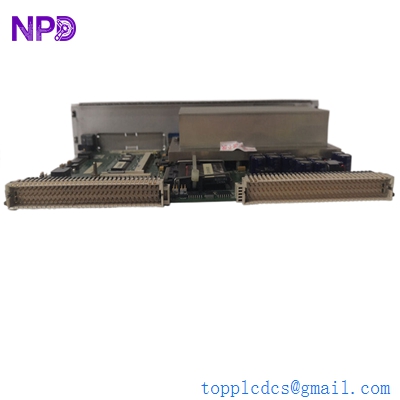
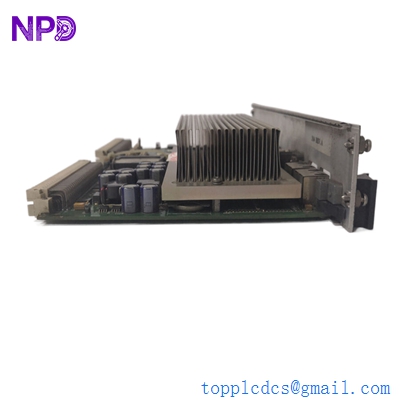
- Model: GE IS215UCVFH2BB (VMIVME-7650-83H)
- Brand: General Electric (GE) / GE Vernova
- Series: Mark VI Speedtronic Control System
- Core Function: High-performance VMEbus Controller / Host Processor
- Product Type: VME System CPU Board (UCVF Model)
- Key Specs: Intel-based processor, dual Ethernet (IONet), VMEbus interface, 256MB+ RAM
- Base Hardware: GE/VME VMIVME-7650-83H series
- Part Number: 350-007650-83H Rev C
- Processor: Intel Pentium III / Celeron (High-clock speed variant)
- Memory: 256 MB SDRAM (typical for UCVF series)
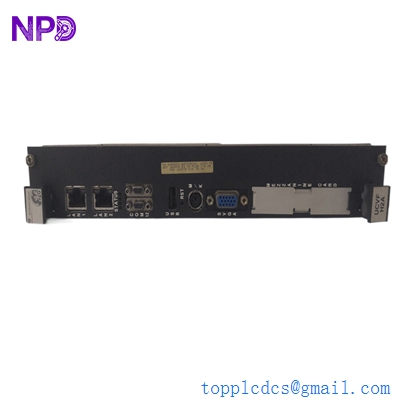
- Front Panel Interfaces:
- 2x RJ-45 Ethernet ports (for IONet communication)
- 1x VGA Video output
- 2x RS-232 Serial ports (COM1/COM2)
- 1x PS/2 Keyboard/Mouse port
- Bus Architecture: 64-bit VMEbus Interface (Single-slot)
- Storage: Integrated CompactFlash (CF) slot for OS and application logic
- Operating System: Typically configured for QNX real-time OS
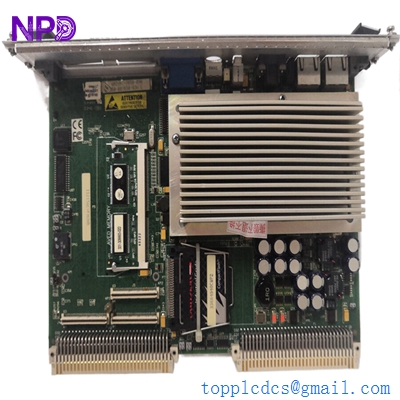
GE IS215UCVFH2BB VMIVME-7650-83H 350-007650-83H C
Application Scenarios & Pain Points
The IS215UCVFH2BB is a “UCVF” style controller, which is essentially a more powerful version of the common UCVE series. In a Mark VI rack, this board acts as the primary “brain,” coordinating the high-speed Ethernet IONet communication between the controller and the I/O racks. Because it is a PC-based VME controller, it is susceptible to typical PC-related failures over time, such as CMOS battery depletion or CompactFlash corruption. When a UCVF fails, the entire control sequence for your gas or steam turbine stops, making it one of the most critical spares for a Mark VI system.
1. Main Turbine Control (Mark VI)
Managing the critical control loops for fuel flow, air intake, and load synchronization in utility-scale power plants.
2. High-Speed Data Acquisition
Used as a host processor in VME racks that require massive data throughput between local I/O modules and plant-wide HMIs.
3. Legacy System Life Extension
Replacing older UCVE or early-model UCVF boards to improve scan times and system responsiveness without a full Mark VIe migration.
Case Study: The “HMI Timeout” Crisis
Background: A combined-cycle power plant started seeing intermittent “Controller Communication Timeout” alarms on their HMI. The system would occasionally freeze for 2–3 seconds before recovering.
The Problem: The site team suspected the Ethernet switches, but after testing, the network was clear. We diagnosed the IS215UCVFH2BB and found that the CompactFlash card was suffering from “read/write fatigue” after 12 years of continuous operation. The OS was struggling to access critical files during high-load periods.
The Solution: We supplied a refurbished IS215UCVFH2BB with a new industrial-grade CompactFlash card. Before shipping, we mirrored their original CF card image onto the new hardware and verified the boot sequence on our VME test rack.
The Result: The HMI timeouts stopped immediately.
- Avoided Loss: Prevented a potential nuisance trip that would have cost the plant roughly $150,000 in startup costs and lost revenue.
- Takeaway: If your Mark VI controller is over 10 years old, the CompactFlash card is a ticking time bomb. Proactive replacement of the UCVF board is the safest route to long-term stability.
GE IS215UCVFH2BB VMIVME-7650-83H 350-007650-83H C
Compatible Replacement Models
| Original Model | Replacement Model | Compatibility | Key Differences | Workload |
| IS215UCVEH2A | IS215UCVFH2BB | ⚠️ Software | UCVF (FH) is faster than UCVE (EH) | Requires PME/Toolbox re-config |
| VMIVME-7650 | IS215UCVFH2BB | ✅ Direct | GE-branded version of the VME-7650 | Plug & Play |
| IS215UCVFH1A | IS215UCVFH2BB | ✅ Direct | H2BB is the updated revision | Plug & Play |
Engineer’s Advice: The “H2BB” revision is highly sought after because it resolved some of the thermal issues found in the “H1A” versions. If you are replacing an older UCVF, the H2BB is a superior choice. Crucial: Always back up your site-specific .tcw configuration files before swapping the board.
Troubleshooting Quick Reference
| Symptom | Possible Cause | UCVF Related? | Quick Check | Action |
| No VGA Display | CPU/BIOS Failure | ✅ High | Check if fan is spinning | Replace Board |
| “Waiting for Controller” | CF Card Corruption | ✅ High | Re-seat the CF card in its slot | Replace CF Card or Board |
| Time/Date Resetting | Dead CMOS Battery | ✅ High | Check battery voltage (>3.0V) | Replace CR2032 battery |
| Link LEDs Off | IONet Port Failure | ✅ High | Swap Ethernet cable with a known good one | Replace Board |
Expert Maintenance Tips:
- CMOS Battery: ❗ Warning! These boards use a CR2032 lithium battery. If the battery dies, the board loses its BIOS settings and won’t boot correctly from the CF card. Replace the battery every 3–5 years.
- Dust and Heat: The Intel processors on these boards generate significant heat. Ensure your rack filters are clean. If the heatsink on the UCVF is clogged with dust, the board will thermally throttle, leading to “Controller Timeouts.”
- CF Card Mirroring: Never just “pull” the CompactFlash card while the power is on. This is the fastest way to corrupt the file system. Always shut down the rack power completely before removing or inserting the storage media.