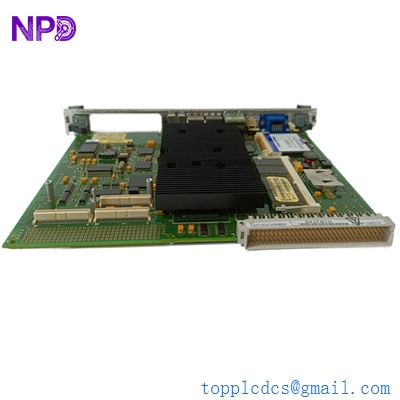


Description
- Model: GE IS215UCVGH1A (VMIVME-7666-111)
- Brand: General Electric (GE) / GE Vernova
- Series: Mark VI Speedtronic Control System
- Core Function: High-performance VMEbus Controller / Host Processor
- Product Type: VME System CPU Board
- Key Specs: Intel-based processor, dual Ethernet ports, VMEbus interface, 128 MB+ RAM
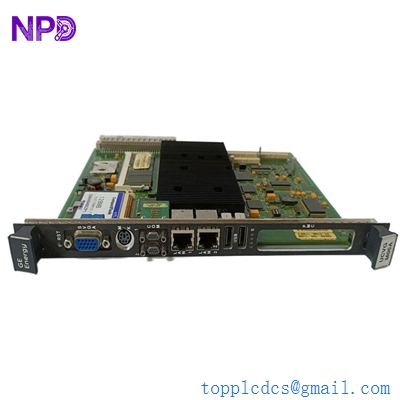
GE IS215UCVGM06A IS215UCVGH1A VMIVME-7666-111000
Key Technical Specifications
- Base Hardware: GE/VME VMIVME-7666-111 series
- Processor: Intel Celeron or Pentium III (Application dependent)
- Operating System: Typically runs QNX or VxWorks (Embedded)
- Memory: 128 MB to 256 MB SDRAM (varies by sub-revision)
- Storage: CompactFlash or Hard Drive (depending on H1A variant)
- Ports: 2x RJ-45 Ethernet, 2x RS-232 Serial, 1x VGA, 1x PS/2 Mouse/Keyboard
- Bus Architecture: 64-bit VMEbus Interface
- Real-time Clock: Integrated with battery backup
- Front Panel: Status LEDs for SYS (System), IDE (Disk activity), and LAN
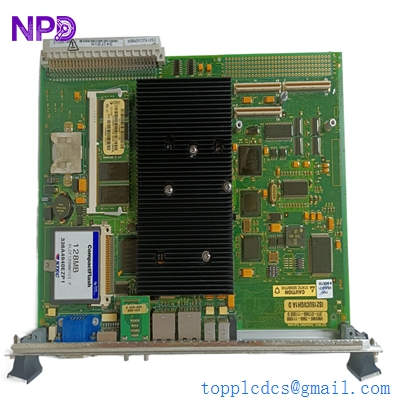
GE IS215UCVGM06A IS215UCVGH1A VMIVME-7666-111000
Application Scenarios & Pain Points
The IS215UCVGH1A is essentially the “brain” of a Mark VI control rack. Unlike simple I/O boards, this is a full industrial PC on a VME card. When this board fails, the entire control loop stops. In my experience, these boards are the most complex to replace because they aren’t just hardware—they hold the runtime environment for your turbine’s logic. Finding an “H1A” revision is getting harder every day, and a failure often means a plant-wide shutdown until a replacement is sourced and configured.
1. Power Generation Control (Mark VI)
Acting as the primary controller for gas or steam turbines, processing hundreds of I/O points in milliseconds to maintain grid synchronization.
2. Complex VME System Hosting
Used in high-speed industrial applications where a robust VMEbus host is required to manage slave modules and communication links.
3. Legacy HMI Interfacing
Serves as the bridge between the high-speed IONet and the operator’s HMI, managing data logging and command execution.
Case Study: The “Cold Boot” Nightmare
Background: A utility plant in Europe had been running their Mark VI system for 15 years without a controller reboot. Following a planned maintenance outage, the IS215UCVGH1A failed to initialize during the power-up sequence.
The Problem: The board was suffering from “capacitor aging” and a dead CMOS battery. The BIOS settings were lost, and the on-board flash storage had corrupted sectors. The plant was stuck in a “Waiting for Controller” state.
The Solution: We provided a fully refurbished IS215UCVGH1A. Before shipping, we performed a 48-hour burn-in test on a VME backplane and verified the BIOS settings for Mark VI compatibility. We also supplied a fresh CMOS battery pre-installed.
The Result: The plant team swapped the board, re-loaded their site-specific application code via the GE Toolbox, and the turbine was back online within 24 hours of the board’s arrival.
- Avoided Loss: Prevented an extended outage that would have cost the utility over $200,000 per day in lost generation revenue.
- Takeaway: If your UCVG controller hasn’t been rebooted in years, you are at risk. Always have a tested spare with a fresh battery on the shelf.
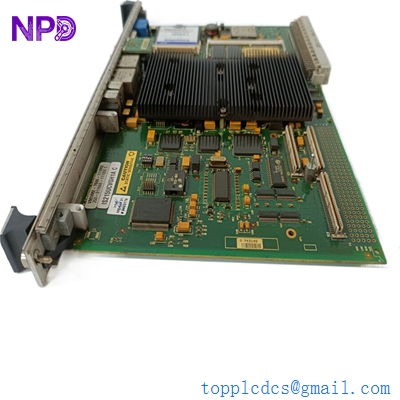
GE IS215UCVGH1A C VMIVME-7666-111000350-017666-11100
Compatible Replacement Models
| Original Model | Replacement Model | Compatibility | Key Differences | Workload |
| IS215UCVEH2A | IS215UCVGH1A | ⚠️ Software | UCVG is a newer/different CPU architecture | Significant; check firmware compatibility |
| VMIVME-7666 | IS215UCVGH1A | ✅ Direct | The IS215 part number is GE’s specific cataloging | Low; swap-in replacement |
| IS215UCVGH1B | IS215UCVGH1A | ✅ Direct | Minor hardware rev changes | Plug & Play |
Engineer’s Advice: The “UCVG” and “UCVE” boards are often confused. While they look similar, they use different drivers in the GE Toolbox software. Always check your configuration in Toolbox before buying. If your system is set up for a UCVG, a UCVE will not work without significant software reconfiguration.
Troubleshooting Quick Reference
| Symptom | Possible Cause | UCVG Related? | Quick Check | Action |
| No VGA Output | CPU or RAM Failure | ✅ High | Check if keyboard NumLock toggles | Replace board or re-seat RAM |
| “CMOS Checksum Error” | Dead Battery | ✅ High | Check battery voltage (should be >3V) | Replace CR2032 battery |
| LAN LEDs Off | Ethernet Controller Fail | ✅ High | Ping the controller IP from HMI | Check IONet cables; replace board |
| VME Bus Fault | Backplane Pin Issue | ⚠️ Medium | Inspect J1/J2 pins on the back of board | Clean pins with Isopropyl Alcohol |
Expert Integration Notes:
- BIOS Battery: ❗ Warning! These boards use a standard CR2032 or a soldered lithium cell. If it dies, the board might “forget” its boot priority. If your board won’t boot from Flash, check the battery first.
- CompactFlash Handling: The storage on these boards is sensitive to static. Always use an ESD wrist strap when handling the CF cards.
- Heat Management: These Intel-based boards run hot. Ensure your VME rack fans are functional. I’ve seen UCVG boards “blue screen” or freeze simply because the rack filter was clogged with dust.