Description
- Model: GE IS215VCMIH2BE (Assembly) / IS200VCMIH2BEE (Board)
- Brand: General Electric (GE)
- Series: Mark VI Turbine Control
- Core Function: Central VME bus controller and communication master
- Product Type: VME Controller Module (Excitation module)
- Key Specs: 80196 Microprocessor | Ethernet Interface | IONet Master
- Processor: Intel 80196 Controller
- Bus Architecture: VMEbus Standard (6U Height)
- Communication: 10Base-T Ethernet Port (RJ45)
- IONet Interface: 3-Channel IONet Communication (Redundant Support)
- Memory: Integrated Flash and RAM for Runtime Configuration
- Diagnostics: Front-panel LED status display (Run, Fail, Status)
- Operating System Compatibility: ControlST / Toolbox for Mark VI
- Power Requirements: +5 V DC from VME Backplane
- Mounting: Single-slot VME Rack Occupancy
- Operating Temp: 0 to +60 °C
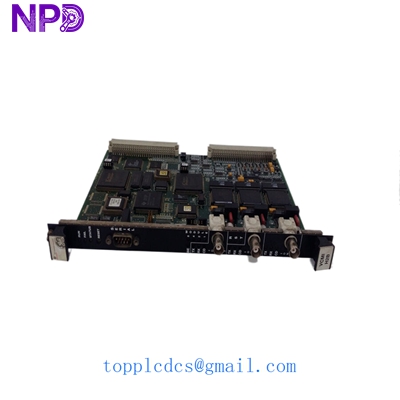
GE IS215VCMIH2BE IS200VCMIH2BEE
Installation & Configuration Guide
Phase 1: Pre-Installation (15 minutes)
Safety First:
- The IS215VCMIH2BE is the “brain” of the VME rack. Replacing it while the turbine is online will cause a trip unless you have a TMR (Triple Modular Redundant) system and follow specific hot-swap procedures.
- Warning: In my experience, even in TMR systems, it is safer to perform this during a planned maintenance window.
Tools & Backup:
- Grounded ESD wrist strap (Mandatory).
- PC with GE Toolbox software and a null-modem serial cable or Ethernet crossover.
- Backup: Ensure you have the latest
.m6bor configuration file for the specific rack.
Phase 2: Removal (5 minutes)
- Verify the “Fail” LED is active on the old board or that it has been logically “Offlined” in the software.
- Unscrew the two captive retention screws at the top and bottom.
- Use the injector/ejector handles to move them outward simultaneously. This breaks the high-density backplane connection.
- Slide the IS200VCMIH2BEE board out of the rack guides.
Phase 3: Configuration (20 minutes)
Address Settings:
- Look at the DIP switches (SW1, etc.) on the PCB. These define the VME address and the IONet ID.
- Crucial: Match the switches on the new IS215VCMIH2BE exactly to the old board. If the ID is wrong, the controller will not communicate with the I/O packs.
- Check the firmware version label. If the new board has a newer version than your existing “R”, “S”, and “T” controllers, you may need to flash the firmware to match the set.
Phase 4: Installation & Software Sync (20 minutes)
- Insert the board and lock the handles.
- Power up the rack.
- Connect your PC to the Ethernet port.
- Use Toolbox to “Download” the configuration. The board will reboot, and the “Run” LED should turn solid Green.
- Check the “Voter” status in the software to ensure the new card is synchronized with the other processors.
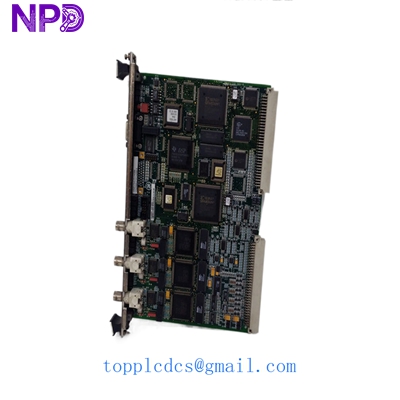
GE IS215VCMIH2BE IS200VCMIH2BEE
Customer Cases & Industry Applications
Case 1: Communication Loss in a 7FA Gas Turbine
Situation: A power plant in the Middle East reported an “IONet Loss of Communication” alarm. The Mark VI rack was unable to see any I/O from the “R” core. Task: Diagnosed as a failed IS215VCMIH2BE master controller. The plant was operating on reduced redundancy, and a second failure would have caused a total blackout. Action: We dispatched a New Surplus IS200VCMIH2BEE board immediately. Because this was a “critical path” item, we provided the customer with the specific DIP switch settings via a video call before the board even left our warehouse. Result: The board was installed within 48 hours of the initial fault. Redundancy was restored, and the plant avoided a potential $200,000 emergency shutdown.
Case 2: Upgrading a Legacy Control System
Situation: A pulp and paper mill was running an older Mark VI system. Their internal spares were all “Used” or “Repaired” units with high failure rates. Task: The mill needed to improve their Buffer stock with reliable, zero-hour components. Action: They procured two IS215VCMIH2BE boards from our “New Surplus” inventory. Result: During their next outage, they swapped one aging board with our new unit. The system boot time improved, and the intermittent communication “retries” they were seeing on the network vanished.
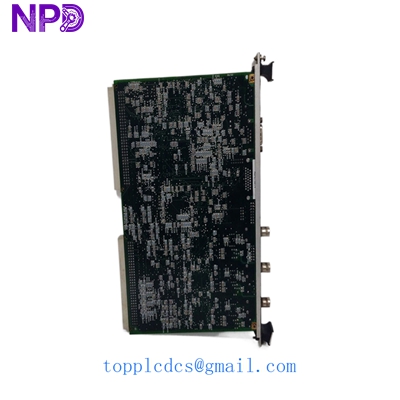
GE IS215VCMIH2BE IS200VCMIH2BEE
Frequently Asked Questions (FAQ)
Q: What is the difference between IS215 and IS200 in the part number? A: In the GE Mark VI world, IS200 refers to the physical printed circuit board (the “naked” board), while IS215 usually refers to the completed assembly, including the faceplate, handles, and pre-loaded base software. We sell them as the complete IS215VCMIH2BE assembly.
Q: Does this board support TMR (Triple Modular Redundancy)? A: Yes. This module is the standard communication master for R, S, and T cores. It manages the IONet traffic that allows all three processors to “vote” on I/O data.
Q: Can I replace a VCMIH1B with this VCMIH2BE? A: Generally, “H2” is a higher-performance version of “H1.” While they are often backward compatible, you must check your system’s “Product Service Guideline” (PSG). In my experience, you should always try to match the “H” revision exactly to avoid software compilation errors.
Q: How do I know if the board is New Surplus? A: We verify the board by inspecting the VME gold fingers for insertion marks. A used board will have distinct vertical scratches; our New Surplus boards are pristine. We also check the date codes on the chips to ensure they match the original factory batch.
Q: What if the board arrives with the wrong firmware? A: We can provide the firmware files and instructions on how to use the GE “Loader” utility to change it. It’s a standard procedure for Mark VI engineers.