Description
Product Core Brief
- Model: GE IS220UCSAH1A
- Brand: General Electric (GE)
- Series: Mark VIe Control System
- Core Function: High-performance stand-alone controller/processor engine
- Product Type: Controller Module (UCSA)
- Key Specs: 667 MHz Processor Dual Ethernet (IONet) QNX Operating System
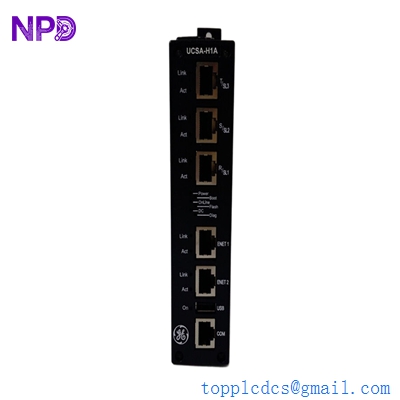
GE IS220UCSAH1A
Key Technical Specifications
- Processor: 667 MHz Freescale PowerPC
- Operating System: QNX Neutrino (Real-time OS for deterministic control)
- Memory: 128 MB DDR SDRAM / 128 MB Compact Flash (Flash-based file system)
- Communication: 3 x 10/100 Ethernet ports (Dual IONet redundancy + 1 Technical port)
- Serial Port: 1 x RS-232 for local diagnostics and configuration
- Input Voltage: 18 to 30 Vdc (24 Vdc nominal)
- Power Consumption: 18 Watts maximum
- Operating Temperature: 0 °C to +60 °C (32 °F to 140 °F)
- Humidity: 5% to 95% non-condensing
- Vibration/Shock: Meets Seismic Category 1 standards for industrial environments
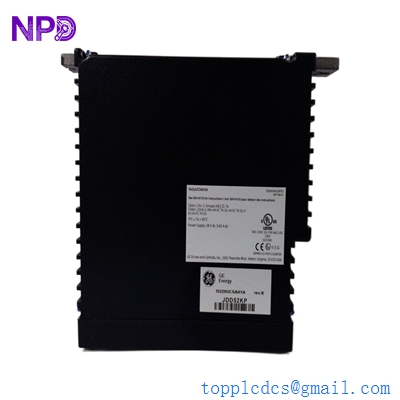
GE IS220UCSAH1A
Application Scenarios & Pain Points
The IS220UCSAH1A is the “brain” of the Mark VIe platform. Unlike older Mark VI boards, this is a self-contained controller that runs the application code, handles the logic, and communicates with the I/O packs over the IONet. The biggest headache for engineers is that when a UCSA module fails, the entire control loop associated with that controller (or the whole turbine, if in simplex mode) stops dead. Because it runs on QNX, it’s highly reliable, but the hardware can eventually fail due to power surges or thermal fatigue in the flash memory. Finding an H1A revision is critical for plants that haven’t yet migrated to the newer UCSBH or UCSCH hardware, as it ensures binary compatibility with existing configurations.
Typical Application Scenarios:
- GE Gas & Steam Turbines Acts as the primary controller for fuel regulation, steam valve positioning, and sequence of events (SOE) logic.
- Balance of Plant (BOP) Control Managing auxiliary systems like cooling water, lubrication skids, and fuel treatment plants.
- Wind Farm Integration Used in large-scale GE wind turbine controllers for pitch and yaw control and grid synchronization.
- Retrofit Projects Replacing legacy Mark V or Mark VI systems with the more modular Mark VIe architecture.
Case Study: The “Ghost” Reboot in a Cogeneration Plant
Background: A 150 MW cogeneration plant was experiencing random “Controller Not Responding” alarms on IONet. The turbine would remain running due to TMR (Triple Modular Redundant) redundancy, but the “R” core would reboot itself every few days.
The Problem: After pulling the diagnostic logs from the Technical port, we found “Flash Memory Read Errors” in the QNX system log. The internal compact flash on the IS220UCSAH1A was reaching its end-of-life, causing the OS to crash under specific load conditions.
The Solution: We supplied a New Surplus IS220UCSAH1A. We guided the customer through the “Controller Download” process in ToolboxST to push the existing application code to the new hardware.
Result:
- Reliability: The random reboots stopped immediately.
- Downtime: Zero hours (The swap was performed live on the “R” core while “S” and “T” maintained control).
- Lesson: Don’t wait for all three cores to fail; if one UCSA starts rebooting, the flash memory on the others is likely not far behind.
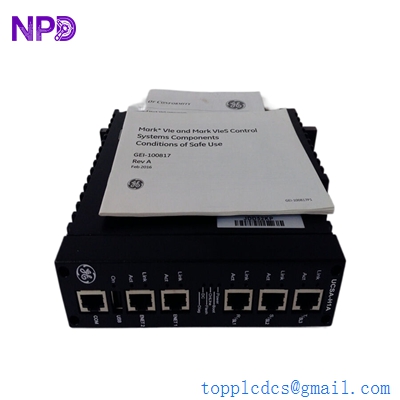
GE IS220UCSAH1A
Compatible Replacement Models
The UCSA has been a workhorse for years, but GE has introduced newer processors that may or may not be direct swaps depending on your WorkstationST/ToolboxST version.
| Original Model | Replacement/Alternative | Compatibility | Key Differences | Change Required |
| IS220UCSAH1A | IS220UCSAH1B | ✅ Direct Replace | Minor component revision; fully backward compatible. | None. Plug and play. |
| IS220UCSAH1A | IS220UCSBH1A | ⚠️ Software Compatible | Faster processor; different memory map. | Requires ToolboxST update and potentially a firmware baseline change. |
| IS220UCSAH1A | IS220UCSCH1A | ❌ Incompatible | Much newer architecture; dual-core. | Requires significant system-wide software migration. |
Troubleshooting Quick Reference
| Symptom | Possible Cause | Related to UCSA? | Quick Check | Action |
| “Status” LED is Solid Red | Kernel/OS Failure | ✅ High | Connect to Serial Port; check for “Boot Failed” messages. | Attempt firmware re-flash; if fails, replace. |
| “IONet” LED Off | Network/Cable Fault | ⚠️ Medium | Swap the Ethernet cable with a known good one. | Check the IONet switch ports. |
| Configuration Mismatch | App Code Version | ✅ High | Check ToolboxST for “Online/Offline Mismatch”. | Perform a “Full Download” to the controller. |
| Boot Loop (Restarting) | Flash Memory Error | ✅ High | Check uptime in the diagnostic screen. | Replace the UCSA module. |
| Excessive Temperature | Fan/Airflow Blockage | ❌ Low | Check cabinet ambient temperature and filters. | Clean the rack; ensure 2″ clearance. |
❗ Pro-Tip: The “Firmware Baseline” Warning
When you install a new IS220UCSAH1A, the firmware inside it might not match your existing system. Always check the firmware version in ToolboxST before putting the core into “Control” mode. If the baseline doesn’t match, you must perform a firmware update to the module, or you’ll get unpredictable behavior on the IONet.