
Description
The GUTOR 0021004-2 is a Front Panel Human-Machine Interface used with GUTOR PEW/PDW industrial UPS systems. The available identification associates the panel with ARP 32.03, A073, 0400782/02, and revision Rev E.
The front panel provides the operator interface for viewing UPS operating information, status indications, alarms, and system controls. It is intended for installation as part of the GUTOR UPS control architecture rather than as a general-purpose standalone HMI.

📊 Product Datasheet
| Parameter | Specification |
|---|---|
| Brand | GUTOR / Schneider Electric |
| Model | 0021004-2 |
| Series | PEW / PDW |
| Product Name | Front Panel Human-Machine Interface |
| Type | HMI / Front Panel |
| Controller Platform | 0400782/02 / 0M-94035A |
| Internal Designation | A073 |
| Model Reference | ARP 32.03 |
| Revision | Rev E |
| Material Rating | 94V-0 |
| Application | Industrial UPS Monitoring & Control |
| Operating Voltage | System-dependent |
| Display | Operator Status / Display Interface |
| Dimensions | System cabinet-dependent |
| Weight | Approx. 1.03 kg |
| Country of Origin | Not consistently verified |
The 0021004-2, A073, ARP 32.03, Rev E, 94V-0 and approximately 1.03 kg details are supported by current product records.
⚙️ Main Features
🖥️ Front-panel HMI for GUTOR PEW/PDW UPS systems
🔹 Operator status and system information display
🔹 Local interface for UPS monitoring
🔹 Alarm/status indication
🔹 Front-panel control interface
🔹 Part number 0021004-2
🔹 Associated with 0400782/02 / 0M-94035A
🔹 Revision Rev E
🔹 A073 system designation
🛠️ Operating Procedure & How to Use
The front panel should be operated only after confirming that it is compatible with the installed GUTOR UPS controller and firmware configuration.
Before installation:
- Confirm 0021004-2 on the original panel.
- Check the revision marking.
- Verify the controller/platform identification.
- Photograph the rear connectors and communication cables.
- Record the original cable positions.
- Put the UPS into the approved maintenance condition.
- Isolate power if required by the site procedure.
- Remove the existing panel carefully.
- Install the replacement panel.
- Reconnect the interface/communication cables.
- Check that every connector is fully seated.
- Restore the UPS control power.
- Allow the HMI to initialize.
- Check the display, LEDs, buttons, alarms, and communication.
- Compare displayed system information with the actual UPS condition.
🔌 Startup Sequence
⚠️ The exact startup sequence depends on the GUTOR PEW/PDW UPS configuration.
- Confirm the panel is securely installed.
- Verify communication cables are correctly connected.
- Confirm the UPS control system is ready.
- Restore control power according to the UPS procedure.
- Allow the front panel to complete initialization.
- Check display illumination and status indicators.
- Verify communication with the main controller.
- Check active alarms.
- Review UPS voltage, operating mode, and system status.
- Test the permitted front-panel navigation and control functions.
- Confirm that displayed information corresponds with the UPS system.
- Return the UPS to normal operation after successful verification.
⏹️ Shutdown Sequence
- Place the UPS in the approved operating condition.
- Follow the normal GUTOR shutdown or bypass procedure.
- Do not use the HMI as a substitute for electrical isolation.
- Isolate power when panel replacement is required.
- Verify safe electrical conditions before disconnecting cables.
- Disconnect the communication/interface cables.
- Remove the panel carefully.
- Protect the removed HMI against ESD and physical damage.
📖 Product Usage Notes
The 0021004-2 front panel is an operator interface rather than the main UPS power-control stage.
Typical operator functions may include:
🖥️ Viewing UPS operating status
⚠️ Reviewing alarms and warnings
📊 Monitoring system parameters
🔧 Accessing permitted configuration menus
🔘 Performing authorized local commands
For replacement work, matching the part number and revision is important. One current listing identifies the unit as 0021004-2 / Rev E, while another identifies it as a PEW/PDW HMI Controller associated with 0400782/02.
Do not assume that a physically similar GUTOR front panel will work with every PEW/PDW system. Firmware, controller revision, communication interface, and panel configuration can affect compatibility.
🔧 Maintenance Recommendations
🧹 Keep the front panel clean and dry.
🔌 Inspect the rear connectors for oxidation or loose contacts.
🖥️ Check the display for missing characters, flickering, or abnormal illumination.
🔘 Check buttons for sticking or intermittent operation.
⚠️ Record recurring communication or alarm faults.
📋 Keep a record of the installed panel part number and revision.
If the panel displays a communication fault, first inspect the communication cable and connectors before replacing the HMI. A communication problem can originate from the main controller or wiring rather than the front panel itself.
❓ Common Questions & Answers
Q: What is GUTOR 0021004-2?
A: It is a GUTOR PEW/PDW Front Panel Human-Machine Interface used for local UPS monitoring and operator interaction.
Q: What is the associated controller platform?
A: Product records identify 0400782/02 / 0M-94035A as the controller platform associated with this panel.
Q: What is A073?
A: A073 is an internal/system designation associated with this front-panel assembly.
Q: What is the revision?
A: The referenced unit is identified as Rev E.
Q: What is the approximate weight?
A: A current product record lists approximately 1.03 kg.
Q: Is this a complete UPS controller?
A: No. It is an operator-facing HMI/front-panel assembly. The main UPS control functions are handled by the associated control electronics.
Q: Can it be used with any GUTOR UPS?
A: No. Compatibility should be confirmed against the PEW/PDW system, controller platform, revision, and communication configuration.
Q: Can the panel be replaced while the UPS is energized?
A: Do not assume hot-swapping is supported. Follow the specific GUTOR service procedure and site electrical safety requirements.
Q: What should I check before purchasing?
A: Confirm 0021004-2, PEW/PDW, 0400782/02, revision, connector arrangement, and the original UPS model.
🔎 Recommended GUTOR Related Models & Modules
- GUTOR 0P2446 / 640-1017 — Main Processor Board
- GUTOR 0P2447 / 640-1017 — Main Processor Board
- GUTOR 0P0363 / 640-0573 — Control PCB
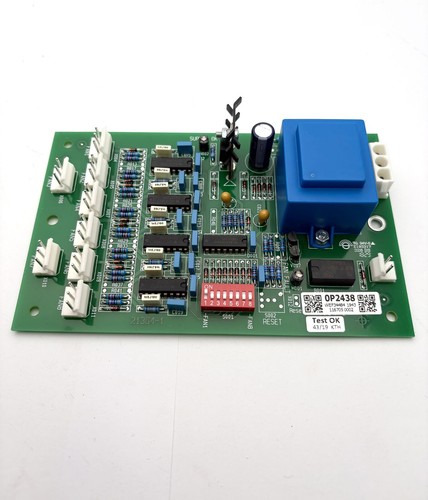
- GUTOR 0P2438 / 21364-1 — Fan Controller PCB
- GUTOR 0P9910 / 0021404 — Interface Fuse Board
- GUTOR 0021004-2 / 0400782/02 — PEW/PDW Front Panel HMI
- GUTOR 0P0280 — AC Power Supply Module
- GUTOR 0P0284 — DC Power Supply Module
- GUTOR 0P9914 — Adapter / Interface Board
- GUTOR 0P9917 — Interface / Control Board