
Description
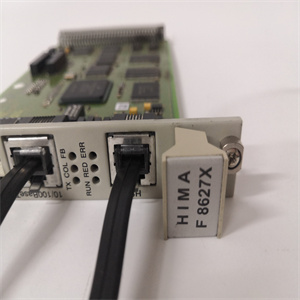
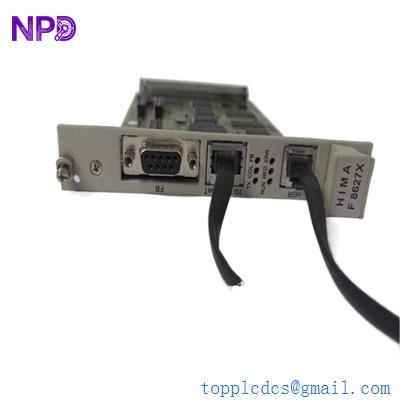
- Model: HIMA F8627X
- Brand: HIMA (Germany)
- Series: HIQUAD (H41q / H51q System)
- Core Function: High-speed Ethernet communication module for safety-related data exchange
- Product Type: Communication Module / Ethernet Interface
- Key Specs: 10/100 Mbps, RJ45 Interface, supports safeethernet protocols
- Communication Standards: IEEE 802.3 (Ethernet)
- Data Rate: 10/100 Mbit/s (Autonegotiation)
- Transmission Protocol: safeethernet (HIMA proprietary) and standard TCP/UDP/IP
- Hardware Interface: RJ45 connector on the front panel
- Compatibility: HIMA H41q and H51q safety systems
- Redundancy: Supports redundant configurations for high-availability communication
- Diagnostics: Integrated LEDs for Link, Activity, and Module Status
- Isolation: Galvanic isolation between the internal bus and the Ethernet network
- Current Consumption: Approximately 0.5 A at 5 V DC (internal)
- Safety Rating: Suitable for use in applications up to SIL 3 (IEC 61508)
HIMA F8627X
Installation & Configuration Guide
Phase 1: Pre-Installation (Estimated time: 15 minutes) ⚠️ Safety First:
- The F8627X is often used for Peer-to-Peer safety communication between different HIMA racks. Ensure your network topology is verified before insertion.
- IP Addressing: Ensure you have the assigned IP address, Subnet Mask, and Gateway details ready for the ELOP II or SILworX configuration.
- Check the “X” suffix. In the HIMA world, the “X” often denotes a coating for harsh environments (G3 coating). Ensure this matches your original hardware requirements.
Phase 2: Removal (Estimated time: 5 minutes)
- Unplug Ethernet: Gently remove the RJ45 cable. Avoid pulling on the cable itself to protect the connector clip.
- Release Retainers: Loosen the top and bottom screws on the faceplate.
- Extraction: Use the pull-handles to withdraw the module. HIMA modules use a high-density DIN connector on the backplane; pull straight to prevent pin misalignment.
Phase 3: Installation (Estimated time: 10 minutes)
- DIP Switches: Check for hardware address switches on the PCB. Match these exactly to the unit being replaced.
- Slide and Seat: Align the F8627X with the rack guides. Push until the module is fully seated and the faceplate is flush.
- Secure: Tighten the screws. This is essential for proper grounding of the Ethernet shield.
Phase 4: Commissioning & Connectivity (Estimated time: 30 minutes)
- Power up the rack.
- LED Diagnostics: The “LNK” (Link) LED should be solid green once the Ethernet cable is reconnected.
- Software Configuration: Open the ELOP II / SILworX project. Perform a “Ping” test to the module’s IP.
- Redundancy Sync: If using redundant F8627X modules, verify that the “Safe Data” is successfully synchronized between the two controllers.
Customer Cases & Industry Applications
Case 1: Offshore Platform Fire & Gas System A gas platform in the North Sea utilized HIMA H51q systems for their Fire & Gas (F&G) logic. A faulty Ethernet module led to a loss of communication between the central control room and the remote I/O rack. We delivered a New Surplus F8627X via helicopter-priority shipping. The on-site technician swapped the module and restored the safety-critical link within 4 hours of the part arriving, maintaining the platform’s safety certification.
Case 2: Chemical Plant Process Safety Link A chemical facility in Singapore needed to link two separate HIMA H41q safety racks for a shared Emergency Shutdown (ESD) function. They purchased our New Surplus F8627X modules to enable safeethernet communication. By utilizing these modules, they achieved a SIL 3 rated communication link between the two buildings without the need for complex hard-wiring.
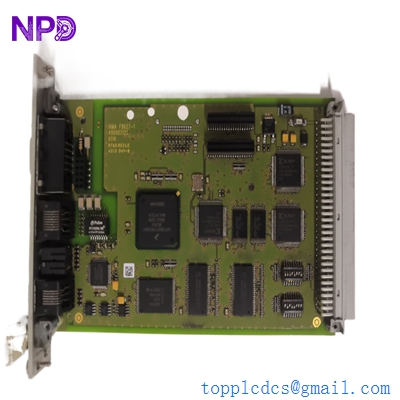
HIMA F8627X
Frequently Asked Questions (FAQ)
Q: Can I use the F8627X with modern SILworX software? A: Yes, the F8627X is compatible with both the legacy ELOP II and the newer SILworX engineering environments, provided your CPU firmware supports it. To be honest, it is the standard “workhorse” for Ethernet communication in the HIQUAD series.
Q: What is the difference between F8627 and F8627X? A: The “X” version is typically the G3-coated version, designed for increased resistance to corrosive gases and harsh environmental conditions. In my experience, it is always safer to use the “X” version even if the original was non-coated, as it provides better longevity.
Q: Why is my “Activity” LED not blinking? A: This usually means there is no data traffic. Check if the “Link” LED is on; if it isn’t, the issue is likely the cable or the network switch. If Link is on but Activity is off, double-check your IP configuration in the HIMA software.
Q: Is “New Surplus” reliable for SIL 3 safety systems? A: Absolutely. HIMA hardware is engineered for extreme reliability. These New Surplus units are original, un-used parts. For safety systems, a “zero-hour” unit is often preferred over a refurbished unit because the electronic components have not been subjected to years of thermal stress.
Q: How many F8627X modules can I put in one rack? A: Typically, HIMA racks support two communication modules for redundancy (one in the left slot, one in the right of the CPU section). Check your specific rack layout to ensure you have the correct bus address available.
I’m always open to corrections if I get something wrong; the best way to handle that is to just tell me what I missed or what I need to know! You can also always turn off the use of this personal context in your settings.