Description
🔥 Product Overview
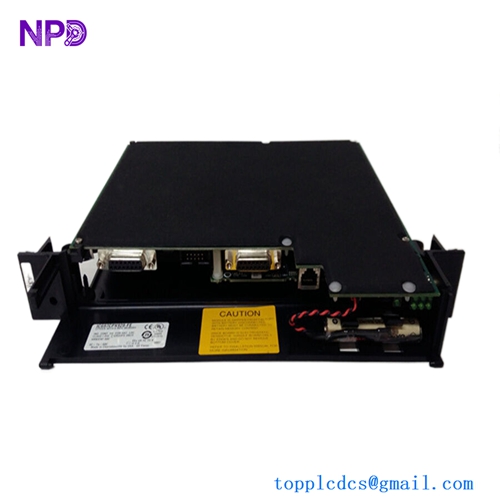
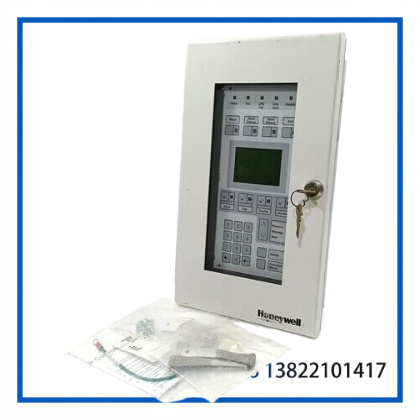
The Honeywell XLS1000 Fire Alarm Controller Module is designed for use within the Honeywell XLS1000 modular fire alarm system. The XLS1000 platform uses a modular architecture that allows central processing, loop control, display, communication, power, and signaling functions to be configured according to system requirements.
This controller module is intended for fire detection and alarm system integration, providing coordination between system modules, field devices, operator interfaces, and networked control panels. It can be used in applications where existing XLS1000 installations require replacement or spare control hardware.
The supplied unit is identified as 260519 Rev 4.0. Because XLS1000 systems are configurable and older installations may contain different module revisions, the exact part number, revision, connector arrangement, and cabinet compatibility should be verified against the existing installation before replacement.
📋 Product Datasheet
| Parameter | Specification |
|---|---|
| Brand | Honeywell |
| Model | XLS1000 |
| Part / Revision | 260519 Rev 4.0 |
| Series | XLS1000 Fire Alarm System |
| Product Name | Fire Alarm Controller Module |
| Product Type | Fire Alarm Control / System Controller Module |
| System Architecture | Modular Fire Alarm System |
| Communication | XLS1000 system/network communication |
| Condition / Status | Used / Surplus; verify actual unit condition |
| Country of Origin | Not specified; verify unit label |
⚙️ Key Features
- 🔥 Designed for Honeywell XLS1000 fire alarm system applications
- 🧩 Modular architecture for system-level expansion and replacement
- 🖥️ Supports coordination with XLS1000 control and display functions
- 🔄 Suitable for maintenance, repair, and spare-parts replacement
- 🔌 Intended for integration with compatible XLS1000 rail modules and system wiring
- 🛠️ Revision identification: 260519 Rev 4.0
- 🏢 Suitable for commercial, industrial, building, and life-safety system installations where XLS1000 equipment remains in service
🔧 System Integration
The XLS1000 platform is built around a modular control architecture. Depending on the cabinet configuration, the system can incorporate central processor, display, power supply, Signature controller, addressable analog controller, initiating-device, signaling, audio, and network communication modules.
For an existing installation, replacement should be performed only after confirming the module type, revision, chassis position, connector configuration, system software compatibility, and field wiring requirements.
The XLS1000 architecture can also support networked panels, allowing multiple cabinets to communicate through the system network. This makes correct module identification especially important when replacing hardware in an operating life-safety system.
🛠️ Installation & Maintenance
Before installation, disconnect the appropriate power sources and follow the site’s approved fire alarm maintenance procedure.
- Record the existing module part number and revision.
- Photograph or document connector and terminal positions before removal.
- Verify that the replacement module matches the existing XLS1000 configuration.
- Check the rail connectors for contamination, corrosion, or mechanical damage.
- Install the module securely in the designated chassis position.
- Restore power according to the manufacturer’s commissioning procedure.
- Check for CPU, communication, ground-fault, trouble, supervisory, and alarm indications.
- Perform functional testing of connected circuits and associated field devices.
- Record the replacement and test results in the fire alarm maintenance log.
⚠️ Fire alarm equipment is life-safety equipment. Installation, programming, commissioning, and functional testing should be performed by qualified personnel in accordance with applicable local codes and the site’s approved procedures.
🔍 Troubleshooting Guide
Controller does not start:
Check system power, rail seating, connectors, and associated power-supply modules. Confirm that the replacement module is correctly installed.
Communication fault appears:
Inspect network wiring, communication interfaces, connectors, and other network nodes. Verify that the replacement module is compatible with the installed system configuration.
Module trouble indication:
Check module seating, terminal connections, configuration data, and system diagnostic information. Compare the installed revision with the approved system configuration.
Field devices are not responding:
Check the associated loop or controller module, field wiring, addressing, and communication path before replacing additional hardware.
Repeated system faults after replacement:
Confirm that the replacement module is the correct XLS1000 hardware type and revision. Also inspect the chassis, power supply, wiring, and connected modules rather than assuming the controller itself is defective.
📦 Condition & Inspection
The listed Honeywell XLS1000 260519 Rev 4.0 unit should be inspected for:
- PCB and component condition
- Connector integrity
- Terminal and mounting hardware
- Corrosion or oxidation
- Physical impact or cracked components
- Revision marking
- Compatibility with the existing XLS1000 cabinet
For used or surplus fire alarm equipment, actual condition, revision, and configuration should be verified against the physical unit before installation.
❓ Frequently Asked Questions
Q1: What system is the XLS1000 module used with?
It is designed for Honeywell XLS1000 modular fire alarm system applications.
Q2: Is XLS1000 still a current-generation fire alarm platform?
No. XLS1000 is an older-generation Honeywell fire alarm platform, so replacement parts are commonly required for maintaining existing installations.
Q3: Is this module a complete fire alarm panel?
The XLS1000 is a modular system. The exact function of an individual controller module depends on its part number and system configuration. It should not be assumed to be a complete standalone fire alarm panel.
Q4: What does Rev 4.0 mean?
Rev 4.0 identifies the hardware or product revision associated with the listed unit. Revision compatibility should be checked before installation.
Q5: Can I directly replace another XLS1000 module with this unit?
Not necessarily. Confirm the exact part number, revision, chassis position, connector configuration, and system requirements before replacement.
Q6: Is this suitable as a spare part?
Yes, it can be considered for maintenance and spare-parts inventory when the installed system has been confirmed as compatible.
🔄 Recommended Honeywell Fire Alarm Models
- Honeywell XLS1000 3-CPU1 Central Processor Module
- Honeywell XLS1000 3-DSDC Signature Driver Controller
- Honeywell XLS1000 3-AADC Addressable Analog Driver Controller
- Honeywell XLS1000 3-LCD Display Module
- Honeywell XLS1000 3-PPS/M Primary Power Supply Module
- Honeywell XLS1000 3-BPS/M Booster Power Supply Module
- Honeywell XLS1000 3-IDC8/4 Initiating Device Circuit Module
- Honeywell XLS1000 3-OPS Off-Premises Signaling Module
- Honeywell XLS1000 3-FIB/A Fiber Optic Interface Module
- Honeywell XLS1000 3-ANNCPU1 Annunciator Controller Module
📌 Spare-Parts Planning
For facilities that continue operating XLS1000 equipment, maintaining critical controller, power-supply, loop-controller, communication, and display modules in spare inventory can reduce downtime during unexpected hardware failures.
Because XLS1000 is an older platform, it is advisable to verify installed revisions and maintain a documented compatibility list before purchasing replacement modules. For critical fire alarm installations, the physical part number and revision should always be compared with the existing module before ordering.