Description
- Model: GE IC697CHS790
- Brand: GE Fanuc / General Electric (USA)
- Series: Series 90-70 PLC
- Core Function: Physical housing and backplane for 90-70 CPU, Power Supply, and I/O modules
- Condition: Original New Surplus (New in Box), Never Installed
- Type: Rear Mount Chassis (Baseplate)
- Key Specs: 9 Slots | VME-based Backplane | Supports Redundant Power Supplies
- Number of Slots: 9 total slots for modules
- Backplane Type: High-speed VME (Virtual Machine Environment) architecture
- Mounting Style: Rear panel mount (Open frame design)
- Dimensions: Approximately 10.43 x 19.0 x 7.5 inches (Fits standard 19″ racks with adapters)
- Module Compatibility: All Series 90-70 CPUs, I/O, and Communication modules
- Power Supply Support: Accepts IC697 Power Supply modules (occupies leftmost slots)
- Bus Expansion: Supports IC697CHS790 expansion via bus cables to additional racks
- Current Carrying Capacity: Up to 15 Amps on the +5V bus
- Operating Temp: 0°C to 60°C (32°F to 140°F)
- Material: Heavy-duty galvanized steel for industrial durability
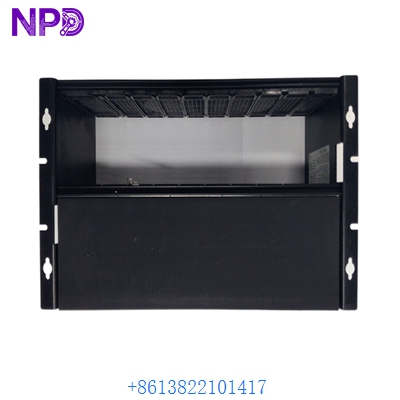
GE IC697CHS790
Installation & Configuration Guide
In my experience, the IC697CHS790 is the backbone of some of the most reliable systems GE ever built. However, because it’s an open-frame chassis, the biggest risk during installation is physical debris or “zinc whiskers” falling into the VME backplane connectors. If you see a “Backplane Parity Error,” check the pins first.
Phase 1: Preparation (15 minutes)
⚠️ Safety First:
- This is a passive backplane, but the power supply module you slide into it handles high voltage. Ensure all source power is locked out.
- Verify your cabinet depth. With modules and cables plugged in, the IC697CHS790 requires at least 10 inches of clearance.
- Check the “Rack Address” jumpers on the backplane if this is an expansion rack.
Phase 2: Physical Mounting
- Orientation: Mount the chassis vertically. Airflow in the Series 90-70 is critical; horizontal mounting will cause the CPU to overheat within hours.
- Grounding: Use the dedicated grounding stud on the bottom right of the IC697CHS790. A poor rack ground is the leading cause of intermittent communication dropouts in 90-70 systems.
- Firmware/Bus Terminations: If this is the last rack in a multi-rack system, ensure the bus terminator plug is firmly seated in the “OUT” port of the expansion module.
Phase 3: Module Population
- Power Supply First: The PS module always goes in the leftmost position. Slide it in carefully; the VME pins are high-density and easy to bend.
- CPU Placement: Typically Slot 1 (next to the PS).
- I/O Modules: Group your high-current digital modules away from sensitive analog cards to minimize EMI interference within the backplane.
Phase 4: Power-Up Testing
- Apply power and check the “OK” LED on the Power Supply module.
- Verify the +5V, +12V, and -12V rails using a multimeter at the test points if available.
- If the CPU “RUN” light doesn’t come on, check the IC697CHS790 backplane for any bent pins or dust in the connectors.
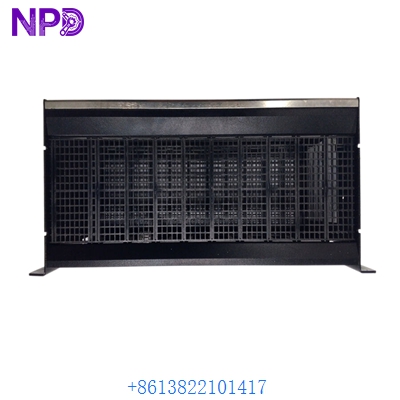
GE IC697CHS790
Customer Cases & Industry Applications
Case 1: Hydroelectric Dam – Replacing a Corroded Rack A hydroelectric facility in the Pacific Northwest had a Series 90-70 system running for 25 years in a high-humidity environment. The backplane of the main chassis (an IC697CHS790) began to develop surface corrosion, leading to random CPU resets. They couldn’t find a new unit through GE. We provided an Original New Surplus chassis. Result: The replacement was completed during a 4-hour scheduled outage, restoring 100% system stability.
Case 2: Steel Mill – Expansion Project on Legacy Platform A steel mill needed to add more I/O to their rolling mill control system but didn’t want to migrate to the newer PACSystems RX3i yet. They purchased a IC697CHS790 from our stock to serve as an expansion rack. Result: They were able to add the necessary 4 modules and keep their existing, proven logic running without a million-dollar upgrade.
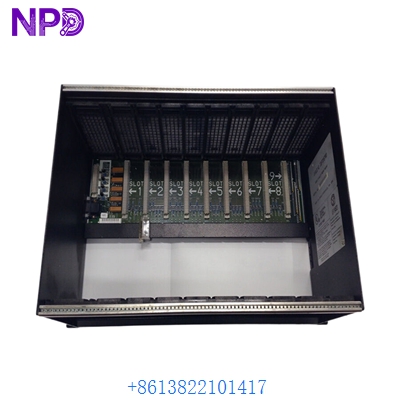
GE IC697CHS790
Frequently Asked Questions (FAQ)
Q: Is the IC697CHS790 the same as the IC697CHS750? A: No. The CHS750 is a 5-slot chassis, while the IC697CHS790 is a 9-slot chassis. If you have the space, you can replace a 5-slot with a 9-slot, but you’ll need to update your hardware configuration in the software (Logicmaster or Proficy).
Q: Does it come with the Power Supply? A: No, this is just the mechanical chassis and backplane. You will need to purchase the Power Supply (e.g., IC697PWR711) separately. We usually have those in stock as well.
Q: Can I use RX3i modules in this rack? A: Generally, no. While the RX3i has a “Universal Backplane” that looks similar, the Series 90-70 IC697CHS790 uses a strictly VME-based protocol. You must use Series 90-70 (IC697) modules.
Q: What happens if a pin is bent on the backplane? A: If it’s a power pin, you might short out the whole rack. If it’s a data pin, you’ll get “Module Missing” or “Bus Error” faults. We inspect every IC697CHS790 under magnification before shipping to ensure every single pin is perfectly straight.
Q: Is “New Surplus” safe for a chassis that hasn’t been made in years? A: Yes. Unlike a CPU or Power Supply, a chassis has no electrolytic capacitors to dry out. As long as it has been stored in its original box in a dry warehouse (like ours), it is as reliable as a factory-fresh unit.