
Description
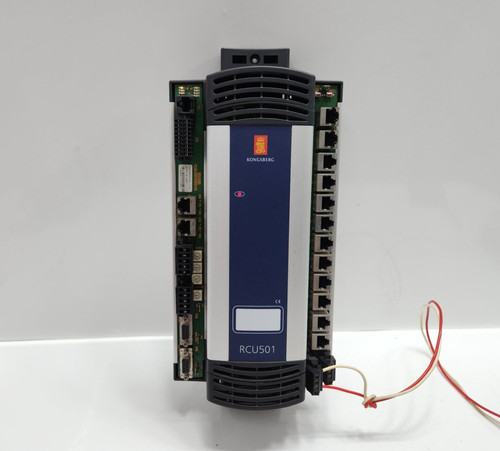
The KONGSBERG RCU501 (Part Number 603439) is a specialized Remote Control Unit (RCU) designed for maritime control systems and industrial automation. It serves as a high-reliability interface module, facilitating real-time monitoring and command execution within Kongsberg’s integrated systems. The RCU501 is built to provide robust data handling and communication between local sensors/actuators and the central bridge or control room display, ensuring operational safety in marine environments.
⚙️ Technical Specifications
- Dimensions: 260 mm x 180 mm x 90 mm
- Weight: 1.5 kg
- Country of Origin: Norway
- Power Input: 24V DC
- Operating Temperature: -25°C to +70°C
- Housing Material: Anodized aluminum/ruggedized industrial casing
- Protection Class: IP56 (Suitable for bridge or engine room environments)
🏗️ Application Areas
- Dynamic Positioning (DP) Systems
- Propulsion Control and Monitoring
- Vessel Management Systems (VMS)
- Industrial Automation and Remote I/O
- Marine Navigation Signaling Integration
📖 Product Usage Instructions
The RCU501 must be installed in an environment protected from extreme direct weather, typically within a console or bulkhead enclosure. Utilize the supplied mounting brackets for secure installation. Wiring should prioritize separate runs for power and high-speed data lines to maintain signal integrity. Ensure that the unit is correctly grounded to the vessel’s hull or common ground bus to prevent galvanic corrosion and electrical noise issues.
🌐 Communication Configuration Steps
- IP Address: Connect a laptop via the service port and use the Kongsberg proprietary configuration tool to set the static IP, subnet, and gateway parameters.
- Station Number: Assign the specific unit ID via the hardware configuration menu; ensure this ID matches the system architecture map to prevent address conflicts.
- Baud Rate: If utilizing serial communication (RS-422/RS-485), select the required baud rate (e.g., 38400 or 115200 bps) within the internal settings menu to synchronize with the main controller.
⚡ Power-Up Debugging Flow
- Verify the 24V DC input at the terminal strip using a calibrated multimeter.
- Ensure all data cables are secured and free of visible damage.
- Apply power and observe the front panel diagnostic LEDs; a steady green status confirms internal initialization.
- Check for any flashing amber indicators, which may signify a configuration mismatch or pending firmware update.
- Utilize the central control system software to confirm the RCU501 is “seen” and communicating on the network.
✅ Initial Run Checklist
- Perform a “Loopback Test” to verify data transmission integrity across the link.
- Confirm that all input signals (sensors/buttons) correctly register on the remote monitoring HMI.
- Validate relay or digital output activation by triggering a non-critical command.
- Save the current project/configuration file to your service computer for future recovery.
- Inspect the cooling vents for any obstructions that might impede airflow during high-temperature operation.
❓ Frequently Asked Questions (Q&A)
Q: What is the primary function of the 603439 unit? A: The RCU501 acts as a data concentrator and remote I/O interface, allowing the central Kongsberg system to communicate with equipment located at a distance from the main control cabinet.
Q: Can the unit be updated in the field? A: Yes, firmware updates are performed using the official Kongsberg service tools. Always ensure the vessel’s power is stable before starting an update process.
Q: What do the different status LEDs indicate? A: Generally, Green indicates “System OK,” Amber indicates “Data Transmission/Traffic,” and Red signifies a “Hardware/Logic Fault.” Refer to the technical manual for specific blink-code sequences.
Q: Is the RCU501 compatible with third-party sensors? A: Yes, provided the electrical signals (4-20mA, digital contacts) fall within the RCU501’s input specifications, it can easily integrate with non-Kongsberg instrumentation.