Description
⚙️ Product Overview
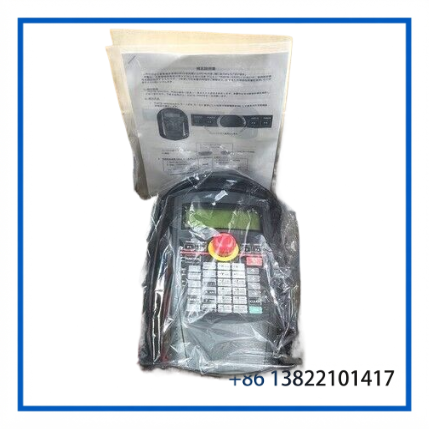
The MITSUBISHI ELECTRIC R33TB is a teaching pendant designed for Mitsubishi Electric industrial robot systems. The specific unit is identified by part number HG1U-SB12JH-MK1382-1-S7, corresponding to an R33TB teaching pendant configuration used for robot programming, teaching, monitoring, and operator interaction.
The R33TB provides a dedicated operator interface between the robot controller and the technician. It allows users to perform teaching operations, edit and manage robot programs, monitor robot status, and carry out maintenance-related operations directly from the pendant.
The R33TB specification includes an LCD interface, 36 operating keys, an RS-422 connection to the robot controller, and a three-position enable switch designed as part of the robot safety-control arrangement.
🔧 Key Features
- 🤖 Mitsubishi Electric industrial robot teaching pendant
- 🖥️ LCD display with backlight
- ⌨️ 36-key operation section
- 🔌 RS-422 communication interface
- 🛡️ Three-position enable switch
- 🧰 Designed for robot teaching and programming
- 📋 Robot status and program monitoring
- 🔧 Suitable for maintenance and commissioning
- 🔄 Direct connection to the compatible robot controller
- 🏭 R33TB industrial robot pendant platform
📊 Technical Datasheet
| Parameter | Specification |
|---|---|
| Brand | MITSUBISHI ELECTRIC |
| Model | R33TB |
| Part Number | HG1U-SB12JH-MK1382-1-S7 |
| Series | R33TB Teaching Pendant |
| Product Name | Robot Teach Pendant Controller |
| Display | LCD, 24 characters × 8 lines, backlit |
| Operation Keys | 36 keys |
| Communication Interface | RS-422 |
| Dimensions | Approx. 195 × 292 × 106 mm |
| Weight | Approx. 1.7 kg including standard cable configuration |
The published Mitsubishi Electric R33TB specifications identify the pendant dimensions as approximately 195(W) × 292(H) × 106(D) mm. The standard R33TB configuration is specified with a 7 m cable and a mass of approximately 1.7 kg; R33TB-15 versions use a 15 m cable and have a higher overall mass.
🖥️ Display & Operator Interface
The R33TB uses an LCD display with a viewing format of 24 characters × 8 lines and backlighting. This interface provides the operator with access to robot programs, operating information, status information, parameter-related screens, and other controller functions supported by the connected robot system.
The 36-key operation section provides dedicated controls for navigating the robot control environment and carrying out teaching and programming operations.
🤖 Robot Teaching Functions
A teaching pendant is used during robot setup, programming, commissioning, and maintenance. With a compatible Mitsubishi Electric robot controller, the R33TB can be used to:
- Create and modify robot programs
- Teach robot positions
- Monitor robot operating status
- Perform program and parameter operations
- Check system information
- Assist with commissioning procedures
- Perform maintenance and diagnostic operations
Actual available functions depend on the connected robot controller, robot model, controller software, and system configuration.
🛡️ Safety & Enable Switch
The R33TB incorporates a three-position enable switch. Mitsubishi Electric documentation describes three switch states:
- Not pressed: Robot operation is inhibited.
- Pressed lightly: Robot operation and teaching are enabled.
- Pressed with force: Robot operation is inhibited.
Releasing or forcefully pressing the enable switch cuts servo power in the same manner as an emergency-stop input. This arrangement provides an additional safety mechanism during manual teaching and robot operation.
Operators should always follow the applicable robot safety procedures and Mitsubishi Electric installation and operation documentation.
🔌 Communication & Connection
The R33TB communicates with the compatible robot controller through an RS-422 interface. The pendant is connected to the controller through its dedicated cable and connector arrangement.
When replacing an existing pendant, the complete part number should be checked carefully. Similar Mitsubishi pendant models can have different cable lengths, controller compatibility, or configuration details.
🛠️ Installation & Maintenance
Before installing the R33TB:
- Verify the complete part number HG1U-SB12JH-MK1382-1-S7.
- Confirm compatibility with the existing Mitsubishi robot controller.
- Check the pendant cable and connector condition.
- Inspect the LCD for cracks, dead areas, or abnormal display behavior.
- Verify operation of the enable switch.
- Check all operating keys for normal response.
- Confirm reliable RS-422 communication with the controller.
- Keep the pendant away from excessive moisture, impact, and contamination.
- Secure the pendant cable to prevent excessive bending or pulling.
- Perform a controlled functional test before returning the robot to production.
Regular maintenance should include inspection of the cable, connector, keys, LCD, housing, and enable switch. Any abnormal safety-switch behavior should be investigated before the pendant is returned to service.
🔍 Troubleshooting
LCD does not illuminate:
Check the pendant connection, controller power, cable condition, and controller-side interface.
No communication with the robot controller:
Inspect the pendant cable and connector. Confirm that the pendant is compatible with the connected controller and that the RS-422 communication path is intact.
Keys do not respond correctly:
Check for mechanical damage, contamination, or worn keys. A functional test should be performed before using the pendant for production operation.
Robot cannot be manually operated:
Check the three-position enable switch and verify that the robot is in the appropriate operating mode. Also check the controller’s safety circuit and emergency-stop status.
Enable switch does not behave normally:
Do not bypass the safety function. Inspect the switch and associated wiring and remove the pendant from service if the safety function cannot be verified.
Pendant works intermittently:
Inspect the cable, connector, strain-relief area, and controller connection. Intermittent communication may result from a damaged cable or poor connector contact.
❓ FAQ
Q: What is the complete part number?
A: The listed part number is HG1U-SB12JH-MK1382-1-S7.
Q: What is the R33TB used for?
A: It is a Mitsubishi Electric robot teaching pendant used for robot programming, teaching, monitoring, commissioning, and maintenance operations.
Q: What communication interface does the R33TB use?
A: The documented R33TB specification identifies an RS-422 interface for connection with the robot controller.
Q: How many operating keys does the R33TB have?
A: The published specification identifies 36 operating keys.
Q: What type of display does it use?
A: The R33TB uses a backlit LCD with a display format of 24 characters × 8 lines.
Q: Does the R33TB have a safety enable switch?
A: Yes. It uses a three-position enable switch for safe manual robot operation and teaching.
Q: Is the R33TB cable length always the same?
A: No. The standard R33TB is documented with a 7 m cable, while the R33TB-15 version uses a 15 m cable. The exact cable configuration should therefore be verified before ordering.
Q: Can this pendant replace another HG1U-SB12JH-MK1382 unit?
A: Compatibility should be confirmed using the complete part number, robot controller model, cable configuration, and existing system requirements.
📦 Recommended Mitsubishi Electric Models
Other Mitsubishi Electric robot and teaching-pendant models that may be relevant to maintenance and spare-parts planning include:
- Mitsubishi Electric R32TB
- Mitsubishi Electric R33TB
- Mitsubishi Electric R33TB-15
- Mitsubishi Electric CR750 Controller
- Mitsubishi Electric CR751 Controller
- Mitsubishi Electric CR800 Controller
- Mitsubishi Electric CR800-D Controller
- Mitsubishi Electric CRnQ-700 Robot Controller
- Mitsubishi Electric RH Series Robot Systems
- Mitsubishi Electric RV Series Robot Systems
For an exact replacement, always match the complete HG1U-SB12JH-MK1382-1-S7 configuration rather than relying only on the R33TB model designation.