Description
⚙️ Product Overview
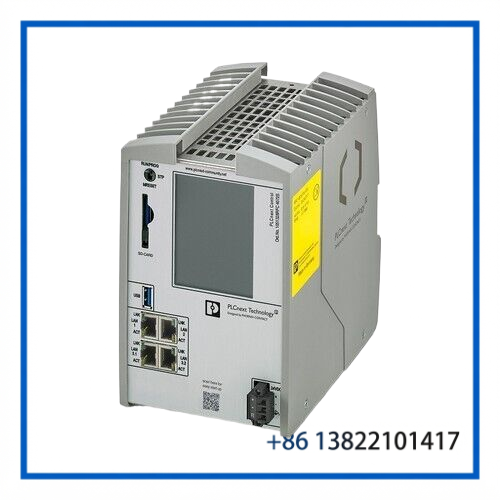
The PHOENIX CONTACT RFC 4072S is a high-performance Remote Field Controller from the PLCnext Control family, item number 1051328. It combines conventional IEC 61131-3 PLC programming with high-level programming languages and a real-time Yocto/Linux operating system.
A key feature of the RFC 4072S is its integrated safety-control capability. The controller supports PROFIsafe F-Host functionality and is designed for safety applications up to SIL 3 / PL e, allowing standard automation and safety functions to be engineered within the PLCnext environment.
🔧 Key Features
- Brand: PHOENIX CONTACT
- Model: RFC 4072S
- Item Number: 1051328
- Product Family: PLCnext Control
- Product Type: Stand-alone Safety Controller
- Processor: Intel Core i5-6300U, 2 × 2.4 GHz standard configuration
- Operating System: Yocto/Linux real-time
- Programming: IEC 61131-3 plus C++, C#, Java, Python, and Simulink
- Engineering: PLCnext Engineer, Eclipse, Visual Studio, MATLAB/Simulink
- PROFINET: Controller / Device
- PROFIsafe: F-Host
- INTERBUS: Master
- OPC UA: Supported
- Safety Rating: Up to SIL 3 / PL e
- Mounting: DIN rail
- Protection: IP20
📋 Product Datasheet
| Parameter | Specification |
|---|---|
| Brand | PHOENIX CONTACT |
| Model | RFC 4072S |
| Item Number | 1051328 |
| Product Name | PLCnext Safety Controller |
| Product Family | PLCnext Control |
| Controller Type | Remote Field / Safety Controller |
| Processor | Intel Core i5-6300U, 2 × 2.4 GHz |
| Operating System | Yocto/Linux Real-Time |
| Program Memory | 16 MB |
| Data Storage | 32 MB |
| Retentive Data | 2 MB |
| Supply Voltage | 24 V DC |
| Supply Range | 19.2–30 V DC |
| Typical Current | Approx. 1 A |
| Power Consumption | Approx. 25 W typical without fan module |
| PROFINET | Controller / Device |
| PROFIsafe | F-Host |
| INTERBUS | Master |
| Ethernet | 4 × RJ45 |
| USB | 1 × USB Type A |
| Safety Capability | Up to SIL 3 / PL e |
| Dimensions | 122 × 182 × 173 mm without fan module |
| Weight | Approx. 2.85 kg excluding packaging |
| Protection Rating | IP20 |
| Mounting | DIN rail |
| Country of Origin | Germany |
🛡️ Safety Control Function
The RFC 4072S is intended for applications where conventional machine control and functional safety need to operate within the same automation architecture.
Its safety functionality supports PROFIsafe F-Host communication and safety applications up to SIL 3 and Performance Level e. This makes the controller suitable for managing safety-related functions through compatible PROFIsafe devices and safety I/O.
Safety functions should always be engineered, validated, and commissioned according to the applicable machine safety requirements. A replacement controller should not be placed directly into a safety-critical installation without verifying the safety configuration and application program.
🧠 PLCnext Control Architecture
The controller combines traditional PLC programming with modern software development.
Supported programming technologies include:
- SFC
- Ladder Diagram
- Function Block Diagram
- Structured Text
- C++
- C#
- Java
- Python
- MATLAB/Simulink
This architecture allows conventional PLC logic to coexist with higher-level applications and Linux-based services.
The real-time operating environment is designed for deterministic execution of time-critical automation tasks while also providing access to modern IT and software technologies.
🌐 PROFINET & Industrial Communication
The 1051328 provides PROFINET Controller and PROFINET Device functionality. The controller can support up to 256 PROFINET devices and a minimum specified update rate of 1 ms under the applicable system conditions.
The four Ethernet interfaces provide network connectivity for different automation and IT requirements. The controller also supports OPC UA and multiple communication protocols depending on the installed application and configuration.
Typical integration can include:
- PROFINET remote I/O
- PROFIsafe safety I/O
- HMI systems
- SCADA systems
- Industrial Ethernet switches
- PLCnext-based controllers
- OPC UA systems
- Higher-level production and IT systems
🔌 INTERBUS & Fieldbus Integration
The RFC 4072S also provides an integrated INTERBUS Master function, making it useful for installations that combine newer Ethernet-based automation with existing INTERBUS equipment.
The controller supports up to 128 kByte of total INTERBUS process data, subject to the applicable system configuration.
This capability can be valuable when upgrading an existing control system without immediately replacing every field device.
💻 Engineering & Software Integration
PLCnext Engineer is the primary engineering environment for standard and safety programming. Depending on the application, developers can also work with Eclipse, Visual Studio, MATLAB/Simulink, and supported high-level programming languages.
Before replacing an existing RFC 4072S, preserve and verify:
- PLCnext project files
- Safety application
- PROFIsafe configuration
- PROFINET device configuration
- IP addresses and network settings
- I/O mapping
- Retentive data
- Firmware/software versions
- User-developed high-level applications
- Safety validation parameters
The controller’s safety application should be treated as configuration-controlled software.
⚡ Electrical & Interface Characteristics
The RFC 4072S operates from a nominal 24 V DC supply with a specified range of 19.2–30 V DC. Typical current consumption is approximately 1 A.
The controller provides:
- 1 × USB Type A interface
- 4 × RJ45 Ethernet interfaces
- Integrated diagnostic display
- Real-time clock
- Screw-terminal power connection
- DIN-rail mounting
The Ethernet interfaces include higher-speed LAN connections as well as internally switched 10/100 Mbps ports according to the individual interface assignment.
🏭 Typical Applications
The PHOENIX CONTACT RFC 4072S can be applied to:
- Machine safety control
- Factory automation
- Production-line control
- Process automation
- Material handling
- Packaging machinery
- Safety-related conveyor systems
- PROFINET/PROFIsafe installations
- Legacy INTERBUS modernization
- PLCnext-based industrial automation
- Integrated standard and safety control systems
🛠️ Installation & Maintenance
Before replacing the controller, isolate all relevant power sources and follow the machine manufacturer’s safety and lockout procedures.
Recommended maintenance sequence:
- Record the complete controller identification.
- Back up the PLCnext application.
- Back up the safety application and configuration.
- Document PROFINET and PROFIsafe device assignments.
- Record network parameters and connected I/O.
- Verify the controller firmware and engineering-software compatibility.
- Check the 24 V DC supply before installation.
- Install the controller correctly on the DIN rail.
- Restore the validated application and configuration.
- Verify standard I/O and communications.
- Perform the required safety validation before returning the machine to operation.
If a fan module is installed, verify its condition and temperature-management requirements during maintenance.
🔍 Troubleshooting Guide
Controller does not power up
Check the 24 V DC supply, polarity, terminal connections, wiring, and controller installation.
PROFINET devices are not detected
Check Ethernet cabling, network configuration, device names, IP settings, PROFINET configuration, and controller diagnostics.
PROFIsafe communication fails
Verify the PROFIsafe device configuration, safety parameters, F-Host assignment, network communication, and safety application.
Safety program does not start
Check the safety project, configuration consistency, safety-related diagnostics, and firmware/software compatibility.
INTERBUS devices are unavailable
Inspect the INTERBUS connection, bus configuration, connected devices, and process-data mapping.
PLC application will not execute correctly
Verify the PLCnext project, controller firmware, application dependencies, memory requirements, and retained data.
Controller temperature is excessive
Check cabinet ventilation, ambient temperature, fan-module status where applicable, and installation clearance.
🔄 Replacement Compatibility
The 1051328 / RFC 4072S should be replaced with the same complete item number whenever possible.
Do not assume that another PLCnext Control model is a direct substitute simply because it uses the same engineering environment. Differences can include:
- Processor architecture
- Safety capability
- PROFIsafe functionality
- PROFINET configuration
- Memory
- Ethernet interfaces
- Firmware
- Application compatibility
- Safety certification and validation requirements
For a safety-critical replacement, the complete hardware and safety application configuration must be verified before commissioning.
❓ FAQ
Q1: What is PHOENIX CONTACT 1051328?
A: It is the item number for the RFC 4072S PLCnext Control safety controller.
Q2: Is the RFC 4072S a PLC?
A: Yes. It is a programmable industrial controller supporting IEC 61131-3 as well as several high-level programming languages.
Q3: Does it support safety applications?
A: Yes. The RFC 4072S supports PROFIsafe F-Host and safety applications up to SIL 3 / PL e.
Q4: What processor does it use?
A: The standard configuration uses an Intel Core i5-6300U processor with two 2.4 GHz cores.
Q5: What operating system does it use?
A: It uses a real-time Yocto/Linux operating environment.
Q6: Does it support PROFINET?
A: Yes. It supports both PROFINET Controller and PROFINET Device functions.
Q7: Does it support INTERBUS?
A: Yes. An integrated INTERBUS Master function is provided.
Q8: What is the power supply?
A: The nominal supply is 24 V DC, with a specified operating range of 19.2–30 V DC.
Q9: Can it replace another PLCnext controller?
A: Replacement should only be made after verifying the exact hardware, firmware, safety functions, I/O architecture, and application requirements.
Q10: What should be checked before purchasing a replacement?
A: Match the item number 1051328, controller type, firmware, PROFINET/PROFIsafe configuration, safety application, connected I/O, and physical hardware configuration.
📦 Recommended Related PHOENIX CONTACT Models & Components
- PHOENIX CONTACT RFC 4072S 1051328 PLCnext Safety Controller
- PHOENIX CONTACT RFC 460R PN 3TX Remote Field Controller
- PHOENIX CONTACT AXC F 2152 PLCnext Control
- PHOENIX CONTACT AXC F 3152 PLCnext Control
- PHOENIX CONTACT AXC F 2152 STARTER KIT PLCnext Controller
- PHOENIX CONTACT Axioline F PROFINET I/O Modules
- PHOENIX CONTACT Axioline Smart Elements I/O Modules
- PHOENIX CONTACT PROFIsafe Safety I/O Modules
- PHOENIX CONTACT RFC FAN MODULE 2404085
- PHOENIX CONTACT SD FLASH 2GB PLCNEXT MEMORY 1043501
⭐ Spare-Part Recommendation
For an installed RFC 4072S / 1051328 system, maintaining a correctly configured spare controller can reduce downtime when a PLC or safety-controller failure occurs.
Because this controller can perform safety-related functions, replacement should be managed as a controlled engineering activity. The hardware part number, firmware, PLCnext project, PROFIsafe configuration, safety application, and connected PROFINET/INTERBUS architecture should all be verified before the spare is commissioned.