Description
🖥️ Product Overview
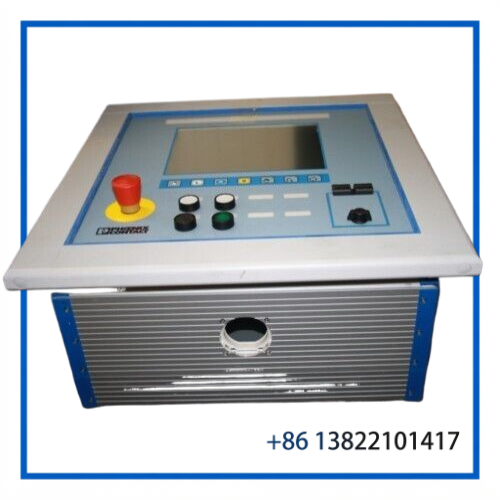
The PHOENIX IBS IP PPC 2 is an industrial operator-panel monitor from Phoenix Contact, identified by Order No. 2836162. The manufacturer classifies the product type as a Monitor and lists the unit under the IBS IP PPC 2 product family.
This unit is intended for industrial control and operator-interface applications where a dedicated panel display is used to present machine, process, or control-system information. For replacement projects, the exact order number, mechanical installation arrangement, connectors, and system configuration should be checked before installation.
The manufacturer identifies Germany as the country of origin and specifies a product weight of approximately 36.5 kg.
📋 Product Datasheet
| Parameter | Specification |
|---|---|
| Brand | PHOENIX CONTACT |
| Model | IBS IP PPC 2 |
| Order No. | 2836162 |
| Product Series | IBS IP PPC |
| Product Name | Industrial Panel Monitor |
| Product Type | Monitor / Operator Panel |
| Product Key | DRBBAZ |
| GTIN | 4017918810887 |
| Country of Origin | Germany |
| Weight | Approx. 36.5 kg |
⚙️ Key Features
- Industrial monitor designed for panel-based operator applications
- Phoenix Contact IBS IP PPC 2 platform
- Manufacturer Order No. 2836162
- Suitable for industrial control-panel and machine-interface environments
- Useful as a replacement unit for existing installations
- Heavy-duty industrial equipment with a documented weight of approximately 36.5 kg
- Manufacturer classification: Monitor
🏭 Industrial Applications
The IBS IP PPC 2 can be considered for industrial operator-interface environments such as:
- Factory automation control panels
- Production machinery
- Process monitoring stations
- Industrial machine operator stations
- PLC and control-system visualization
- Manufacturing equipment
- Legacy industrial control-panel replacement projects
The monitor should be evaluated as part of the complete control-panel architecture rather than treated as a universal display. Mechanical dimensions, interface connections, mounting arrangement, and system compatibility should be confirmed against the existing installation.
🔌 System Integration
When replacing an existing IBS IP PPC 2 unit, verify the following before commissioning:
- Confirm the Phoenix Contact Order No. 2836162.
- Compare the nameplate and identification markings with the existing unit.
- Check the panel cutout and mounting arrangement.
- Verify all display, communication, and power connections.
- Inspect the associated PLC, IPC, or industrial control system.
- Confirm that the replacement unit matches the original system configuration.
- Check cables and connectors for mechanical damage or oxidation.
- Perform a controlled startup after installation.
Do not assume that a visually similar Phoenix Contact operator panel is a direct replacement. Exact model and order-number matching is recommended for legacy systems.
🛠️ Installation & Maintenance
Before installation
- Disconnect the applicable equipment according to the machine’s safety procedure.
- Record the original wiring and connector positions.
- Inspect the replacement unit for shipping or storage damage.
- Confirm the Order No. and identification label.
During installation
- Mount the monitor securely in the designated panel location.
- Avoid excessive mechanical stress on the housing and connectors.
- Reconnect cables according to the original system documentation.
- Keep signal and power wiring properly routed.
Routine maintenance
- Keep the display surface clean and free of industrial contaminants.
- Check mounting hardware periodically.
- Inspect cables and connectors for wear.
- Monitor the unit for abnormal display behavior, intermittent communication, or startup problems.
🔍 Troubleshooting
Display does not start
Check the power connection, protective devices, connector seating, and system-side power supply before replacing the monitor.
Display is intermittent
Inspect cables and connectors for loose contacts, mechanical damage, or contamination. Check whether the problem follows the monitor or remains with the control-system connection.
No communication with the control system
Verify the interface connection and the configuration of the connected control equipment. A monitor replacement should not be assumed to resolve a communication fault originating elsewhere in the system.
Mechanical installation does not match
Confirm that the replacement is specifically IBS IP PPC 2, Order No. 2836162 and compare the mounting arrangement with the existing panel before proceeding.
✅ First-Operation Checklist
- Model confirmed: IBS IP PPC 2
- Order No. confirmed: 2836162
- Nameplate and product identification checked
- Panel mounting arrangement verified
- Power connection verified
- Signal/interface connections verified
- Associated PLC/IPC/control system checked
- Cables and connectors inspected
- Display operation tested
- System communication tested
- Final machine operation tested under controlled conditions
❓ FAQ
What is the PHOENIX IBS IP PPC 2?
It is an industrial monitor/operator-panel product from Phoenix Contact. The manufacturer’s product classification for Order No. 2836162 is “Monitor.”
What is the Order No.?
The manufacturer identifies the product with Order No. 2836162.
What is the product key?
The official product record lists product key DRBBAZ.
Where is it manufactured?
Phoenix Contact lists the country of origin as Germany.
How much does it weigh?
The manufacturer’s current product information lists approximately 36.5 kg per unit.
Is this a PLC or controller?
No. The manufacturer classifies the IBS IP PPC 2 as a Monitor, so it should not be treated as a standalone PLC or controller.
What should be checked before purchasing a replacement?
The most important checks are the exact Order No., nameplate, mounting configuration, connectors, cabling, and compatibility with the existing control system.
🔧 Related PHOENIX CONTACT Models / Product Families
For industrial operator-panel and control-system replacement planning, related Phoenix Contact product families may include:
- IBS IP PPC Series
- INTERBUS Operator Panels
- Phoenix Contact Industrial PCs
- Phoenix Contact Industrial Monitors
- Phoenix Contact Panel PCs
- Phoenix Contact Operator Panels
- Phoenix Contact INTERBUS Control Components
- Phoenix Contact PLCnext Control
- Phoenix Contact Inline Control Systems
- Phoenix Contact Industrial Ethernet Components
Compatibility should always be verified by exact order number and system configuration before substitution.
📦 Spare-Parts & Lifecycle Planning
For legacy Phoenix Contact operator-panel installations, maintaining an identified spare can reduce downtime during display or operator-interface failures.
A practical inventory strategy is:
- Critical equipment: Maintain at least one tested replacement unit.
- High-risk legacy systems: Consider a buffer stock based on equipment age and replacement lead time.
- ABC classification: Prioritize expensive or production-critical operator panels for controlled inventory.
- Incoming inspection: Record Order No., serial number, condition, and visible markings.
- Replacement testing: Verify display and system communication before placing the spare into long-term storage.
- Last-time-buy planning: For discontinued or difficult-to-source equipment, consider securing additional verified units before the installed base becomes difficult to support.