Description
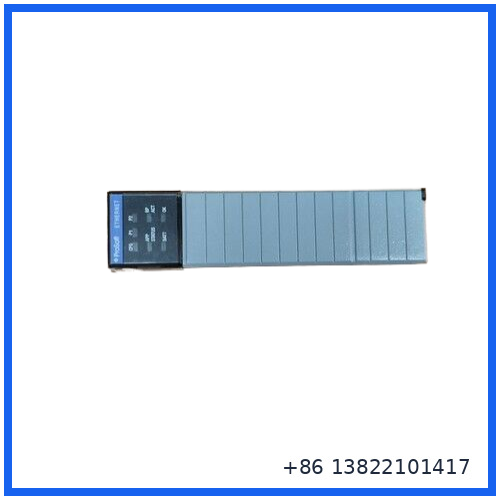
The ProSoft MVI56-ADMNET is a Modbus/TCP communication module designed for industrial automation applications using the ControlLogix platform. It provides a communication bridge between ControlLogix controllers and devices operating on Modbus TCP/IP networks.
The module is installed in a compatible 1756 ControlLogix chassis and operates as an interface between the ControlLogix backplane and Ethernet-based Modbus devices. This type of communication architecture is commonly used when PLC systems need to exchange process data with Modbus-compatible controllers, instruments, HMIs, drives, remote I/O equipment, or other industrial devices.
🔧 Main Functions
The MVI56 Modbus TCP/IP communication platform supports Client and Server communication functions, allowing the module to actively exchange data with external Modbus TCP/IP devices while also making module data available to external network clients.
Typical communication features include:
✔ Modbus TCP/IP Client communication
✔ Modbus TCP/IP Server communication
✔ ControlLogix 1756 backplane compatibility
✔ Ethernet-based industrial communication
✔ User-configurable data mapping
✔ Data exchange between ControlLogix processors and Modbus TCP/IP devices
✔ Support for ladder logic integration and communication diagnostics
The MVI56 Modbus TCP/IP platform supports user-definable data memory mapping and can exchange up to 5,000 16-bit registers in applicable configurations.
📋 Product Datasheet
🏷️ Brand: ProSoft Technology
🔢 Model: MVI56-ADMNET
📚 Series: MVI56 Series
📦 Product Name: Modbus/TCP Client/Server Communication Module
🏭 Platform: Rockwell Automation ControlLogix
🔌 Backplane Compatibility: Single-slot 1756 ControlLogix chassis
🌐 Communication Protocol: Modbus TCP/IP
🔗 Communication Function: Client/Server communication
⚡ Ethernet Interface: 10/100 Mbps Ethernet, depending on hardware version
🧠 Data Mapping: Modbus data memory mapping for industrial data exchange
📊 Register Capacity: Up to 5,000 16-bit registers for standard MVI56 Modbus TCP/IP configurations
🖥️ Configuration: ProSoft Configuration Builder or compatible configuration tools
🔧 Programming Integration: Ladder logic and Add-On Instruction support for applicable versions
🏗️ Installation: Local or remote ControlLogix rack, depending on system architecture
🌡️ Operating Environment: Industrial control cabinet installation
⚖️ Weight: Varies according to the exact hardware version and supplied configuration
📐 Dimensions: Standard single-slot 1756 chassis module form factor
✨ Product Condition: New Surplus
⚠️ Important: The exact suffix and complete part number should be verified from the physical module nameplate before ordering. Different MVI56 communication modules may have similar naming but different communication capabilities.
💡 Typical Applications
The MVI56-ADMNET can be used when a ControlLogix system needs to communicate with equipment operating on a Modbus TCP/IP network.
Common applications include:
🏭 Process automation systems
⚙️ PLC-to-PLC communication
📡 Remote industrial equipment monitoring
🖥️ SCADA and HMI data exchange
🔄 Integration between ControlLogix and Modbus devices
🏗️ Water treatment and infrastructure systems
⚡ Power and energy monitoring applications
🛢️ Oil and gas automation systems
🏭 Manufacturing production lines
📊 Industrial data acquisition systems
The MVI56 Modbus TCP/IP architecture allows the ControlLogix processor to exchange data with a wide range of Modbus-compatible instruments and controllers through an internal module database.
❓ FAQ
🔹 Q1: What is the ProSoft MVI56-ADMNET used for?
A: It is used to provide communication between a ControlLogix automation system and devices operating with the Modbus TCP/IP protocol.
🔹 Q2: Is this module installed directly in a ControlLogix chassis?
A: The MVI56 family uses a single-slot module format compatible with the 1756 ControlLogix backplane. The exact installation requirements should be verified against the specific module revision.
🔹 Q3: Can the module communicate with third-party Modbus devices?
A: Yes. Modbus TCP/IP communication modules are designed to interface with compatible Modbus TCP/IP instruments, controllers, and other industrial network devices.
🔹 Q4: What is the difference between Client and Server communication?
A: In Client operation, the module can actively read and write data to Modbus TCP/IP devices. In Server operation, external Modbus Clients can access data stored in the module’s configured data area.
🔹 Q5: Can the module be used in a remote rack?
A: Applicable MVI56 communication modules can support local or remote rack architectures, depending on the specific module version and network configuration.
🔹 Q6: What should be checked before purchasing a replacement module?
A: Check the complete model number, suffix, hardware revision, firmware requirements, ControlLogix chassis compatibility, Ethernet configuration, and existing PLC communication program.
🔹 Q7: Does the module require configuration software?
A: ProSoft MVI56 communication products can use ProSoft configuration and diagnostic tools, together with ladder logic or Add-On Instructions, depending on the specific hardware version.
🔹 Q8: Is MVI56-ADMNET the same as MVI56-MNET?
A: The model designation should be checked carefully. ProSoft MVI56 products include several Modbus communication variants with different Client, Server, Multi-Client, and remote-rack capabilities. Always verify the complete part number printed on the module before replacement.
🔍 Recommended ProSoft Models
• ProSoft MVI56-MNET
• ProSoft MVI56E-MNET
• ProSoft MVI56E-MNETXT
• ProSoft MVI56-MNETR
• ProSoft MVI56E-MNETR
• ProSoft MVI56-MNETCR
• ProSoft MVI56E-MNETC
• ProSoft MVI56E-MNETCXT
• ProSoft MVI56E-MNETRXT
• ProSoft MVI56E-MNET Series Communication Modules
📦 Procurement Recommendation
For industrial spare parts replacement, verify the complete ProSoft model number directly from the module label before ordering. Pay particular attention to the suffix, ControlLogix platform compatibility, Modbus Client/Server function, Ethernet configuration, firmware version, and installed ControlLogix application requirements.