Description
🔹 Product Overview
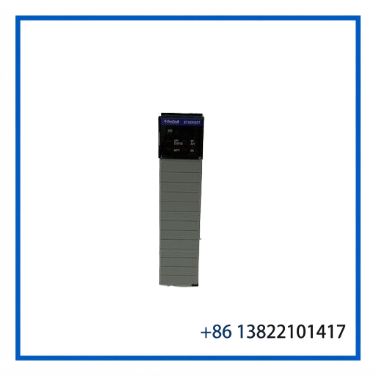
The ProSoft MVI56-GEC is a Generic ASCII Ethernet Communication Module designed for Rockwell Automation ControlLogix systems. It allows a ControlLogix processor to exchange ASCII data with Ethernet-connected devices using TCP/IP communication.
The module is compatible with the 1756 ControlLogix backplane and occupies a single slot. It can be installed in either a local or remote rack and is recognized by the processor as an I/O module. Data exchange between the processor and the module is handled through ladder logic and module memory mapping.
The MVI56-GEC supports ASCII devices with integrated Ethernet connectivity, as well as conventional ASCII equipment connected through an Ethernet thin server. It provides five configurable Server connections and five configurable Client connections for transmitting and receiving data.
⚙️ Key Features
🔹 Generic ASCII communication over TCP/IP
🔹 Designed for Rockwell Automation ControlLogix systems
🔹 Single-slot 1756 backplane-compatible module
🔹 Five Server connections
🔹 Five Client connections
🔹 10/100 Base-T Ethernet communication
🔹 Supports ASCII strings up to 2048 characters
🔹 User-definable memory allocation
🔹 Supports storage and transfer of up to 4000 bytes between the module and ControlLogix processor
🔹 Configuration through a dedicated configuration file
🔹 Ladder logic used for processor-to-module data transfer
🔹 Diagnostic and communication status reporting
🔹 Suitable for local or remote ControlLogix racks
📋 Product Datasheet
| Parameter | Specification |
|---|---|
| Brand | ProSoft Technology |
| Model | MVI56-GEC |
| Series | MVI56 / ControlLogix Platform |
| Product Name | Generic ASCII Ethernet Communication Module |
| Application | ControlLogix ASCII Device Communication |
| Backplane Compatibility | Rockwell Automation 1756 ControlLogix |
| Rack Position | Local or Remote Rack |
| Slot Requirement | Single Slot |
| Communication Protocol | TCP/IP |
| Ethernet Interface | 10/100 Base-T |
| Ethernet Connector | RJ45 |
| Server Connections | 5 |
| Client Connections | 5 |
| Maximum ASCII String Length | 2048 Characters |
| Processor Data Transfer | Ladder Logic / I/O Access |
| User Data Transfer Capacity | Up to 4000 Bytes |
| Backplane Current Load | 800 mA @ 5 VDC |
| Additional Backplane Load | 3 mA @ 24 VDC |
| Operating Temperature | 0 to 60°C |
| Storage Temperature | -40 to 85°C |
| Relative Humidity | 5% to 95%, Non-Condensing |
| Shock Resistance | 30 g Operational / 50 g Non-Operational |
| Vibration | 5 g, 10 to 150 Hz |
The MVI56-GEC hardware specifications include an 800 mA load at 5 VDC and 3 mA at 24 VDC. The documented operating temperature range is 0 to 60°C, with storage from -40 to 85°C.
🌐 Communication Function
The MVI56-GEC acts as a communication bridge between the ControlLogix processor and TCP/IP-connected ASCII devices.
The module can operate with equipment such as:
🔹 Barcode systems
🔹 Serial-to-Ethernet devices
🔹 Industrial instruments
🔹 Data collection equipment
🔹 Legacy ASCII devices connected through Ethernet servers
🔹 Custom industrial communication equipment
Each Server and Client connection can be configured for parameters such as service port number, connection timeout, and connection-close behavior.
🏭 Typical Applications
The MVI56-GEC is commonly suitable for ControlLogix applications that require ASCII communication with external Ethernet devices.
Typical applications include:
🔹 Manufacturing systems
🔹 Material handling equipment
🔹 Packaging machinery
🔹 Barcode and identification systems
🔹 Industrial monitoring equipment
🔹 Data acquisition systems
🔹 Legacy equipment integration
🔹 Custom TCP/IP communication projects
For replacement applications, the existing Ethernet configuration, IP address, port assignments, ladder logic, and communication format should be checked before installing another module.
🔧 Installation and Configuration
Before installation, confirm that the ControlLogix chassis uses a compatible 1756 backplane.
Recommended installation procedure:
- 🔍 Verify the complete model number MVI56-GEC.
- ⚡ Remove system power according to the approved maintenance procedure.
- 🧩 Install the module into an available ControlLogix chassis slot.
- 🔌 Connect the Ethernet cable to the designated Ethernet port.
- 💻 Configure the module IP address, subnet mask, and gateway.
- 📄 Load the required module configuration.
- 🧠 Configure the ControlLogix processor data structure and ladder logic.
- 📡 Verify Server and Client communication.
- 🛠 Check diagnostic information and communication status.
- ✅ Perform a controlled functional test before returning the system to normal operation.
The documented configuration process uses module configuration data and processor-side logic to manage communication between the ControlLogix processor and connected devices.
🛠 Maintenance and Inspection
For surplus or replacement inventory, inspect the following items before installation:
🔹 Front-panel condition
🔹 Ethernet RJ45 connector
🔹 Backplane connector
🔹 Module labels and part number
🔹 LED indicators
🔹 Signs of corrosion or moisture
🔹 Evidence of overheating
🔹 PCB condition
🔹 Connector pin condition
🔹 Previous configuration information
After installation, check the Ethernet connection and confirm that the ControlLogix processor can exchange data with the module.
Communication diagnostics should also be reviewed for connection errors, port status, receive status, transmit status, and module fault conditions.
❓ Frequently Asked Questions
Q1: What is the main function of the MVI56-GEC?
The MVI56-GEC allows a ControlLogix processor to communicate with ASCII devices through TCP/IP Ethernet communication.
Q2: Is the MVI56-GEC compatible with the ControlLogix platform?
Yes. It is designed for the Rockwell Automation ControlLogix platform and is compatible with the 1756 backplane.
Q3: How many Ethernet communication connections does it support?
The module provides five Server connections and five Client connections for sending and receiving data.
Q4: What Ethernet interface does it use?
The MVI56-GEC supports a 10/100 Base-T Ethernet-compatible interface.
Q5: Can it communicate with ordinary serial ASCII equipment?
Yes. ASCII equipment without native Ethernet can be connected through a compatible serial-to-Ethernet thin server.
Q6: Is configuration stored directly in the ControlLogix processor?
The module uses processor data structures and configuration information to manage communication. The original MVI56-GEC documentation also describes configuration through a dedicated configuration file.
Q7: Can the MVI56-GEC be replaced directly with the MVI56E-GEC?
The newer MVI56E-GEC is an enhanced successor, but replacement compatibility should be verified carefully because configuration, firmware, Ethernet diagnostics, and application behavior may differ. ProSoft lists the original MVI56-GEC as a legacy product and provides separate documentation for the enhanced MVI56E-GEC platform.
🔄 Recommended Replacement Check
Before replacing an existing MVI56-GEC, confirm:
🔹 ControlLogix chassis compatibility
🔹 Existing ladder logic
🔹 IP address
🔹 Subnet mask
🔹 Gateway configuration
🔹 TCP/IP port numbers
🔹 Server and Client assignments
🔹 ASCII message format
🔹 Existing module configuration
🔹 Firmware and hardware revision
Matching the model number alone may not be sufficient if the original installation contains custom communication parameters.
⭐ Recommended ProSoft Technology Models
- MVI56E-GEC — Generic ASCII Ethernet Enhanced Communication Module
- MVI56-GSC — Generic ASCII Serial Communication Module
- MVI56E-GSC — Generic ASCII Serial Enhanced Communication Module
- MVI56-MCM — Modbus Master/Slave Communication Module
- MVI56E-MCM — Enhanced Modbus Master/Slave Communication Module
- MVI56-MNET — Modbus TCP/IP Client/Server Communication Module
- MVI56E-MNET — Enhanced Modbus TCP/IP Communication Module
- MVI56-DFCM — DF1 Master/Slave Communication Module
- MVI56-PDPMV1 — PROFIBUS DP Master Communication Module
- MVI56E-AFC — Advanced Frequency Counter Communication Module
📌 Recommended eBay SEO Title
PROSOFT MVI56-GEC | Generic ASCII Ethernet Communication Interface Module ControlLogix