
Description
⚙️ Product Overview
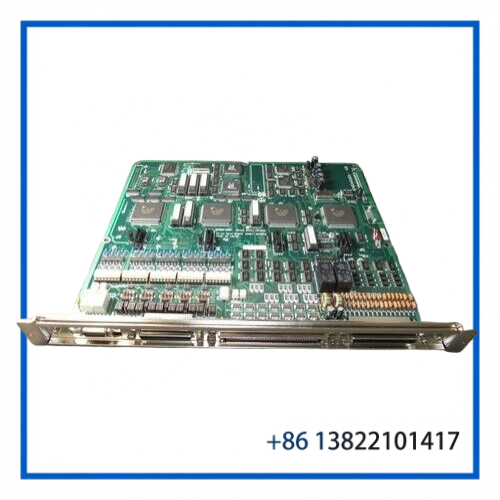
The SEIKO EPSON SKP373-1 is a Drive Main Board used in the Epson SRC520 robot controller architecture. It is identified as a Drive Main Board (DMB) and is associated with the SRC520 controller platform used for industrial robot motion control.
The board is intended to operate as part of the controller’s drive-control hardware rather than as a standalone robot controller. For replacement applications, the exact board number and controller compatibility should be checked before installation.

🔧 Key Features
- Seiko Epson industrial robot controller board
- SKP373-1 Drive Main Board configuration
- DMB architecture with dual LED indicators
- Associated with the Epson SRC520 robot controller
- Designed for robot drive and motion-control circuitry
- Suitable for legacy Epson robot maintenance
- Modular PCB construction for controller-level replacement
- Useful as a spare for maintaining existing SRC520 installations
- Related SKP373-series drive boards are available in different revisions/configurations
📋 Technical Datasheet
| Parameter | Specification |
|---|---|
| Brand | SEIKO EPSON |
| Model | SKP373-1 |
| Product Series | Epson SRC520 Robot Controller |
| Product Name | Drive Main Board |
| Product Type | Robot Drive Control PCB |
| Board Designation | DMB |
| Indicator Configuration | Dual LED |
| Primary Function | Drive / Motion-Control Processing |
| Compatible Controller | Epson SRC520 |
| Product Status | Legacy Industrial Robot Replacement Spare |
🤖 Robot Drive Control Function
The SKP373-1 forms part of the electronics responsible for drive-related control within the Epson robot controller. It should be considered a controller-level circuit board rather than a complete servo amplifier or complete robot controller.
A typical system relationship can be represented as:
Epson Robot → SRC520 Controller → Drive Electronics → Robot Servo System → Robot Mechanisms
The Drive Main Board works together with other controller boards, power/drive assemblies, I/O boards, and the controller backplane.
🔌 System Integration
When installing an SKP373-1, compatibility with the complete SRC520 controller configuration is important. Board-level replacement should take into account:
- Existing SRC520 controller model
- Complete SKP373-1 part number
- Board revision and identification labels
- Associated drive/power boards
- Controller backplane
- Robot and motor configuration
- Existing wiring and connectors
- Controller firmware and configuration
The SKP373-1 should not be assumed interchangeable with SKP373-2 or SKP373-3 solely because they share the SKP373 family designation.
🏭 Typical Applications
The board is suitable for maintenance of Epson industrial robot systems, particularly applications involving:
- Assembly automation
- Pick-and-place equipment
- Material handling
- Machine loading and unloading
- Small-part manufacturing
- Automated production cells
- Legacy Epson robot installations
- SRC520 controller systems
🛠️ Installation & Commissioning
Before replacing the board, isolate the robot controller and follow the equipment manufacturer’s electrical and ESD safety procedures.
- Record the original board identification and revision.
- Confirm the replacement is SKP373-1.
- Inspect connectors and board contacts.
- Check the controller backplane for contamination or damage.
- Install the board using ESD-safe handling procedures.
- Verify all connectors are correctly seated.
- Restore controller power according to the service procedure.
- Check controller diagnostics and LED status.
- Verify robot drive and motion functions at low speed.
- Perform the required robot calibration and operational checks before production.
🔍 Troubleshooting
Controller does not recognize the board:
Check board seating, backplane connections, connector condition, and compatibility with the SRC520 controller configuration.
Drive-related alarm after replacement:
Inspect associated drive electronics, motor wiring, feedback connections, and controller diagnostic information.
LED status is abnormal:
Compare the indicator behavior with the controller service documentation and check related power and communication circuitry.
Robot movement is unavailable:
Do not immediately assume the SKP373-1 is defective. Check the complete drive chain, emergency-stop circuit, servo enable conditions, motor feedback, and related controller boards.
Intermittent operation:
Inspect connectors, solder joints, board contacts, cable assemblies, and signs of heat or vibration-related damage.
🧰 Maintenance
For legacy robot controllers, preventive maintenance should include:
- Visual inspection of PCB components
- Cleaning accumulated dust from the controller cabinet
- Checking connectors and backplane contacts
- Inspecting cooling and ventilation
- Reviewing controller diagnostic alarms
- Checking robot drive and feedback cables
- Maintaining a tested spare board
- Storing spare PCBs in antistatic packaging
Avoid unnecessary component-level repairs unless the appropriate electronic repair procedures and test equipment are available.
♻️ Replacement Considerations
The SKP373-1 belongs to a family of Epson Drive Main Boards. Related SKP373 boards may have different hardware configurations, so the complete part number should be matched before substitution.
For a replacement project, verify:
SKP373-1 → SRC520 controller → board revision → associated drive electronics → robot configuration
This helps prevent installing a visually similar board that is electrically or functionally incompatible with the existing controller.
❓ FAQ
What is the SEIKO EPSON SKP373-1?
It is a Drive Main Board used in the Epson SRC520 robot controller system.
What does DMB mean?
DMB refers to the Drive Main Board designation used for this controller board.
Is the SKP373-1 a complete robot controller?
No. It is a circuit-board assembly installed within the Epson robot controller architecture.
Which controller is it associated with?
The SKP373-1 is specifically identified with the Epson SRC520 robot controller.
Is SKP373-2 interchangeable with SKP373-1?
Not automatically. The complete part number and controller configuration should be verified before substitution.
What should be checked before installation?
Verify the board number, revision, controller model, connectors, associated drive boards, and robot configuration.
Can this board be used for robot maintenance?
Yes. It is particularly useful as a replacement spare for legacy Epson robot controller systems.
Does replacing the board require testing?
Yes. Controller diagnostics, drive status, robot movement, feedback signals, and safety functions should be verified before production operation.
How should the PCB be stored?
Use antistatic packaging and keep the board in a clean, dry environment protected from dust and moisture.
Is the SKP373-1 the same as a servo amplifier?
No. It is a Drive Main Board within the controller architecture and should not be confused with a complete external servo drive or power amplifier.
📦 10 Related SEIKO EPSON Models / Parts
- SEIKO EPSON SKP373-2 Drive Main Board
- SEIKO EPSON SKP373-3 Drive Main Board
- SEIKO EPSON SKP372-2 DR-03 MIB Board
- SEIKO EPSON SKP372-3 MIB Control Board
- SEIKO EPSON SKP374 Drive Power Board
- SEIKO EPSON SKP375 Regeneration Module / Power Supply Board
- SEIKO EPSON SKP376 I/O Board
- SEIKO EPSON SKP376-1 I/O Control Board
- SEIKO EPSON SKP329-2 Remote Board
- SEIKO EPSON SKP364-1 AC/DC Power Board
✅ Product Summary
The SEIKO EPSON SKP373-1 is a dedicated Drive Main Board for the Epson SRC520 robot controller. Its role within the controller’s drive and motion-control architecture makes it an important maintenance component for legacy Epson industrial robot installations.
For replacement applications, match the complete SKP373-1 identification and verify the SRC520 controller configuration before installation.