Description
🔧 Product Overview
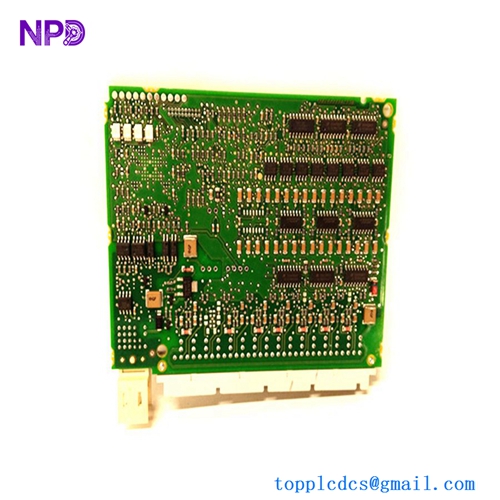
The SEIKO EPSON SKP461-1 is a PCU Drive Board identified in equipment listings as a DBP / PCU drive board for Seiko Epson industrial motion-control equipment. It is intended for use within Epson robot and motion-control electronics where dedicated drive circuitry is required for motor-control functions.
The board is identified by the part number SKP461-1 and revision/reference R1S5.5. Available listings identify it specifically as a PCU Drive Board, making the exact board marking and revision important when selecting a replacement.
This type of replacement PCB is particularly useful for maintaining older Epson automation equipment when the original drive electronics are no longer readily available through normal production channels.
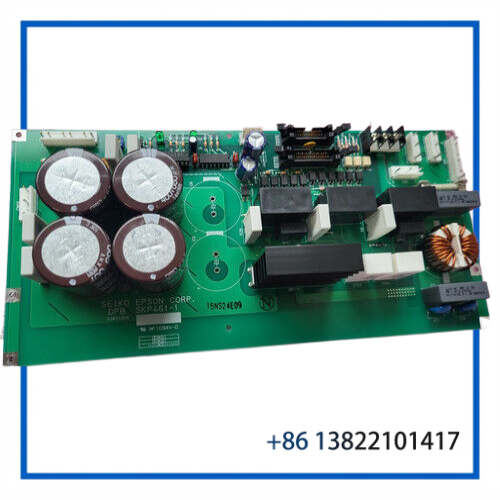
⚙️ Key Features
- Manufacturer: Seiko Epson
- Part Number: SKP461-1
- Board Type: PCU Drive Board
- Reference: R1S5.5
- Application: Epson industrial robot and motion-control equipment
- Function: Drive and motor-control circuitry
- Form: Dedicated industrial control PCB
- Replacement Use: Suitable for maintenance, repair, and restoration when the board revision matches the installed system
- Service Consideration: Board revision, connector arrangement, firmware compatibility, and system configuration should be checked before installation
📋 Product Datasheet
| Parameter | Specification |
|---|---|
| Brand | Seiko Epson |
| Model | SKP461-1 |
| Board Reference | R1S5.5 |
| Product Name | PCU Drive Board |
| Product Type | Industrial Motion-Control PCB |
| Equipment Category | Epson Robot / Motion Control |
| Main Function | Drive and motor-control processing |
| Manufacturer | Seiko Epson |
| Condition | Listing-dependent; verify physical condition before installation |
| Country/Region Listed | Canada on one equipment listing; verify actual board origin from nameplate |
| Dimensions | Not reliably specified; verify from physical board |
| Weight | Not reliably specified |
| Power Requirements | System/configuration dependent; verify before energizing |
🧩 PCU Drive System Integration
The SKP461-1 should be treated as a system-specific replacement board rather than a universal drive controller. Its electrical connections, board-to-board interfaces, and operating parameters depend on the Epson equipment in which it is installed.
Before replacing a failed board, technicians should compare:
- Board part number and revision
- Connector locations and connector keying
- PCB markings and component revisions
- Existing cable routing
- Associated control and power boards
- Motor/drive configuration
- Controller software and firmware compatibility
- Alarm history and diagnostic information
A replacement board with a similar physical appearance should not automatically be considered interchangeable. The SKP461-1 marking should be matched against the machine’s service documentation and the board being removed.
🔌 Drive & Control Function
As a PCU Drive Board, the SKP461-1 is associated with the electronic drive section of an Epson motion-control system. In practical maintenance work, the board may be involved in the processing and control of motor-drive signals between the controller electronics and the associated motion hardware.
When diagnosing a drive-related fault, technicians should distinguish between a PCB failure and faults originating from:
- Motor or actuator wiring
- Encoder/feedback circuits
- Power-supply assemblies
- Motor amplifiers or power stages
- Controller communication
- Mechanical overload
- Grounding or shielding problems
- Configuration or firmware mismatch
Replacing the PCB without checking these related circuits can result in repeated failures.
🏭 Typical Applications
The SKP461-1 can be considered for maintenance applications involving Seiko Epson industrial automation and robotic motion systems, including:
- 🤖 Industrial robot maintenance
- ⚙️ Servo-drive electronic replacement
- 🏭 Automated assembly equipment
- 🔩 Precision positioning systems
- 📦 Pick-and-place machinery
- 🔧 Legacy Epson motion-control equipment
- 🛠️ Controller refurbishment and restoration
- ♻️ Long-term spare-parts inventory
The exact compatible robot/controller model should always be confirmed from the original equipment documentation.
🛠️ Installation & Maintenance
Before Installation
- Shut down the robot/controller according to the manufacturer’s shutdown procedure.
- Isolate the equipment from its electrical power source.
- Allow sufficient time for internal capacitors and drive circuits to discharge.
- Record all connector positions before removing the original PCB.
- Check the replacement board for shipping damage, corrosion, contamination, or bent connector pins.
- Confirm SKP461-1 and the board revision against the removed board.
- Use appropriate ESD protection when handling the PCB.
During Installation
- Handle the PCB only by its edges.
- Do not touch exposed IC pins or connector contacts unnecessarily.
- Verify every cable before insertion.
- Confirm connector orientation and locking mechanisms.
- Check that mounting hardware is correctly installed.
- Keep cables away from moving mechanisms and high-current wiring.
After Installation
Perform a controlled startup rather than immediately running the robot at full operating speed.
Recommended checks include:
- Controller power-up diagnostics
- Drive alarm status
- Motor/axis initialization
- Encoder or feedback status
- Communication status
- Low-speed manual movement
- Axis positioning accuracy
- Emergency-stop operation
- Repeated start/stop testing
🔍 Troubleshooting Guide
Board is not recognized
Check connector seating, backplane/interface connections, controller configuration, and board revision.
Drive alarm appears after replacement
Check whether the alarm originated from the drive board or from the motor, feedback device, power stage, or associated wiring.
Axis will not move
Verify drive enable conditions, safety circuits, controller status, motor connections, and feedback signals before assuming the PCB is defective.
Intermittent operation
Inspect connectors, solder joints, PCB contamination, cable strain, grounding, and power stability.
Replacement board produces different faults
Compare the original and replacement board revisions and confirm that the SKP461-1 is approved for the exact Epson controller configuration.
❓ FAQ
Q1. What is the SEIKO EPSON SKP461-1?
It is a PCU Drive Board used in Seiko Epson industrial motion-control equipment.
Q2. What does the R1S5.5 designation mean?
R1S5.5 is a board/reference revision designation appearing with the SKP461-1 listing. The exact revision relationship should be confirmed from the physical PCB marking.
Q3. Is SKP461-1 a complete robot controller?
No. It is a dedicated PCB intended to operate as part of a larger Epson motion-control system.
Q4. Can I replace any Epson drive board with SKP461-1?
No. Part number, revision, connectors, system architecture, and software/configuration compatibility should all be checked.
Q5. Is the SKP461-1 suitable for repairing older Epson equipment?
It can be valuable as a maintenance spare for compatible legacy equipment, especially when original replacement availability is limited.
Q6. Should the board be tested before installation?
Yes. If the board’s operational test status is unknown, it should be inspected and electrically evaluated by a qualified technician before being placed into service.
Q7. What should be checked before ordering?
Confirm the original board number, revision, connector layout, equipment model, and any associated controller or drive-board part numbers.
Q8. Does a visually similar Epson PCB guarantee compatibility?
No. Industrial PCBs can have different firmware, electrical configurations, connector assignments, or system revisions despite similar physical construction.
📦 Recommended Related Seiko Epson Parts
- SEIKO EPSON SKP416 Control Card
- SEIKO EPSON SKP417 Control Card
- SEIKO EPSON SKP375 Power Supply Module
- SEIKO EPSON RC420-DMB Drive Main Board
- SEIKO EPSON RC420 Drive Control Board
- SEIKO EPSON RC520 Motion Controller Components
- SEIKO EPSON Robot Controller Interface Boards
- SEIKO EPSON Servo Drive Boards
- SEIKO EPSON Robot Controller Power Modules
- SEIKO EPSON Industrial Robot Replacement PCBs
📌 Spare-Part Recommendation
For legacy Epson robotic and motion-control systems, maintaining a spare SKP461-1 can reduce downtime when a drive-control PCB develops an unexpected fault. Store the board in an ESD-safe package in a clean, dry environment and keep its part number and revision clearly documented.
For replacement purposes, SKP461-1 should be matched directly against the original installed board and the machine’s controller configuration. Do not rely solely on the general description “PCU Drive Board” when confirming interchangeability.