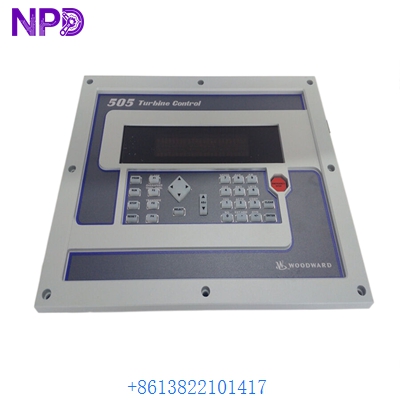

Description
⚙️ Product Specifications (Datasheet)
| Parameter | Value |
|---|---|
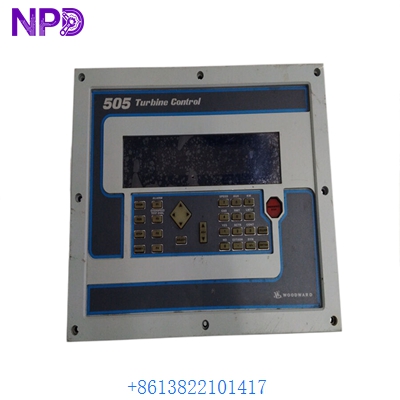
| Part Number | 9907-164 (505 / 505E Series) |
| Device Type | Microprocessor-Based Digital Steam Turbine Governor |
| Input Power Supply | LVDC Option (+18 to +32 VDC, 24 VDC Nominal @ 1 A) |
| Dimensions | 14.0″ W x 11.0″ H x 4.0″ D (35.6 cm x 27.9 cm x 10.2 cm) |
| Weight | Approx. 9.11 lbs (4.13 kg) |
| Country of Origin | USA (Woodward, Inc.) |
| Front Panel Display | Integrated Operator Control Panel (2 Lines x 24 Characters LCD) |
| Discrete Inputs / Outputs | 16 Contact Inputs (4 Dedicated, 12 Programmable) / 8 Relay Outputs |
| Analog Inputs / Outputs | 6 Programmable 4–20 mA Inputs / 6 Programmable 4–20 mA Outputs |
| Actuator Drivers | 2 Actuator Outputs (Single or Split-Range Actuators, 4–20 mA or 20–160 mA) |
🚀 Standard Operating Procedure
- Pre-Start System Inspection: Verify all electrical wiring, speed sensor signals (MPT/proximity probes), and trip circuit contacts are securely connected. Ensure input supply voltage is steady at +24 VDC.
world of controls
- Power On & Self-Test: Switch on the DC power supply breaker. Wait for the 505 controller to complete its boot sequence and microprocessor diagnostics without displaying fault codes.
- Select Control Mode: Set turbine control to manual or automatic via the front Operator Control Panel (OCP) or remote DCS discrete signals.
- Initiate Turbine Start Sequence: Press the Run/Start key on the OCP. The 505 will follow programmed idle/warm-up speed ramp routines (e.g., Cold, Warm, or Hot start curves).
- Monitor Speed & Process Values: Observe real-time speed (RPM), valve position limiter %, and auxiliary process setpoints on the front character display screen.
- Load Application & Synchronization: Ramp up the setpoint through critical speed avoidance bands until reaching rated operational speed. Engage the generator breaker or load governor as required.
- Controlled Normal Shutdown: Initiate the Stop command on the front panel to allow the 505 to ramp the turbine speed down to zero and close the steam inlet valves safely.
⚙️ Parameter Configuration Guide
- Press the PRGM (Program) key on the front keypad to access the field-configuration menu.
- Enter the security passcode (Level 1/Level 2 password) when prompted on the 2×24 character display.
- Select the target configuration block using the numeric keypad and directional arrow keys (e.g., Speed Setpoints, Valve Positioning, or Over/Underspeed Protection Limits).
- Modify the selected parameter value using the front panel keys. The controller’s OptiTune technology aids in optimizing PID loop settings for dynamic speed and load control.
dsf technologies
- Press ENTER to confirm each value edit.
- Save changes to non-volatile EEPROM memory upon exiting the programming mode to prevent parameter loss during power cycles.
🔄 Manual / Automatic Mode Switching
- To Select Manual Mode: Select Local/Manual mode using the OCP front panel key. Manual mode allows operators to directly adjust speed setpoints, valve position limits, and start/stop routines locally via the 30-key keypad.
- To Select Auto Mode: Switch control to Auto/Remote. In Auto mode, the 505 accepts remote analog setpoint signals (4–20 mA) or Modbus serial communications (RS-232/RS-422/RS-485) from a master Distributed Control System (DCS) for automated plant operation.
❓ Frequently Asked Questions (Q&A)
- Q: How does the 9907-164 handle single vs. split-range actuators? A: The 9907-164 features two independent, software-configurable actuator driver outputs. It can drive a single actuator coil or split-range actuators across two steam inlet valves to handle complex load control or extraction requirements.
Automation Industrial+ 1
- Q: What protection feature prevents speed-governing instability during startup? A: The controller incorporates programmable critical speed avoidance bands, automatic ramp rate limiters, and first-out trip indications to protect the turbine from resonance damage during spin-up.
dsf technologies
- Q: What serial protocol is supported for remote plant integration? A: The 9907-164 includes dual serial Modbus communication ports (RS-232/RS-422/RS-485), enabling direct read/write parameter monitoring with plant PLC or SCADA systems.
Automation Industrial